
1. Entwodiksyon
The D-Link GO-SW-5G is a 5-Port Unmanaged Gigabit Desktop Switch designed for home and small office environments. This device provides a simple and cost-effective solution to expand your network connectivity, offering high-speed Gigabit Ethernet ports for reliable data transfer. It incorporates D-Link's Green Technology for energy efficiency, reduced heat generation, and extended product lifespan.
This switch is a plug-and-play device, requiring no complex configuration or software installation, making it easy to integrate into an existing network.
2. Pake kontni
Tanpri verifye ke tout atik ki nan lis anba a yo enkli nan pakè ou a:
- D-Link GO-SW-5G 5-Port Gigabit Desktop Switch
- Adaptè pouvwa
- Gid Enstalasyon Rapid
Si gen nenpòt atik ki manke oswa ki domaje, tanpri kontakte machann ou pou asistans.
3. Enstriksyon Enstalasyon
The D-Link GO-SW-5G switch is designed for easy plug-and-play installation. Follow these steps to set up your device:
3.1. Konekte adaptè pouvwa a
- Locate the power input port on the side of the D-Link GO-SW-5G switch.
- Konekte adaptè kouran ki vini ak li a nan pò sa a.
- Branche lòt bout adaptè kouran an nan yon priz elektrik estanda.
- The power LED on the front of the switch will illuminate, indicating that the device is receiving power.

Figi 1: Side view of the D-Link GO-SW-5G switch with the power input port.
3.2. Konekte ak rezo ou a
- Using a standard Ethernet cable (RJ45), connect one end to an available LAN port on your router (not your modem).
- Connect the other end of this Ethernet cable to any of the five available ports on the back of the D-Link GO-SW-5G switch.
- The corresponding LED on the front of the switch will light up, indicating an active connection.
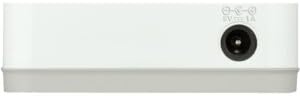
Figi 2: Dèyè view of the D-Link GO-SW-5G switch with five Ethernet ports.
3.3. Connect Network Devices
- Connect your network devices (e.g., computers, gaming consoles, network printers, smart TVs) to the remaining available Ethernet ports on the D-Link GO-SW-5G switch using Ethernet cables.
- Each connected device will have its corresponding LED on the front of the switch illuminate, confirming a successful connection.

Figi 3: Devan view of the D-Link GO-SW-5G switch showing active port LEDs.
4. Operasyon Enstriksyon
The D-Link GO-SW-5G is an unmanaged switch, meaning it operates automatically without requiring user configuration. Once connected as described in the Setup section, it will begin forwarding network traffic between connected devices.
- Negosyasyon Otomatik: The switch automatically detects the network speed (10/100/1000 Mbps) and duplex mode (half/full) of connected devices and adjusts accordingly.
- MDI/MDIX Otomatik: All ports support automatic MDI/MDIX crossover, eliminating the need for crossover cables when connecting to other switches or hubs.
- Endikatè ki ap dirije: Each port has an LED indicator on the front panel. A lit LED indicates an active link, and blinking indicates network activity.
5. Antretyen
To ensure optimal performance and longevity of your D-Link GO-SW-5G switch, consider the following maintenance guidelines:
- Plasman: Place the switch in a cool, dry location away from direct sunlight, heat sources, and excessive moisture. Ensure adequate ventilation around the device.
- Netwayaj: Use a soft, dry cloth to clean the exterior of the switch. Avoid using liquid or aerosol cleaners, as they may damage the device.
- Jesyon kab: Keep Ethernet cables neatly organized to prevent tangles and accidental disconnections.
- Sik pouvwa: If you experience network issues, a simple power cycle (unplugging the power adapter for 10 seconds and then plugging it back in) can often resolve minor problems.
NAN. Depanaj
If you encounter issues with your D-Link GO-SW-5G switch, refer to the following common troubleshooting steps:
- Pa gen LED pouvwa:
- Asire w ke adaptè kouran an byen konekte ak switch la ak yon priz elektrik ki fonksyone.
- Verifye si priz elektrik la fonksyone byen lè w branche yon lòt aparèy.
- No Link/Activity LED for a Connected Device:
- Tcheke ke kab Ethernet la byen branche nan pò switch la ak nan aparèy rezo a.
- Eseye yon lòt kab Ethernet pou elimine si kab la gen pwoblèm.
- Asire w ke aparèy ki konekte a limen epi adaptè rezo li a ap fonksyone byen.
- Eseye konekte aparèy la nan yon pò diferan sou switch la.
- Vitès rezo a ba:
- Verify that all connected devices and cables support Gigabit Ethernet (1000 Mbps) for optimal performance. The switch will operate at the lowest common speed.
- Ensure your router and internet service provider (ISP) plan support the desired speeds.
- Perform a power cycle on the switch and your router.
- Koneksyon tanzantan:
- Tcheke pou koneksyon kab ki lach.
- Ensure the switch is not overheating; provide adequate ventilation.
- Fè tès la avèk diferan kab Ethernet.
7. Espesifikasyon
| Mak | D-Link |
| Nimewo Modèl | GO-SW-5G/B |
| Kantite pò | 5 |
| Chanje Kalite | San jere |
| Pousantaj Transfè Done | 1 Gigabit pa segonn (10/100/1000 Mbps) |
| Entèfas | RJ45 |
| Koulè | Blan |
| Pwa atik | 0.22 liv |
| Voltage | 100-240 vòlt |
| Aparèy konpatib | PC, Mac, and other Ethernet-enabled devices |
| Chanje twal | 10 Gbps |
| UPC | 790069365669 |
8. Garanti ak sipò
Garanti limite: The D-Link GO-SW-5G switch comes with a 3-year limited warranty. For detailed terms and conditions, please refer to the warranty information included in your package or visit the official D-Link websit.
Sipò teknik: For technical assistance, product registration, or to download the latest firmware and documentation, please visit the Sipò D-Link Websit or contact D-Link customer service.