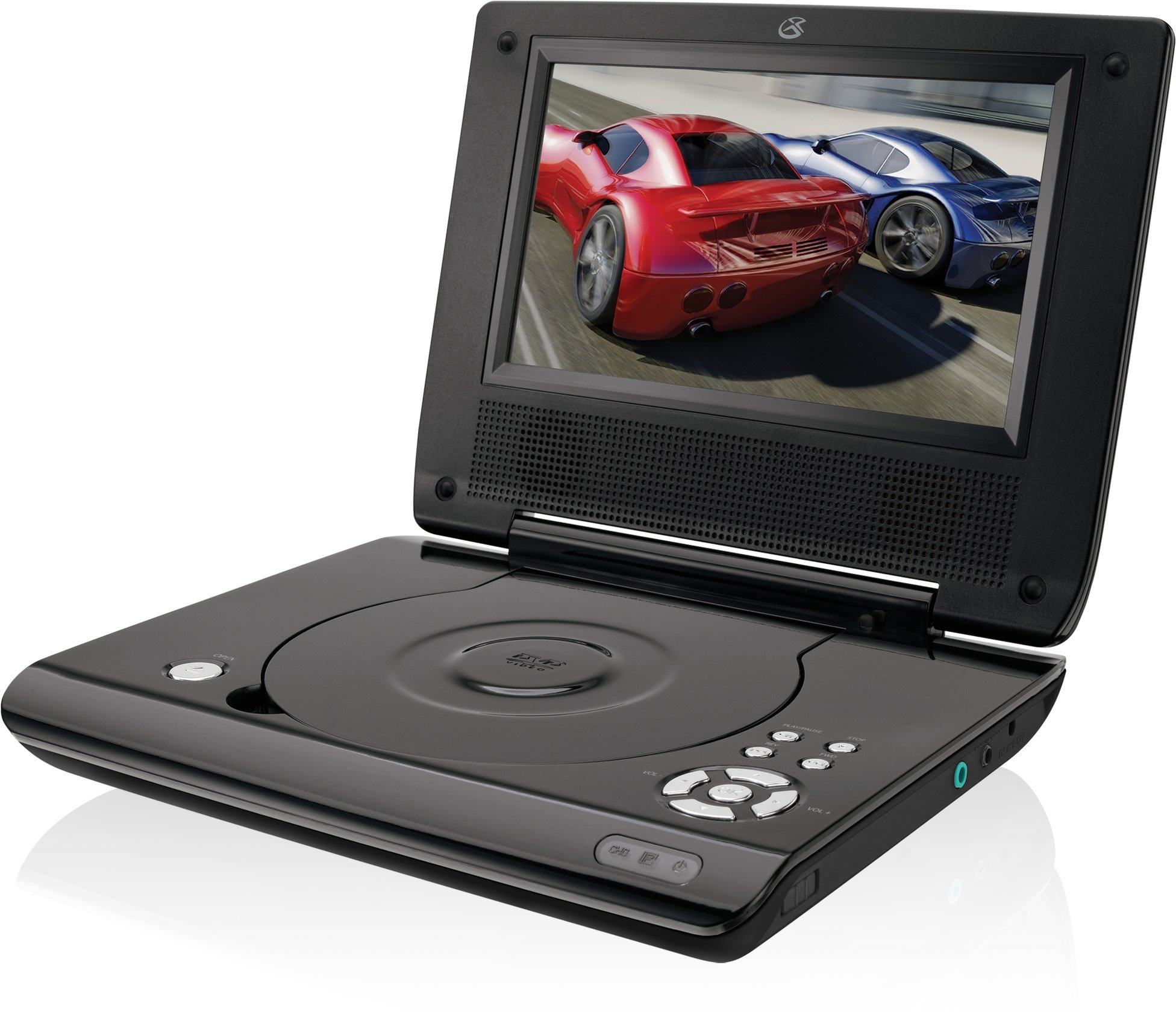
This manual provides essential instructions for the safe and efficient operation of your GPX PD730B 7-inch Portable DVD Player. Please read this manual thoroughly before using the device and retain it for future reference. The GPX PD730B is designed for portable entertainment, allowing you to enjoy DVDs, CDs, and JPEG files on its 7-inch TFT LCD screen.
Kontni pake
Verifye ke tout atik ki nan lis anba a yo enkli nan pakè ou a:
GPX PD730B Portable DVD Player
AC/DC pouvwa adaptè
DC Car Adapter (12V)
Stereo ekouteur
Kontwòl remote (avèk 2 pil AAA)
Manyèl Itilizatè (dokiman sa a)
Pwodwi souview
Figure 1: GPX PD730B Portable DVD Player (Closed)
This image shows the GPX PD730B portable DVD player in its closed position, highlighting its compact and sleek design. The top surface is smooth and black, with control buttons visible on the right edge.
Kontwòl ak Koneksyon
Familiarize yourself with the various controls and connection ports on your portable DVD player.
Bouton pouvwa: Limen oswa etenn inite a.
Bouton jwe/poz: Kòmanse oswa poz lèktur.
Bouton Stop: Sispann lekti.
Bouton Sote/Rechèch: Navigates tracks or chapters, or fast-forwards/rewinds.
Kontwòl Volim: Ajiste nivo pwodiksyon odyo a.
Kas ekoutè Jack: For private listening with stereo earbuds or headphones.
Pò DC Antre: Connects to the AC/DC or car power adapter for charging and power.
Enstalasyon
1. Chaje batri a
Before initial use, fully charge the built-in rechargeable battery. A full charge provides approximately 2 hours of playback time.
Connect the AC/DC power adapter to the DC In port on the DVD player.
Ploge adaptè pouvwa AC/DC a nan yon priz estanda miray.
The charging indicator light (if present) will illuminate. Charging is complete when the light changes color or turns off (refer to device for specific indicator behavior).
Alternatively, use the 12V DC car adapter to charge the player in a vehicle.
2. Powering On / Off
Peze epi kenbe la Pouvwa button on the unit to turn the player on or off. The screen will illuminate when powered on.
Enstriksyon Operasyon
1. Mete ak Retire Disk
Gently open the disc compartment lid.
Place a DVD or CD onto the spindle with the label side facing up. Press down gently on the center of the disc until it clicks into place.
Close the disc compartment lid firmly.
To remove a disc, open the lid, gently press the spindle button (if present) or lift the disc from the edges, avoiding touching the data surface.
2. Lekti debaz
After inserting a disc, the player will typically begin playback automatically.
Sèvi ak la Jwe/Poz bouton pou fè yon poz oswa rezime lekti.
Peze a Sispann bouton pou sispann lèktur.
Sèvi ak la Sote buttons (usually labeled with arrows) to navigate between chapters or tracks.
Sèvi ak la Chèche buttons (often combined with Skip) to fast-forward or rewind.
3. Sèvi ak kontwòl remote la
The included remote control provides convenient access to all player functions from a distance. Ensure the 2 AAA batteries are correctly installed. Point the remote control directly at the player's remote sensor.
4. Konekte kas ekoutè
For private listening, plug the stereo earbuds (or your own headphones) into the Jack kas ekoutè on the side of the player. The built-in speakers will automatically mute when headphones are connected.
Figure 2: Portable DVD Player in use (Bedroom)
This image illustrates the portable DVD player being used by a girl in a bedroom setting, demonstrating its suitability for personal entertainment at home.
Figure 3: Portable DVD Player in use (Vehicle)
This image shows a boy watching the portable DVD player in the back seat of a car, highlighting its utility for entertainment during travel.
Figure 4: Portable DVD Player in use (Airplane)
This image depicts a woman using the portable DVD player with headphones on an airplane, showcasing its versatility for quiet, personal entertainment during flights.
Antretyen
Netwaye jwè a
Disconnect the player from all power sources before cleaning.
Sèvi ak yon twal mou epi sèk pou siye sifas ekstèn yo. Pa sèvi ak pwodui netwayaj abrazif, sir, oswa solvan.
For the screen, use a soft, lint-free cloth specifically designed for LCD screens. Avoid excessive pressure.
Keep the disc compartment free of dust and debris.
Swen batri
Pou pwolonje lavi batri a, evite dechaje batri a nèt souvan.
If the player will not be used for an extended period, charge the battery to about 50% before storing.
Store the player in a cool, dry place.
Depanaj
If you encounter issues with your GPX PD730B, refer to the following common problems and solutions:
Pwoblèm
Kòz posib
Solisyon
Jwè a pa limen.
Battery is discharged; Power adapter not connected properly.
Charge the battery; Ensure power adapter is securely connected to both the player and power source.
No disc playback.
Disc inserted incorrectly; Disc is dirty or scratched; Incorrect disc format.
Reinsert disc correctly (label side up); Clean disc with a soft cloth; Ensure disc is DVD, CD, or JPEG CD format.
Pa gen son ki soti nan oratè/kas ekoutè yo.
Volume too low; Headphones not fully plugged in; Mute function active.
Increase volume; Ensure headphones are fully inserted; Check if mute is active on remote or player.
Remote kontwòl pa travay.
Pil yo mouri oswa yo pa byen mete; Gen yon obstak ant telekòmand lan ak jwè a.
Replace remote batteries; Ensure correct polarity; Remove any obstructions and point remote directly at sensor.
Espesifikasyon
Nimewo Modèl
PD730B
Gwosè ekran
7 pous
Kalite ekspozisyon
TFT LCD
Rezolisyon natif natal
480x234
Aspè rapò
16:9
Medya konpatib
DVD, DVD+R/RW, CD, CD-R/RW, JPEG CD
Dire Batri (Mwayèn)
2 èdtan
Antre pouvwa
AC/DC Adapter, 12V DC Car Adapter
Koneksyon
Auxiliary (Headphone Jack)
Pwa atik
1.72 liv
UPC
047323007309
Garanti ak sipò
For warranty information, technical support, or service inquiries, please refer to the warranty card included with your product or visit the official GPX websit la. Kenbe resi acha ou kòm prèv acha pou reklamasyon garanti.
Ask about setup, troubleshooting, compatibility, parts, safety, or missing instructions. Manuals+ will review the question and use this page’s manual context to help answer it.