
1. Entwodiksyon
The Imada DS2-1 Digital Force Gauge is a precision instrument designed for accurate force measurement. It features a large, easy-to-read LCD display and intuitive push-button operation, making it suitable for various industrial applications.
Its robust ergonomic metal housing provides protection for the highly accurate load cell and internal electronics, ensuring durability in demanding environments. The gauge supports both tension and compression measurements and offers advanced functionalities such as programmable high/low setpoints for Go/No-Go testing.
Data acquisition is facilitated through standard outputs including RS-232C, Digimatic, and 1VDC analog, allowing for permanent record keeping. The DS2-1 can be powered by internal Ni-MH batteries or via the AC adapter/charger.
2. Karakteristik kle
- Kapasite: 18 Oz / 500 G / 5 N, 110V.
- Presizyon: 0.2% Full scale ±1 LSD.
- Ekspozisyon: 4-digit, 12 mm high LCD for clear readings.
- Kapasite Surcharge: 200% Full scale, with display flashing beyond 105% full scale to warn of overload.
- Data Processing Speed: 1,000 data/second (30 data/second rate selectable).
- Montre Mizajou Pousantaj: 10 fwa pa segonn.
- Sòti: Standard RS-232C, Digimatic, and 1VDC analog outputs for data acquisition.
- Pouvwa: Operates on internal Ni-MH batteries or AC adapter/charger.
- Ergonomi: Ergonomic metal housing for durability and comfortable handling.
3. Pwodwi souview
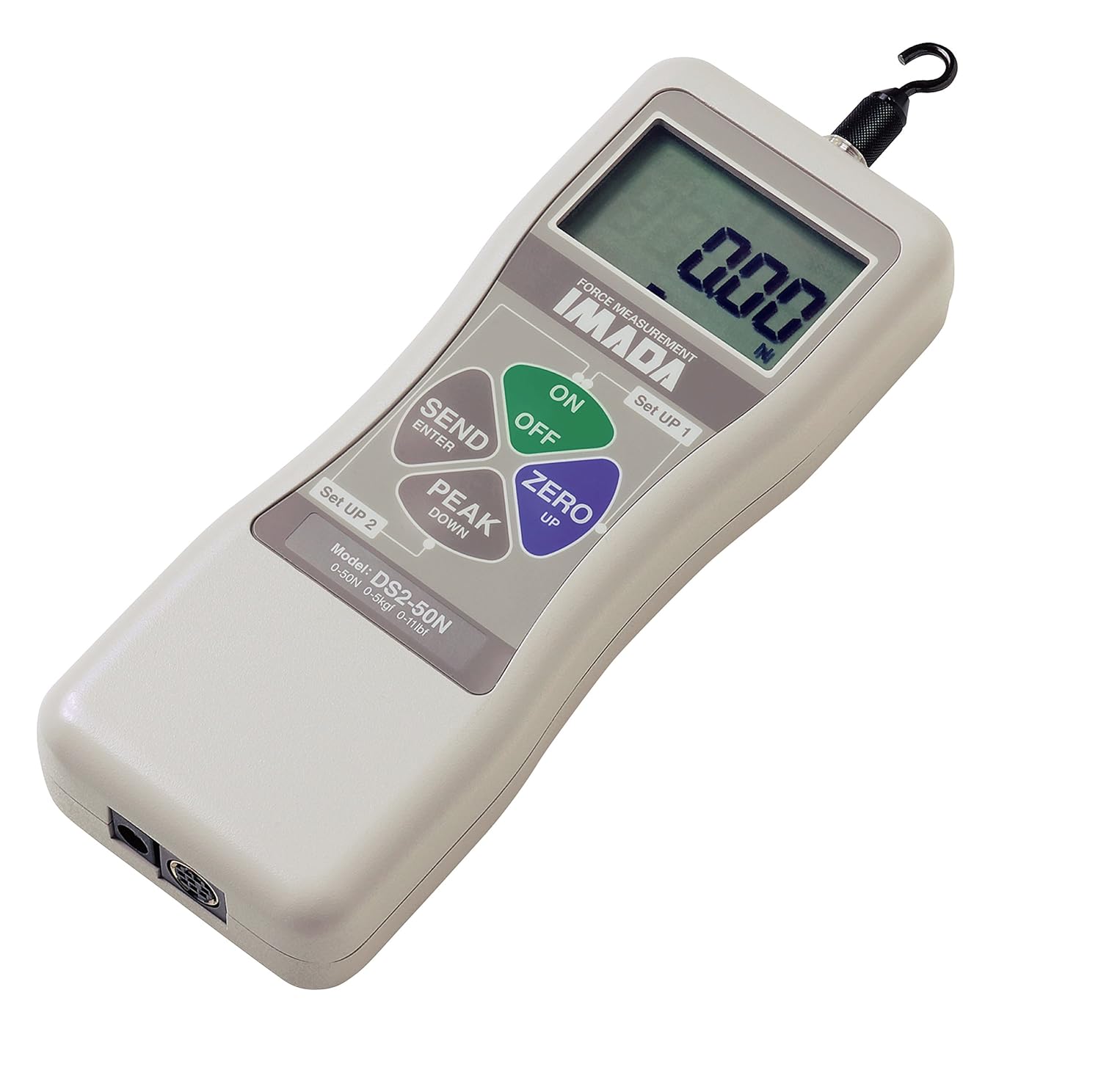
Figi 1: Imada DS2-1 Digital Force Gauge. This image shows the top view of the force gauge, highlighting its LCD display, control buttons (ON/OFF, ZERO, PEAK, SEND), and the measurement hook at the top. The model number DS2-50N is visible on the label, indicating a specific capacity variant.
3.1. Konpozan ak Kontwòl
- Ekspozisyon LCD: Shows force readings, units of measure, tension/compression icon, and battery status.
- Bouton ON/OFF: Limen oswa etenn aparèy la.
- ZERO Button (Up): Used to zero the current reading.
- PEAK Button (Down): Activates peak hold function to capture maximum force.
- SEND/ENTER Button: Used for data transmission or confirming settings.
- Set UP 1 / Set UP 2 Buttons: For accessing and navigating setup menus.
- Measurement Hook: Located at the top for attaching to test samples.
- Pò Sòti: Located at the bottom for RS-232C, Digimatic, and analog connections.
4. Enstalasyon
- Debake: Carefully remove the force gauge and all accessories from the packaging. Inspect for any signs of damage.
- Limen:
- Operasyon batri: Ensure the internal Ni-MH batteries are charged. A battery icon on the display indicates low battery.
- AC adaptè: Connect the provided AC adapter/charger to the gauge and a power outlet for continuous operation or charging.
- Initial Zeroing: Before taking any measurements, press the ZERO button to set the display to zero. This compensates for any initial load or tare weight.
- Unit Selection (Optional): If necessary, refer to the detailed manual (not provided here) for instructions on changing measurement units (Oz, G, N).
5. Operasyon Enstriksyon
5.1. Mezi Debaz
- Pouvwa sou: Peze a ON button to turn on the gauge.
- Mete ekran an sou zewo: Ensure the display reads "0.00" before applying any force. If not, press the ZERO bouton.
- Aplike fòs: Attach the object to be measured to the measurement hook and apply force. The display will show the real-time force reading. The display will indicate whether the force is tension or compression.
- Li Mezi: Observe the reading on the LCD display.
- Pouvwa Off: Peze a OFF button to turn off the gauge after use.
5.2. Peak Hold Function
The peak hold function captures and displays the maximum force applied during a measurement cycle.
- Perform basic measurement steps 1 and 2.
- Peze a PAK button. The display will show "PEAK" or a similar indicator.
- Apply force. The display will continuously update with the current force, but will hold and show the highest value reached.
- To clear the peak value and return to real-time measurement, press the PAK bouton ankò.
5.3. Setting High/Low Setpoints (Go/No-Go Testing)
The DS2-1 allows programming of high and low setpoints for Go/No-Go testing, indicated by LCD indicators.
- Access the setup menu using the Set UP 1 or Set UP 2 bouton.
- Navigate through the menu to find the "Setpoints" or "Limits" option.
- Enter your desired high and low force values.
- Confirm the settings using the SEND/ENTER bouton.
- During measurement, the gauge will provide visual indicators on the LCD if the measured force falls within, below, or above the set limits.
5.4. Sòti Done
The gauge is equipped with RS-232C, Digimatic, and 1VDC analog outputs for connecting to external devices for data logging and analysis.
- Connect the appropriate cable from the gauge's output port to your computer or data acquisition system.
- Refer to the detailed communication protocol in the full manual for specific software and connection settings.
- Peze a SEND/ENTER button to transmit data if configured for manual send, or data may stream automatically depending on settings.
6. Antretyen
- Netwayaj: Wipe the gauge with a soft, dry cloth. Do not use abrasive cleaners or solvents.
- Depo: Store the gauge in a clean, dry environment, away from extreme temperatures and humidity.
- Swen batri: If using battery power, ensure batteries are charged regularly. For long-term storage, it is advisable to fully charge the batteries and then store the unit.
- Kalibrasyon: Regular calibration by authorized service personnel is recommended to maintain accuracy.
NAN. Depanaj
| Pwoblèm | Kòz posib | Solisyon |
|---|---|---|
| Ekspozisyon pa limen. | Batri ki ba oswa pa gen pouvwa. | Charge batteries using AC adapter or connect to AC power. |
| Ekspozisyon kliyot. | Overload condition (force exceeds 105% of full scale). | Remove excessive load immediately. Ensure applied force is within gauge capacity. |
| Lekti ki pa kòrèk. | Not zeroed properly, or needs calibration. | Press the ZERO button before measurement. If issue persists, consider professional calibration. |
| Battery icon is displayed. | Batri ki ba. | Recharge the internal Ni-MH batteries using the AC adapter. |
8. Espesifikasyon
| Paramèt | Valè |
|---|---|
| Mak | Imada |
| Nimewo Modèl | DS2-1 |
| Kapasite | 18 Oz / 500 G / 5 N, 110V |
| Presizyon | 0.2% Full scale ±1 LSD |
| Ekspozisyon | 4 digit, 12 mm high |
| Kapasite Surcharge | 200% Full scale (display flashes beyond 105% full scale) |
| Data Processing Speed | 1,000 data/second (30 data/second rate selectable) |
| Ekspozisyon Mizajou | 10 fwa pa segonn |
| Pwa atik | 363 g |
| Dimansyon pwodwi (LxWxH) | 17.5 x 6.6 x 3.3 santimèt |
| Materyèl | Metal |
| Batri enkli? | No (Internal Ni-MH batteries are rechargeable) |
9. Garanti ak sipò
For detailed warranty information, technical support, or service inquiries, please refer to the official Imada website or contact your authorized Imada distributor. Keep your purchase receipt for warranty claims.
Regular calibration and maintenance by qualified personnel are recommended to ensure the long-term accuracy and performance of your Imada DS2-1 Digital Force Gauge.