
1. Entwodiksyon
The Genius GX-Gaming SW-G2.1 3000 is a 2.1 channel speaker system designed to enhance audio experiences for gaming, music, and movies. It features a powerful subwoofer for deep bass and two satellite speakers for clear mid and high-range sounds. The system includes a dedicated control box for convenient adjustments and multiple input options for various devices.
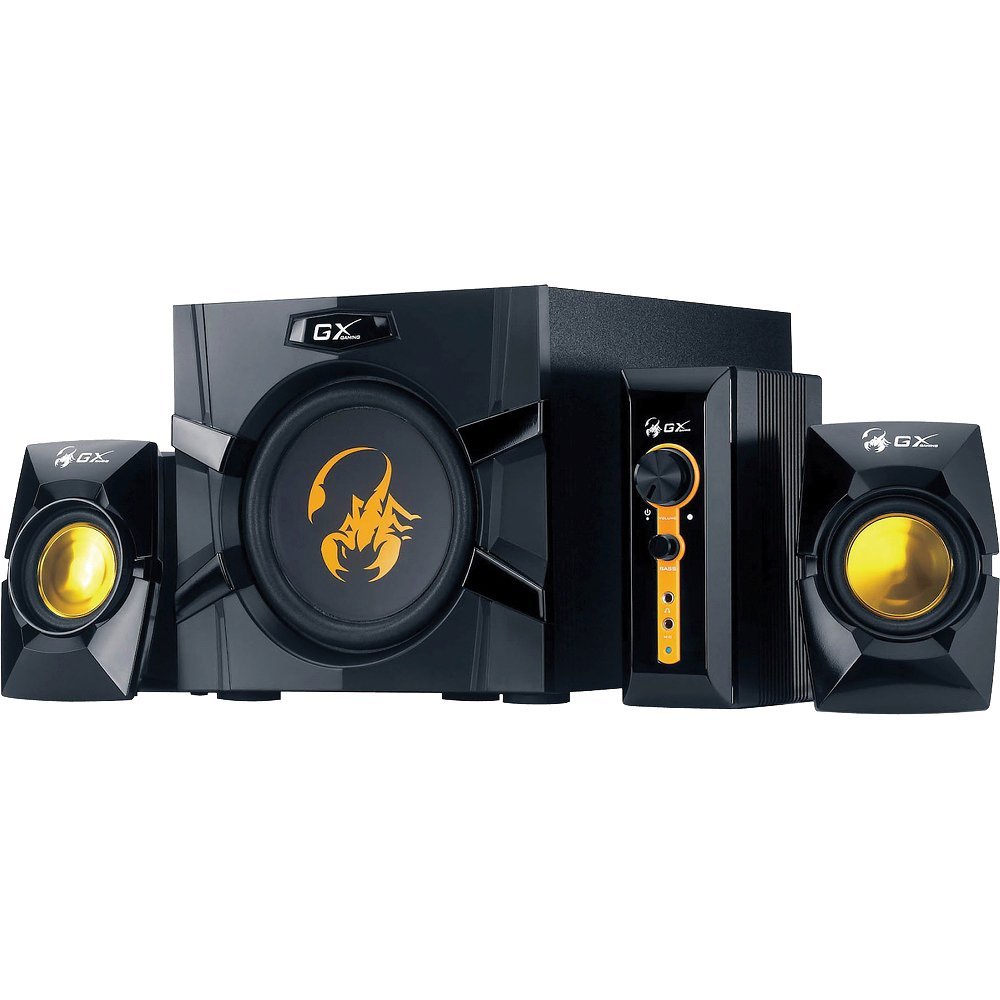
An image showing the Genius GX-Gaming SW-G2.1 3000 speaker system, featuring the subwoofer, two satellite speakers, and the control unit.
2. Pake kontni
Tanpri verifye ke tout atik ki nan lis anba a yo enkli nan pakè ou a:
- One (1) Wooden Cabinet Subwoofer
- De (2) Oratè Satelit
- One (1) Control Box
- One (1) Stereo RCA to 3.5mm Audio Cable
- One (1) 3.5mm Plug Audio Cable
- One (1) Microphone Jack Cable
- One (1) Headphone Jack Cable
- One (1) Multi-language User Manual
3. Pwodwi Features
- Pouvwa pwodiksyon total: 70 Watt (RMS)
- Subwoofers: Wooden cabinet with a 6.5-inch driver for deep bass
- Oratè satelit: Two curvaceous speakers with 3-inch metal drivers for clear mid and high tones
- Bwat kontwòl: Independent controls for volume and bass adjustment
- Koneksyon: Two input jacks (3.5mm standard and two RCA) for PC, TV, DVD, and game devices
- Pak odyo: Dedicated microphone jack for online communication and headphone jack for private listening
- Repons frekans: 35 Hz ~ 20K Hz
- Siyal-a-bri Bri: 85 dB
- Pouvwa ekonomize mòd: Automatically enters sleep mode after 1 minute of inactivity. To resume, ensure audio input device volume is at least 50%.
4. Enstriksyon Enstalasyon
- Pozisyon moun ki pale yo: Place the subwoofer on a stable surface, preferably on the floor, for optimal bass. Position the satellite speakers on either side of your listening area, facing you.
- Konekte Oratè Satelit yo: Connect the cables from the two satellite speakers to the corresponding output ports on the subwoofer.
- Konekte Bwat Kontwòl la: Plug the control box cable into the designated port on the subwoofer.
- Konekte Sous Odyo a:
- For PC, MP3/CD players: Use the 3.5mm audio cable to connect your device's audio output to the 3.5mm input on the control box.
- For Game Consoles, DVD Players, TV: Use the stereo RCA to 3.5mm cable. Connect the RCA ends to your device's audio output and the 3.5mm end to the corresponding input on the control box.
- Konekte pouvwa: Plug the subwoofer's power cord into a standard electrical outlet (110V or 220V AC, depending on your region).
- Pouvwa sou: Turn on the power switch, usually located on the subwoofer. The system is now ready for use.
5. Operasyon Enstriksyon
- Kontwòl Volim: Use the large knob on the control box to adjust the overall volume of the speaker system.
- Kontwòl bas: Use the dedicated bass knob on the control box to increase or decrease the subwoofer's bass output.
- Itilizasyon Mikwofòn: Connect a microphone to the MIC jack on the control box for online communication.
- Itilizasyon kas ekoutè: Plug your headphones into the headphone jack on the control box for private listening. This will mute the speakers.
- Pouvwa ekonomize mòd: If the system enters sleep mode due to inactivity, ensure your audio input device's volume is set to 50% or higher, then adjust the system's volume using the control box to resume audio.
6. Antretyen
- Netwayaj: Use a soft, dry cloth to clean the surfaces of the speakers and control box. Avoid using liquid cleaners or abrasive materials.
- Plasman: Keep the speakers away from direct sunlight, heat sources, and excessive moisture. Ensure adequate ventilation around the subwoofer.
- Jesyon kab: Asire w tout kab yo byen konekte epi yo pa mele oswa kwense pou evite domaj.
- Depo: Si w ap sere sistèm nan pou yon peryòd tan pwolonje, dekonekte l nan kouran an epi sere l nan yon kote ki fre epi sèk.
NAN. Depanaj
- Pa gen son:
- Ensure the power cable is securely plugged in and the power switch is on.
- Check all audio cables are correctly connected between the source device, control box, and subwoofer.
- Verify the volume knob on the control box is turned up.
- Ensure the audio source device (PC, TV, etc.) is playing audio and its volume is not muted or too low.
- If in Power Saving Mode, increase the audio source device's volume to at least 50%.
- Son defòme:
- Reduce the volume on both the speaker system and the audio source device.
- Adjust the bass level on the control box.
- Ensure speaker cables are not damaged or loosely connected.
- Yon Oratè Pa Ap Travay:
- Tcheke koneksyon oratè satelit ki pa fonksyone a ak subwoofer la.
- Test with another audio source or swap the satellite speaker connections (if possible) to isolate the issue.
8. Espesifikasyon teknik
| Pouvwa Sòti Total | 70 Watt (RMS) |
| Pouvwa satelit | 2 x 15 Watts |
| Pouvwa Subwoofer | 40 Watts |
| Inite chofè yo | Satellites: 2 x 3 inches, Subwoofer: 1 x 6.5 inches |
| Repons Frekans | 35 Hz ~ 20K Hz |
| Siyal-a-bwi Pwopòsyon | 85 dB |
| Dimansyon subwoofer (LxHxP) | 230 x 314 x 215 mm (apeprè 9 x 12.4 x 8.5 pous) |
| Satellite Dimensions (WxHxD) | 99 x 115 x 143 mm |
| Controller Dimensions (WxHxD) | 60 x 154 x 170 mm |
| Pwa sistèm | 4.66 kg (apeprè 10.27 lbs) |
| Sous pouvwa | 110V oswa 220V AC |
| Aparèy konpatib | Personal Computer, Television, DVD Players, Game Consoles, MP3/CD players |
| Antre Jacks | 3.5mm standard input, two RCA jacks |
| Metòd kontwòl | Knobs/Buttons (listed as 'Touch' in some specifications) |
9. Garanti ak sipò
This Genius GX-Gaming SW-G2.1 3000 speaker system comes with a Garanti limite. For specific details regarding warranty coverage, duration, and terms, please refer to the warranty card included in your product packaging or visit the official Genius websit.
For technical support, troubleshooting assistance, or service inquiries, please contact Genius customer support through their official website or the contact information provided in your product documentation. When contacting support, please have your product model number (SW-G2.1 3000) and purchase information readily available.