
Entwodiksyon
The Eton American Red Cross FRX2 is a versatile, multi-powered emergency weather radio designed to keep you informed and connected during emergencies. It features AM/FM and NOAA weather band reception, multiple charging options including solar and hand turbine, an LED flashlight, and a USB port for charging small devices. This manual provides detailed instructions for the proper setup, operation, and maintenance of your FRX2 radio.

Figure 1: Eton American Red Cross FRX2 Emergency Weather Radio
Enfòmasyon sou Sekirite
- Pa ekspoze aparèy la nan tanperati ekstrèm, limyè solèy dirèk pou yon peryòd tan pwolonje, oswa nan imidite ki wo.
- Kenbe aparèy la lwen dlo ak lòt likid.
- Pa eseye demonte oswa modifye radyo a. Sa ap anile garanti a epi li ka lakòz domaj oswa blesi.
- Use only the specified charging methods (USB, solar, hand crank).
- Ensure the hand turbine crank is fully retracted when not in use to prevent damage.
- Jete pil yo selon règleman lokal yo.
Pwodwi souview
Familiarize yourself with the various components and controls of your FRX2 radio.
Front Panel

Figi 2: Kontwòl Panèl Devan an
- Akò Dial: Used to select AM, FM, or Weather Band frequencies.
- Kontwòl Volim: Ajiste nivo pwodiksyon odyo a.
- Selektè Gwoup Mizik: Switches between AM, FM, and Weather Band (WB) modes.
- Endikatè ki ap dirije: Shows charging status and alert status.
Side and Back Panels

Figure 3: Side Panel with Solar Panel
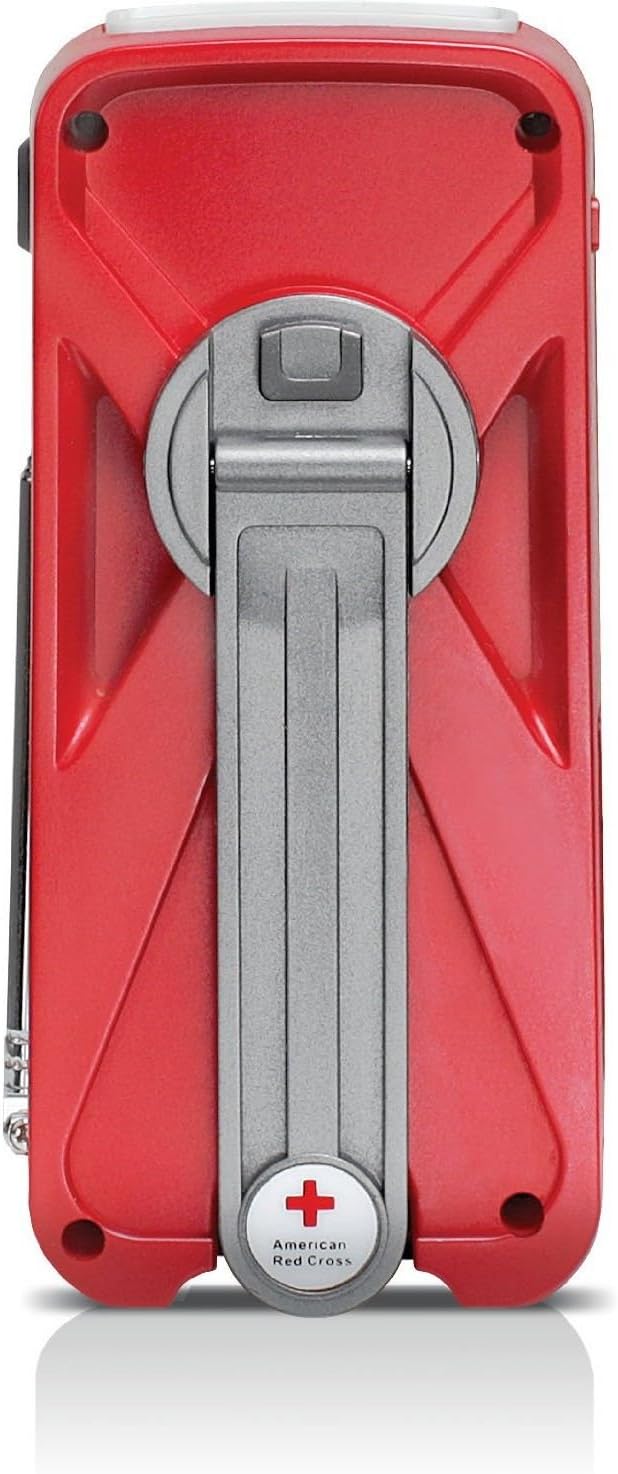
Figure 4: Back Panel with Hand Turbine Crank
- Panèl solè: Located on the top/side for solar charging.
- Hand Turbine Crank: Fold-out crank on the back for manual power generation.
- Antèn teleskopik: Extendable antenna for improved radio reception.
- Flach: Integrated LED flashlight.
Pò ak konektè
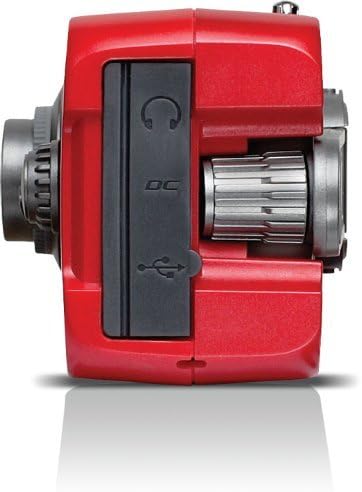
Figure 5: Top Panel Ports
- Mini-USB DC Input: For charging the internal battery via an AC adapter (not included) or computer USB port.
- Sòti USB: Pou chaje aparèy ekstèn tankou smartphones.
- Kas ekoutè Jack: Pou koute prive.
Enstalasyon
Inisyal chaje
Before first use, fully charge the internal battery using one of the following methods:
- Chaje USB: Connect the supplied USB cable to the radio's Mini-USB DC input and to a powered USB port (e.g., computer, USB wall adapter). The charging indicator LED will illuminate.
- Solè chaje: Place the radio with the solar panel facing direct sunlight. The solar panel charges the internal battery. This method is slower and best for maintaining charge or trickle charging.
- Hand Turbine Charging: Unfold the hand turbine crank and rotate it clockwise or counter-clockwise for 1-2 minutes. This provides power for immediate use or a quick boost to the internal battery.
Enfòmasyon sou batri
The FRX2 is powered by a built-in 1000mAh rechargeable internal battery. This battery is designed for long-term use and is not user-replaceable. For optimal performance, ensure the battery is regularly charged.
Enstriksyon Operasyon
Power On/Off
Vire a Kontwòl Volim knob clockwise to turn the radio on. Rotate it counter-clockwise until it clicks to turn the radio off.
Radio Tuning (AM/FM/Weather Band)
- Lonje antèn teleskopik la pou yon resepsyon optimal.
- Sèvi ak la Selektè Gwoup Mizik switch to choose between AM, FM, or WB (Weather Band).
- Vire a Akor Dial to find your desired station. The tuning indicator LED will light up when a strong signal is received.
- Ajiste a Kontwòl Volim nan yon nivo koute konfòtab.
NOAA Weather Alert Function
In WB mode, the radio can receive NOAA weather alerts. When an alert is broadcast, the radio will automatically switch from standby to the alert broadcast. Ensure the radio is in WB mode to receive these alerts.
Operasyon flach
Press the flashlight button to cycle through different modes: On, SOS (flashing), and Off. The flashlight provides illumination during power outages or in dark environments.
Smartphone Charging (Dump Charge)
The FRX2 can provide a 'dump charge' to small USB-powered devices like smartphones. This means it will transfer its stored battery power to the connected device. It is not designed for a full charge but can provide enough power for emergency communication.

Figure 6: Charging a Smartphone
- Ensure the FRX2's internal battery has sufficient charge.
- Connect your smartphone's USB charging cable to the FRX2's USB output port.
- The radio will begin transferring power to your device.
Antretyen
- Netwayaj: Siye radyo a ak yon mou, damp twal. Pa sèvi ak pwodui netwayaj abrazif oswa solvang.
- Depo: Store the radio in a cool, dry place when not in use. For long-term storage, ensure the internal battery is charged every 3-6 months to maintain its lifespan.
- Antèn: Handle the telescopic antenna with care to prevent bending or breakage. Retract it when not in use.
Depanaj
| Pwoblèm | Kòz posib | Solisyon |
|---|---|---|
| No power/Radio not turning on | Internal battery is depleted. | Charge the radio using USB, solar, or hand turbine. |
| Resepsyon radyo pòv | Antèn nan pa lonje, siyal la fèb, oswa entèferans. | Lonje antèn teleskopik la nèt. Eseye chanje pozisyon radyo a. |
| Smartphone not charging | Radio battery too low, incorrect cable, or device incompatibility. | Ensure radio is sufficiently charged. Use the correct USB cable. Note that the FRX2 provides a 'dump charge' and may not fully charge all devices. |
| Hand crank is stiff or not charging | Mechanism obstruction or internal issue. | Ensure the crank moves freely. If issues persist, contact customer support. |
Espesifikasyon
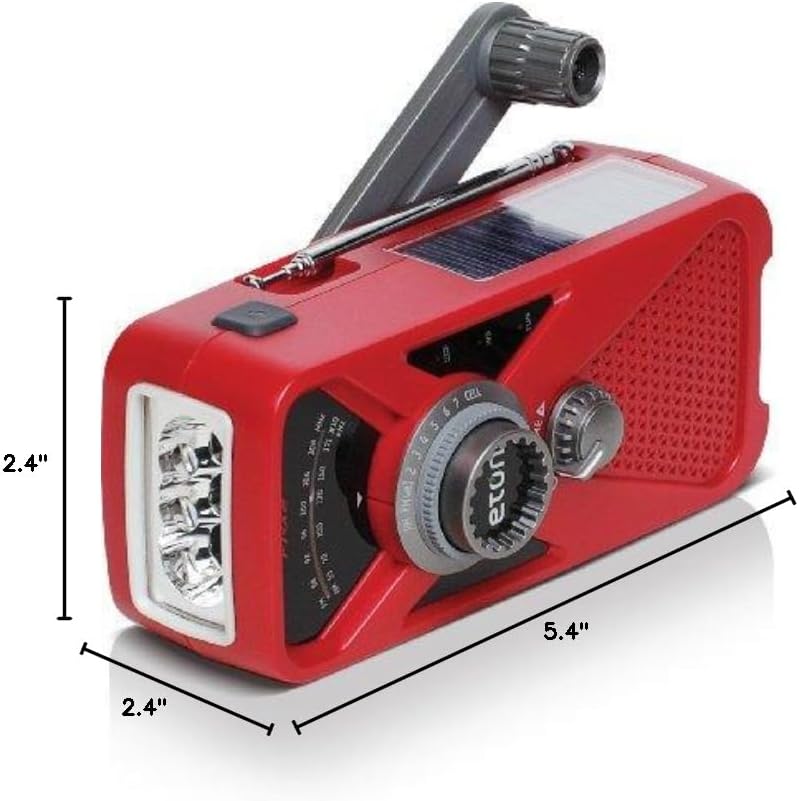
Figi 7: Dimansyon pwodwi a
- Modèl: ARCFRX2WXR
- Dimansyon (L x W x H): 5.4" x 2.4" x 2.4"
- Pwa: 0.56 liv
- Gwoup Radyo: AM, FM, NOAA Weather Band
- Sous pouvwa: Internal Rechargeable Battery (1000mAh), Solar Panel, Hand Turbine, Mini-USB DC Input
- Sòti: USB (pou chaje aparèy ekstèn)
- Karakteristik: Lanp pòch LED, Jack pou kas ekoutè
Enfòmasyon sou Garanti
Eton products are designed for reliability and performance. For specific warranty details, please refer to the warranty card included with your product or visit the official Eton websit la. Kenbe prèv acha ou pou reklamasyon garanti.
Sipò
If you have any questions or require assistance with your Eton American Red Cross FRX2 radio, please contact Eton Customer Support:
- Websit: www.etoncorp.com
- Imèl: Gade websit pou fòm kontak oswa adrès imel.
- Telefòn: Gade websit pou nimewo telefòn sipò aktyèl yo.