
1. Entwodiksyon
Mèsi pou acha aasing the Gemini PS3-USB 3 Channel 10-Inch Mixer. This manual provides essential information for the proper setup, operation, and maintenance of your mixer. Please read this manual thoroughly before use to ensure optimal performance and to prevent damage.
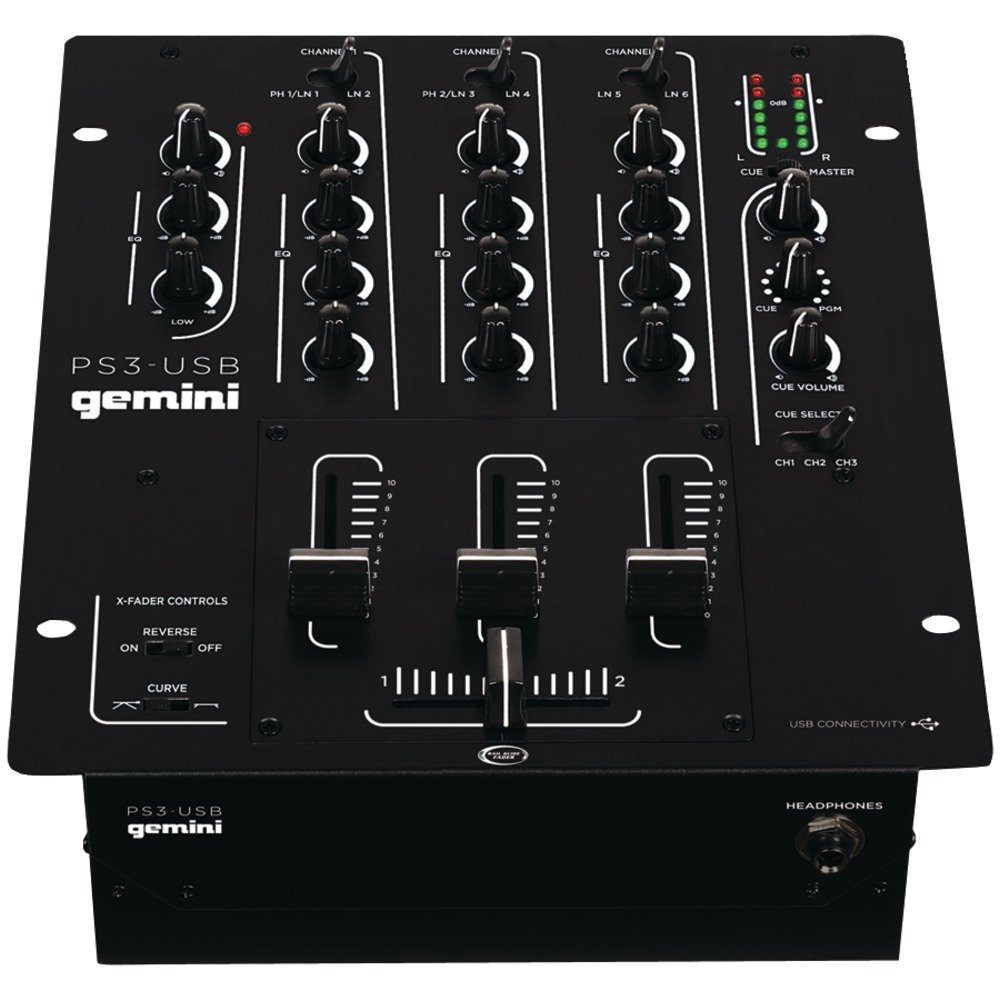
Figi 1: Devan view of the Gemini PS3-USB Mixer, showing controls and inputs.
2. Enstriksyon Sekirite
- Sous pouvwa: Konekte aparèy la sèlman ak ekipman pou pouvwa espesifye a.
- Vantilasyon: Asire bon vantilasyon. Pa bloke ouvèti vantilasyon yo.
- Dlo ak imidite: Pa ekspoze aparèy la anba lapli oswa imidite. Pa mete objè ki plen likid sou aparèy la.
- Chalè: Kenbe aparèy la lwen sous chalè tankou radyatè, recho, recho, oswa lòt aparèy (ki gen ladan amplifiers) ki pwodui chalè.
- Netwayaj: Netwaye sèlman ak yon twal sèk.
- Sèvis: Konfye tout sèvis bay pèsonèl sèvis kalifye. Pa eseye fè reparasyon pwodui sa a tèt ou.
3. Enstalasyon
3.1 Debake
Carefully unpack the mixer and check for any signs of damage. Retain the packaging materials for future transport or storage.
3.2 Konekte pouvwa
Connect the provided power adapter to the mixer's power input and then to a suitable electrical outlet.
3.3 Koneksyon Audio
The PS3-USB features 5-line, 3-channel inputs with 2 convertible Phono/Line RCA inputs.
- Antre Phono/Liy: Connect turntables or line-level devices (CD players, media players) to the RCA inputs. Use the Phono/Line switch to select the appropriate input type for each channel.
- Mèt Sòti: Connect the Master RCA outputs to your amplifier oswa oratè ki mache ak pisans.
- Sòti dosye: Connect the Record RCA outputs to a recording device if you wish to record your mix.
- kas ekoutè: Plug your 1/4" (6.3mm) headphones into the front panel headphone connector.
3.4 USB Koneksyon
Connect the mixer to your Mac or PC using a standard USB cable. This allows for simultaneous playback and recording through your computer's media player software.
4. Operasyon Enstriksyon
4.1 Controls and Functions Overview
Familiarize yourself with the mixer's layout:
- Channel Gain Control: Ajiste nivo antre a pou chak kanal.
- 3-Band Rotary EQ: Provides control over High, Mid, and Low frequencies for each channel.
- Chèn Faders: Control the volume of each individual channel.
- Crossfader: A user-replaceable Rail Glide crossfader with curve and reverse controls for blending between channels.
- Mèt Volim: Kontwole nivo pwodiksyon an jeneral nan mixer la.
- VU mèt: Visual indicators for master or cue levels.
- Cue Section: Includes rotary cue volume, CUE/PGM controls, and a split cue switch for headphone monitoring.
- Seksyon Mikwofòn: Features a rotary microphone volume control and a 2-band EQ for microphone input.
4.2 Melanj debaz
- Connect your audio sources to the appropriate Phono/Line inputs.
- Set the Phono/Line switch for each channel to match your source.
- Adjust the Gain control for each active channel to achieve a healthy input level without clipping (distortion).
- Use the channel faders to bring up the volume of your desired audio sources.
- Utilize the 3-band EQ to shape the sound of each channel.
- Use the crossfader to smoothly transition between channels.
- Monitor your mix using headphones via the Cue section and adjust the Master Volume for the main output.
4.3 Lekti ak Anrejistreman USB
Once connected via USB, your computer should recognize the PS3-USB as an audio device.
- Lektur: Select the PS3-USB as the output device in your computer's sound settings or media player software to route audio through the mixer.
- Anrejistreman: Select the PS3-USB as the input device in your recording software. The mixer's master output will be sent to your computer for recording.
5. Antretyen
- Netwayaj: Sèvi ak yon twal mou epi sèk pou netwaye deyò mixer la. Pa sèvi ak pwodui netwayaj likid oswa solvan.
- Crossfader Replacement: The Rail Glide crossfader is user-replaceable. Refer to the Gemini website or authorized service centers for replacement parts and instructions if needed.
- Depo: When not in use for extended periods, store the mixer in a cool, dry place, preferably in its original packaging.
NAN. Depanaj
| Pwoblèm | Kòz posib | Solisyon |
|---|---|---|
| No sound output from master. | Master volume too low; incorrect input selection; amppwoblèm ak lifizè/oratè. | Increase Master Volume. Check Phono/Line switches. Verify ampkoneksyon anplifikatè/oratè ak pouvwa. |
| No sound from a specific channel. | Channel fader down; Gain too low; incorrect Phono/Line selection; source device off/muted. | Raise channel fader. Adjust Gain. Correct Phono/Line switch. Check source device. |
| Odyo defòme. | Input Gain too high; Master Volume too high; faulty cable. | Reduce channel Gain. Reduce Master Volume. Replace cables. |
| USB recording/playback not working. | Incorrect USB connection; computer audio settings incorrect; driver issues. | Ensure USB cable is securely connected. Select PS3-USB as audio device in computer settings. Restart computer. |
7. Espesifikasyon
- Modèl: PS3USB
- Chanèl: 3
- Antre: 5-Line, 2 Convertible Phono/Line RCA, USB
- Sòti: Master RCA, Record RCA, 1/4" (6.3mm) Headphone
- EQ: 3-Band Rotary EQ per channel, 2-Band EQ for Microphone
- Crossfader: User-replaceable Rail Glide with Curve and Reverse controls
- Koneksyon: USB for Mac/PC Playback & Recording
- Dimensions (Approximate Shipping): 12.00in x 10.00in x 3.25in
- Weight (Approximate Shipping): 6.2 liv (2.8 kg)
- UPC: 747705208149
8. Garanti ak sipò
This Gemini product is covered by a 90-jou garanti apati dat acha a. Garanti sa a kouvri domaj fabrikasyon ak atizan konn fè nan itilizasyon nòmal. Li pa kouvri domaj ki koze pa move itilizasyon, aksidan, modifikasyon oswa reparasyon san otorizasyon.
For technical support, service inquiries, or warranty claims, please contact your authorized Gemini dealer or visit the official Gemini websit pou enfòmasyon kontak.
Tanpri konsève prèv acha ou a pou validasyon garanti a.