
Entwodiksyon
Thank you for choosing the Tele System TS6512HD Digital Terrestrial Receiver. This device allows you to receive digital terrestrial television broadcasts and offers additional features such as multimedia playback via USB and recording capabilities. This manual provides essential information for the safe and efficient use of your receiver, including setup, operation, maintenance, and troubleshooting.
Enfòmasyon enpòtan sou sekirite
- Pwovizyon pou pouvwa: Sèvi ak adaptè kouran espesifye a sèlman. Asire w ke vòl latage matche ak ekipman pou kouran lokal ou a.
- Vantilasyon: Do not block ventilation openings. Place the receiver on a stable, flat surface with adequate space around it for proper airflow.
- Dlo ak imidite: Do not expose the receiver to rain, moisture, or liquids. Do not place objects filled with liquids, such as vases, on the receiver.
- Sous Chalè: Keep the receiver away from heat sources such as radiators, heat registers, stoves, or other heat-producing appliances.
- Netwayaj: Unplug the receiver from the power outlet before cleaning. Use a soft, dry cloth. Do not use liquid or aerosol cleaners.
- Sèvis: Pa eseye fè sèvis pwodui sa a tèt ou. Refere tout sèvis yo bay pèsonèl sèvis kalifye.
- Zeklè: Unplug the receiver during lightning storms or when unused for long periods.
Kontni pake
Tanpri tcheke kare a pou atik sa yo:
- Tele System TS6512HD Digital Terrestrial Receiver
- Kontwòl Remote
- Adaptè pouvwa
- Manyèl Itilizatè (dokiman sa a)
Gid Enstalasyon
1. Konekte Reseptè a
- Konekte ak televizyon an:
- For optimal picture quality, connect an HDMI cable (not included) from the receiver's HDMI OUT port to an available HDMI IN port on your television.
- Alternatively, if your TV does not have an HDMI port, connect a SCART cable (not included) from the receiver's SCART port to the SCART IN port on your television.
- Konekte Antèn: Connect your terrestrial antenna cable to the ANT IN port on the back of the receiver.
- Konekte pouvwa: Plug the power adapter into the DC IN port on the receiver, then plug the adapter into a wall outlet.
- Mete pil: Open the battery compartment on the remote control and insert two AAA batteries (not included), observing the correct polarity.
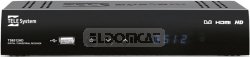
Figi 1: Devan view of the Tele System TS6512HD receiver, showing its compact design and essential indicators.
2. Premye Enstalasyon
- Turn on your TV and select the correct input source (HDMI or SCART) corresponding to where you connected the receiver.
- Power on the Tele System TS6512HD receiver.
- The first-time installation wizard should appear on your TV screen. Follow the on-screen prompts to select your language, country, and initiate an automatic channel scan.
- Once the scan is complete, the receiver will save the found channels, and you can begin watching TV.
Enstriksyon Operasyon
Basic Remote Control Functions
- POUVWA: Turns the receiver on or off (standby mode).
- CH +/-: Chanje chanèl monte oswa desann.
- VOL +/-: Ajiste nivo volim.
- Bèbè: Silenn oswa retire odyo a.
- MENI: Accesses the main menu for settings and features.
- Sòti: Kite meni aktyèl la oswa ekspozisyon sou ekran an.
- OK: Konfime seleksyon yo nan meni yo.
- Flèch yo (Anwo/Anba/Agoch/Dwat): Navige nan meni ak opsyon.
- ENFO: Montre enfòmasyon sou chanèl aktyèl la.
- EPG: Aksè a Gid Pwogram Elektwonik la.
Chèn Navigasyon
Sèvi ak la CH +/- buttons to browse channels sequentially. To directly enter a channel number, use the numeric keypad on the remote control.
Sèvi ak meni prensipal la
Peze a MENI button to access the receiver's main menu. Here you can configure various settings, including:
- Chènye rechèch: Rescan for channels or perform a manual search.
- Anviwònman sistèm: Adjust language, time, parental control, and other system preferences.
- Anviwònman Foto: Configure aspect ratio, resolution, and other display options.
- Anviwònman odyo: Adjust audio output preferences.
- USB: Access multimedia files from a connected USB device or manage recordings.
Recording TV Programs (PVR Function)
The TS6512HD receiver supports recording of TV programs to an external USB storage device (e.g., USB flash drive or external hard drive, not included). Ensure your USB device is formatted correctly (FAT32 or NTFS) and has sufficient free space.
- Connect a compatible USB storage device to the USB port on the receiver.
- To record instantly, press the REC button on the remote control while watching a program. Press SISPANN pou fini anrejistreman an.
- To schedule a recording, use the EPG (Electronic Program Guide) to select a program and follow the on-screen prompts to set a timer recording. Alternatively, access the Timer settings via the main menu.
- Recorded programs can be accessed and played back through the "USB" section in the main menu.
Multimedia Playback via USB
The receiver can play various multimedia files (video, audio, photos) from a connected USB storage device.
- Connect a USB storage device containing your multimedia files nan pò a USB.
- Peze a MENI button, navigate to the "USB" section, and select "Multimedia" or "Player".
- Browse ou files ak laprès OK pou jwe.
- Note: The receiver supports specific file formats (e.g., H.264, MPEG2, MPEG4 for video; AAC+, LC-AAC for audio). Compatibility with all file types is not guaranteed.
Antretyen
Netwayaj
To clean the receiver, first unplug it from the power outlet. Use a soft, dry, lint-free cloth to wipe the exterior surfaces. Do not use liquid cleaners, abrasive pads, or chemical solvents, as these can damage the finish or internal components.
Mizajou lojisyèl
Periodically, Tele System may release software updates to improve performance or add new features. Check the manufacturer's website for available updates and instructions on how to install them via USB.
Depanaj
| Pwoblèm | Kòz posib | Solisyon |
|---|---|---|
| No power / Receiver does not turn on. | Power cable not connected properly; Power outlet not working; Faulty power adapter. | Check power cable connection. Try a different power outlet. Ensure the power adapter is working. |
| Pa gen foto oswa son. | Incorrect TV input selected; HDMI/SCART cable loose or faulty; Antenna not connected or signal too weak. | Select the correct TV input source. Check HDMI/SCART cable connections. Ensure antenna is connected and try rescanning channels. |
| Remote kontwòl pa travay. | Batteries are dead or inserted incorrectly; Obstruction between remote and receiver; Remote sensor blocked. | Replace batteries, ensuring correct polarity. Remove any obstructions. Ensure the remote sensor on the receiver is clear. |
| Poor picture quality / Pixelation. | Weak antenna signal; Antenna alignment issue; Interference. | Check antenna connection and alignment. Consider using a signal amplifier if signal is consistently weak. |
| Cannot record to USB device. | USB device not connected; USB device not formatted correctly; Insufficient storage space; USB device incompatible. | Ensure USB device is connected. Format the USB device to FAT32 or NTFS. Check available space. Try a different USB device. |
Espesifikasyon teknik
| Non modèl | TS6512HD |
| Nimewo Modèl | 21005197 |
| Mak | Tele System |
| Kalite sentonizè | Terrestrial, DVB |
| Rezolisyon videyo | 1920 x 810 piksèl |
| kodèk videyo | H.264, MPEG2, MPEG4 |
| Kodèk odyo | AAC+, LC-AAC |
| Total pò USB | 1 |
| Total pò HDMI | 1 |
| Aparèy konpatib | Televizyon |
| Koulè | Nwa |
| Dimansyon (Pake) | 24 x 23.4 x 5.2 cm |
| Pwa (Pakè) | 421.84 g |
| GTIN (EAN/UPC) | 08024427014350 |
Garanti ak sipò
The Tele System TS6512HD receiver comes with a standard manufacturer's warranty. For specific warranty terms and conditions, please refer to the warranty card included with your product or visit the official Tele System website. For technical support, troubleshooting assistance beyond this manual, or service inquiries, please contact Tele System customer support through their official channels.