
Entwodiksyon
Welcome to the user manual for the Lindy 4x2 HDMI 1.4 Switching Splitter, Model 38054. This device allows you to connect up to four HDMI or DVI source devices to two HDMI display devices, distributing signals simultaneously or switching between sources. Please read this manual thoroughly to ensure proper installation and operation.
Enfòmasyon sou Sekirite
Please observe the following safety guidelines to prevent damage to the unit and ensure user safety:
- Do not expose this unit to rain, moisture, or liquids.
- Do not attempt to open the unit casing. Pa gen okenn pyès itilizatè a ka repare anndan an.
- Use only the provided power adapter. Using an unauthorized adapter may damage the unit and void the warranty.
- Asire w ke gen bon vantilasyon toutotou aparèy la. Pa bloke okenn ouvèti vantilasyon.
- Disconnect power before cleaning. Clean the unit with a soft, dry cloth only.
Kontni pake
Verifye ke pake ou a gen atik sa yo:
- Lindy 4x2 HDMI 1.4 Switching Splitter (Model 38054)
- Adaptè pouvwa
- Envizib detèktè kontwòl
- Manyèl Itilizatè (dokiman sa a)
Karakteristik pwodwi
- Connects up to 4 HDMI/DVI source devices to 2 HDTV displays or projectors.
- Supports 1080p resolution and 3D video formats.
- Compatible with digital video formats in deep color mode (up to 36 bit).
- Supports lossless compressed digital audio formats, including Dolby TrueHD and DTS-HD Master Audio.
- Each selected input signal is simultaneously sent to both connected display devices.
- Includes an infrared remote control for convenient switching.
- Features signal re-timing, compensation, and regeneration for output signal transmission up to 10 meters.
Pwodwi souview
The Lindy 4x2 HDMI 1.4 Switching Splitter is designed for efficient signal management in home theater or professional AV setups.
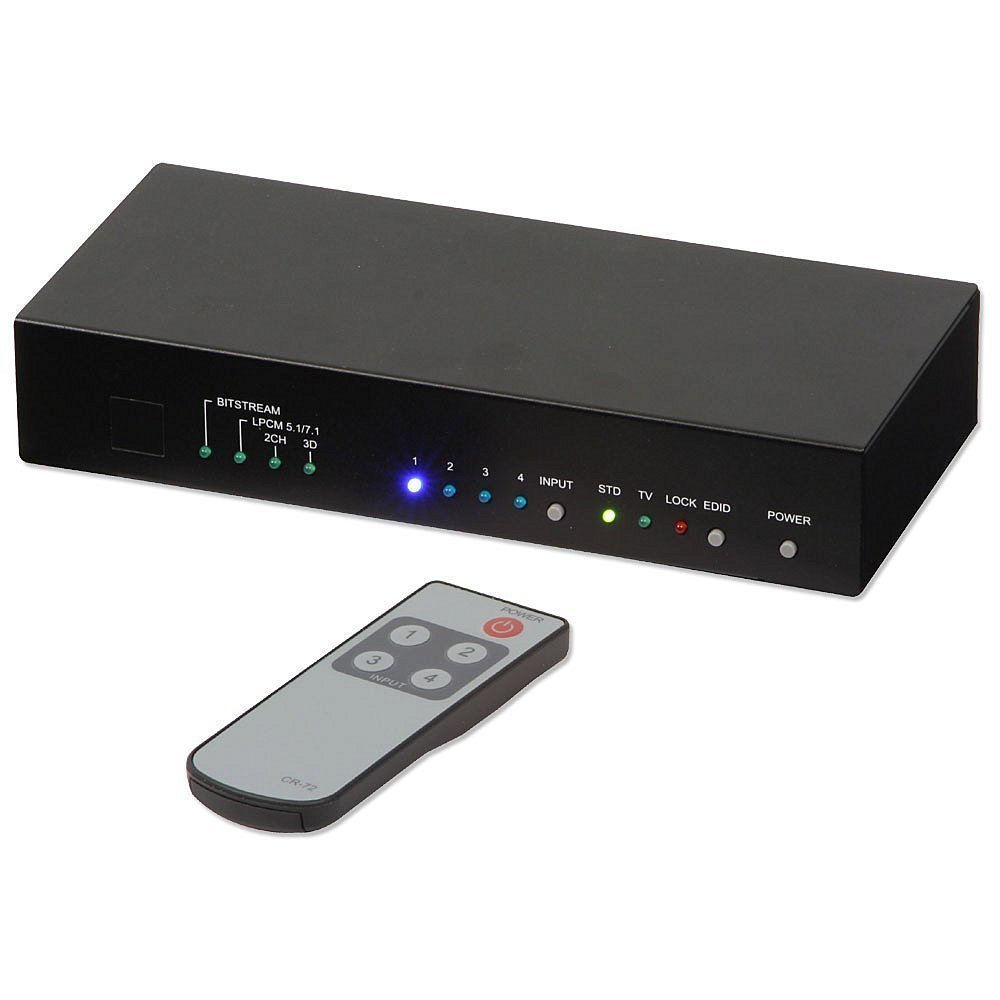
Imaj sa a montre devan an ak anwo a view of the Lindy 4x2 HDMI 1.4 Switching Splitter. The front panel typically features LED indicators for active inputs and outputs, along with buttons for manual switching. The rear panel, not fully visible, would contain the HDMI input and output ports, and the power input.
Front Panel
The front panel typically includes:
- Input Selection Buttons: For manually selecting the desired HDMI input source (e.g., Input 1, Input 2, etc.).
- Endikatè ki ap dirije: To show which input is currently active and which outputs are connected.
- IR Reseptè: Pou resevwa siyal ki soti nan kontwòl remote enfrawouj la.
Panèl dèyè
The rear panel typically includes:
- HDMI Input Ports (x4): Connect your source devices (e.g., Blu-ray player, game console, PC).
- HDMI Output Ports (x2): Connect to your display devices (e.g., HDTV, projector).
- DC 5V Antre pouvwa: Pou konekte adaptè kouran ki founi an.
Enstalasyon ak Enstalasyon
Follow these steps to set up your Lindy 4x2 HDMI 1.4 Switching Splitter:
- Ensure all devices (source, display, and splitter) are powered off and unplugged from their power outlets.
- Connect your HDMI source devices (e.g., DVD player, game console, PC) to the HDMI Input ports (HDMI IN 1-4) on the rear of the splitter using high-quality HDMI cables.
- Connect your HDMI display devices (e.g., HDTV, projector) to the HDMI Output ports (HDMI OUT 1-2) on the rear of the splitter using high-quality HDMI cables.
- Connect the provided power adapter to the DC 5V Power Input on the splitter, then plug the adapter into a suitable power outlet.
- Power on your display devices, then your source devices, and finally the Lindy 4x2 HDMI 1.4 Switching Splitter.
- Select the desired input source using the buttons on the front panel or the infrared remote control.
Enstriksyon Operasyon
Manyèl Chanje
To switch between input sources manually, press the corresponding input selection button on the front panel of the splitter. The LED indicator for the active input will illuminate.
Operasyon kontwòl Remote
Use the provided infrared remote control to select input sources. Point the remote control towards the IR receiver on the front panel of the splitter.
- Input 1-4 Buttons: Press the button corresponding to the desired HDMI input source (1, 2, 3, or 4).
- Bouton pouvwa: (If available on your remote) To power the unit on or off.
The selected input will be displayed on both connected output devices simultaneously.
Antretyen
To ensure optimal performance and longevity of your Lindy 4x2 HDMI 1.4 Switching Splitter:
- Keep the unit in a cool, dry place, away from direct sunlight and heat sources.
- Clean the unit with a soft, dry cloth. Do not use liquid or aerosol cleaners, as they may damage the finish or internal components.
- Ensure proper ventilation and do not block any vents on the unit.
Depanaj
If you encounter issues with your Lindy 4x2 HDMI 1.4 Switching Splitter, refer to the following common solutions:
| Pwoblèm | Kòz posib | Solisyon |
|---|---|---|
| No picture or sound on display. | Loose cable connections, incorrect input selection, power issue, incompatible resolution. |
|
| Intermittent signal or flickering. | Poor quality HDMI cables, signal interference, long cable runs, HDCP issues. |
|
| Remote kontwòl pa travay. | Dead battery, obstructed IR path, remote too far. |
|
Espesifikasyon
| Karakteristik | Detay |
|---|---|
| Nimewo Modèl | 38054 |
| Mak | Lindy |
| Antre | 4 x HDMI |
| Sòti yo | 2 x HDMI |
| HDMI estanda | HDMI 1.4 |
| Rezolisyon sipòte | Jiska 1080p |
| Sipò 3D | Wi |
| Gwo twou san fon Koulè | Jiska 36 ti jan |
| Sipò odyo | Dolby TrueHD, DTS-HD Master Audio |
| Max Output Cable Length | 10m (32.8 pye) |
| Pwa atik | 2.9 liv (1.32 kg) |
Garanti ak sipò
This Lindy product comes with a 2-ane garanti soti nan dat acha a.
For technical support, troubleshooting assistance, or warranty claims, please contact your local Lindy customer service or visit the official Lindy website for further assistance. Please retain your proof of purchase for warranty validation.