
Entwodiksyon
The Waring Pro TCO650 Digital Convection Oven is a versatile kitchen appliance designed for baking, convection-baking, broiling, toasting, and pizza preparation. This manual provides essential information for the safe and efficient operation, maintenance, and troubleshooting of your oven. Please read all instructions thoroughly before first use.

Image: The Waring Pro TCO650 Digital Convection Oven, showcasing its compact design and a pizza being cooked inside. The control panel with digital display is visible on the right side.
Garanti enpòtan yo
Lè w ap itilize aparèy elektrik, yo ta dwe toujou swiv prekosyon sekirite debaz yo pou redwi risk pou dife, chòk elektrik ak/oswa blesi moun, tankou sa ki annapre yo:
- Li tout enstriksyon yo anvan ou itilize fou a.
- Pa manyen sifas cho. Sèvi ak manch oswa bouton.
- To protect against electrical shock, do not immerse cord, plug, or oven body in water or other liquids.
- Sipèvizyon sere se nesesè lè nenpòt aparèy itilize pa oswa toupre timoun yo.
- Debranche soti nan priz lè yo pa itilize ak anvan netwaye. Kite refwadi anvan ou mete oswa retire pati yo.
- Pa opere nenpòt aparèy ki gen yon kòd oswa ploge ki domaje, oswa apre aparèy la fonksyone mal oswa li te domaje nan nenpòt fason.
- The unit must be placed at least 6 inches away from the wall or any combustible material. When using, pull the unit out a minimum of 6 inches away from the wall or other cords.
- The exterior surfaces, especially the top and glass door, become hot during operation. Exercise caution. The handle remains cool to the touch.
Pati ak Karakteristik
Familiarize yourself with the components of your Waring Pro TCO650 Digital Convection Oven:
- Etajè fou: For supporting food items during cooking.
- Chodyè boulanjri: Used for baking and roasting.
- Plato ti kal pen: Ranmase ti kal pen ak degoute pou fasilite netwayaj.
- Ekspozisyon dijital: Shows time, temperature, and function settings.
- Kontwòl Touchpad: Buttons for selecting functions (Bake, Convection-Bake, Broil, Toast, Pizza) and adjusting settings.
- Kòmanse / Stop bouton: Initiates or cancels cooking cycles.
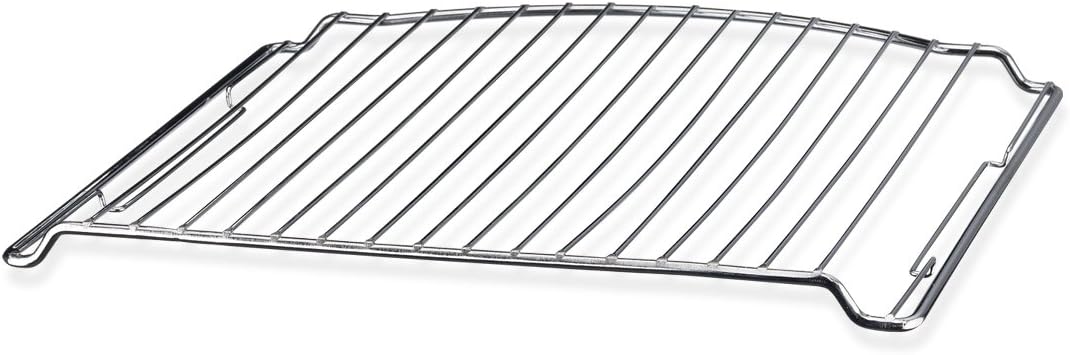
Image: A metal oven rack, designed to fit inside the Waring Pro TCO650 Digital Convection Oven, used for supporting food items.

Image: A rectangular metal baking pan, included with the Waring Pro TCO650 Digital Convection Oven, suitable for various cooking tasks.

Image: A removable metal crumb tray, designed to slide into the bottom of the Waring Pro TCO650 Digital Convection Oven to catch food debris.
Enstalasyon
- Debake: Remove all packaging materials and any promotional labels or stickers from your oven.
- Plasman: Place the oven on a stable, heat-resistant surface. Ensure there is at least 6 inches of clearance from walls, cabinets, and other combustible materials on all sides and above the oven for proper ventilation.
- Netwayaj inisyal: Siye enteryè a ak anonsamp cloth. Wash the oven rack, baking pan, and crumb tray in warm, soapy water. Rinse and dry thoroughly.
- Enstalasyon plato pou kraze mikwòb: Slide the crumb tray into the bottom of the oven.
- Koneksyon pouvwa: Ploge kòd elektrik la nan yon priz elektrik estanda.
- Premye Itilizasyon Burn-Off: Before cooking food, operate the oven empty on the "Bake" function at 400°F (200°C) for approximately 15 minutes to burn off any manufacturing residues. A slight odor or smoke is normal during this process. Ensure the area is well-ventilated.
Enstriksyon Operasyon
Operasyon Jeneral
- Place food on the baking pan or directly on the oven rack, depending on the recipe.
- Fèmen pòt fou a byen.
- Select the desired cooking function using the touchpad controls.
- Adjust the temperature and time as needed using the control knob.
- Peze bouton START/STOP pou kòmanse kwit manje.
- The oven will preheat if necessary, then begin the cooking cycle. The digital display will count down the remaining time.
- When the cooking cycle is complete, the oven will beep, and the heating elements will turn off.
- Carefully remove food using oven mitts.
Fonksyon
- Kwit: Ideal for general baking tasks like cookies, cakes, and casseroles.
- Convection-Bake: Uses a fan to circulate hot air, resulting in faster and more even cooking. Reduce cooking time by approximately 20% compared to conventional baking.
- Griye: For browning the top of food, melting cheese, or cooking thin cuts of meat. Position food closer to the top heating element.
- pen griye: Specifically designed for toasting bread, bagels, and frozen waffles. Adjust the darkness setting as desired. The oven can hold up to 6 slices of bread.
- Pitza: Optimized for cooking pizzas up to 12 inches in diameter.
Antretyen ak netwayaj
Regular cleaning will ensure optimal performance and extend the life of your oven.
- Toujou Dekonekte: Before cleaning, ensure the oven is unplugged from the power outlet and has completely cooled down.
- Plato ti kal pen: Remove the crumb tray and discard accumulated crumbs. Wash the tray in warm, soapy water, rinse, and dry thoroughly. Reinsert the tray.
- Oven Rack and Baking Pan: Wash these accessories in warm, soapy water. For stubborn food residue, soak them before scrubbing. Rinse and dry completely.
- Enteryè: Wipe the interior walls and bottom of the oven with a damp cloth and mild detergent. Avoid abrasive cleaners or scouring pads, as they can damage the non-stick coating.
- Eksteryè: Siye sifas eksteryè yo ak anonsamp twal. Pa sèvi ak pwodui netwayaj oswa poli abrazif.
- Pòt Glass: Netwaye pòt an vit la avèk yon pwodui netwayaj pou vit oswa yon pwodui netwayaj pou vit.amp twal.
- Pa janm plonje: Never immerse the oven body, cord, or plug in water or any other liquid.
Depanaj
| Pwoblèm | Kòz posib | Solisyon |
|---|---|---|
| Fou a pa limen. | Pa branche; kouran koupetage; priz ki gen pwoblèm. | Asire w ke fou a byen branche nan yon priz ki fonksyone. Tcheke disjonktè w la. |
| Manje pa kwit menm jan. | Improper rack position; overcrowding; convection fan issue. | Adjust rack position. Do not overcrowd the oven. Ensure the convection fan is operating (if using convection mode). |
| Twòp lafimen pandan kwit manje. | Food spills; greasy residue; first use burn-off. | Clean the interior and crumb tray thoroughly. Ensure the oven is clean before use. If it's the first use, this is normal. |
| Ekspozisyon dijital la pa fonksyone. | Pwoblèm kouran; fonksyònman entèn ki pa kòrèk. | Debranche fou a pou kèk minit, apresa branche l ankò. Si pwoblèm nan pèsiste, kontakte sèvis kliyan. |
Espesifikasyon
- Modèl: TCO650
- Mak: Waring
- Kapasite: 0.6 pye kib
- Pouvwa: 1500 Watts
- Exterior Dimensions (D x W x H): 14.5" x 17" x 10.75"
- Interior Dimensions (D x W x H): 10.5" x 12" x 8.5"
- Kalite kontwòl: Kontwòl Touchpad
- Fonksyon: Bake, Convection-Bake, Broil, Toast, Pizza
- Revèy: Digital 60-minute timer with LCD display
- Eleman ki enkli: Oven Rack, Baking Pan, Crumb Tray
- Materyèl: Stainless Steel (door)
- Koulè: Nwa
- Pwa atik: 22.8 liv
Enfòmasyon sou Garanti
Waring products are manufactured to the highest standards and are warranted to be free from defects in material and workmanship for a period of one year from the date of purchase. This warranty covers defects in materials and workmanship under normal use and service. It does not cover damage resulting from accident, misuse, abuse, or unauthorized modification. For warranty service, please retain your original purchase receipt.
Sipò pou Kliyan
For technical assistance, service, or to order replacement parts, please contact Waring Customer Service. You can find contact information on the official Waring websit entènèt la oubyen atravè anbalaj orijinal pwodwi w la.
Websit: www.waringcommercialproducts.com
Please have your model number (TCO650) and date of purchase available when contacting support.