
InFocus IN126
InFocus IN126 DLP Pwojektè Manyèl Itilizatè
Model: IN126 | Brand: InFocus
1. Pwodwi souview
The InFocus IN126 is a DLP projector designed for various projection needs, offering high brightness and a clear image. This manual provides essential information for the proper setup, operation, and maintenance of your projector.
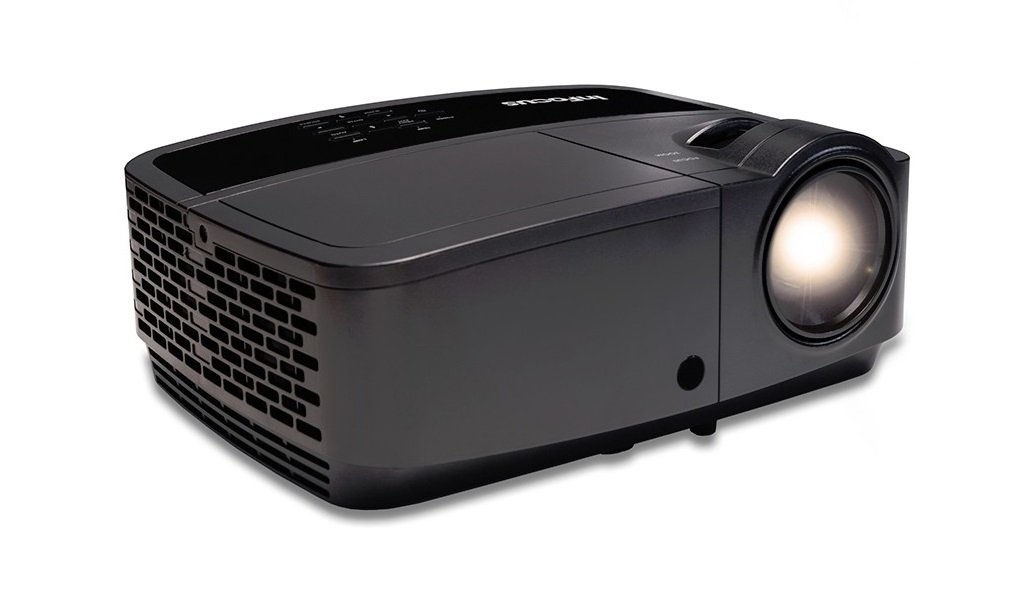
Imaj 1.1: Devan view of the InFocus IN126 DLP Projector.
Karakteristik kle:
- High brightness of up to 3200 lumens for clear images in various lighting conditions.
- High 3000:1 contrast ratio for sharp detail.
- Compact and portable design, weighing approximately 4.8 lbs. (2.17 kg).
- 3D-Ready capability for immersive viewfè eksperyans.
- HDMI connectivity for versatile input options.
2. Enstalasyon ak Enstalasyon
2.1 Debake
Carefully remove the projector and all accessories from the packaging. Verify that all components are present according to the packing list.
2.2 Plasman Pwojektè
Place the projector on a stable, flat surface or mount it securely. Ensure adequate ventilation around the projector to prevent overheating. Position the projector at an appropriate distance from the screen to achieve the desired image size.
2.3 Konekte Aparèy
Connect your video source (e.g., laptop, gaming console) to the projector using an HDMI cable. Ensure the cable is securely plugged into both the source device and the projector's HDMI input port.

Image 2.1: An InFocus projector set up for a business presentation, demonstrating typical usage.
2.4 Limen/Etenyen
- Pou limen: Connect the power cord to the projector and a power outlet. Press the power button on the projector or remote control. The power indicator light will illuminate.
- Pou etenn: Press the power button twice. The projector will enter a cooling cycle before completely shutting down. Do not unplug the projector during the cooling cycle.
2.5 Ajisteman Imaj
- Konsantre: Vire bag konsantre a sou lantiy la jiskaske imaj la vin byen file epi klè.
- Koreksyon Keystone: Use the keystone adjustment feature (usually found in the projector's menu or via dedicated buttons) to correct trapezoidal image distortion if the projector is not perfectly perpendicular to the screen.
3. Itilizasyon Pwojektè a
3.1 Seleksyon Sous Antre
Press the 'Source' or 'Input' button on the remote control or projector control panel to cycle through available input sources (e.g., HDMI, VGA). Select the input corresponding to your connected device.
3.2 Navigasyon meni
Use the arrow buttons on the remote or control panel to navigate the on-screen display (OSD) menu. Press 'Enter' or 'OK' to confirm selections and 'Menu' or 'Exit' to go back or close the menu.
3.3 Ajisteman Imaj
Within the OSD menu, you can adjust various picture settings:
- Klate: Ajiste klète oswa fènwa jeneral imaj la.
- Kontras: Kontwole diferans ki genyen ant pati ki pi klè ak pati ki pi fonse nan imaj la.
- Koulè: Ajiste entansite koulè yo.
- Rapò aspè: Chwazi fòma ekspozisyon an (pa egzanp, 4:3, 16:9).
3.4 Anviwònman odyo
If your projector has built-in speakers or is connected to an external audio system, you can adjust the volume and other audio settings through the OSD menu.
3.5 3D Operation
The IN126 projector is 3D-Ready. To view 3D content, you will need compatible 3D glasses, a 3D-enabled source device, and 3D content. Refer to your 3D glasses and source device manuals for specific instructions on enabling 3D mode.
4. Antretyen
4.1 Netwaye Lantiy la
Sèvi ak yon twal mou ki pa gen pousyè, espesyalman fèt pou lantiy optik, pou siye lantiy pwojektè a dousman. Evite itilize pwodui netwayaj abrazif oswa fòs twòp, ki ka grate lantiy la.
4.2 Cleaning the Projector Casing
Wipe the projector's exterior casing ak yon mou, damp twal. Pa sèvi ak pwodwi chimik piman bouk oswa solvang.
4.3 Antretyen filtè lè
Regularly check and clean the air filter to ensure proper airflow and prevent overheating. Refer to the full product manual for instructions on locating and cleaning or replacing the air filter.
4.4 Lamp Ranplasman
Pwojektè a lamp has an estimated operating life of up to 20,000 hours. When the lamp reaches the end of its life, a warning message may appear, or the image brightness may significantly decrease. Refer to the full product manual for detailed instructions on safe lamp replacement. Always use genuine InFocus replacement lamps.
NAN. Depanaj
Seksyon sa a adrese pwoblèm komen ou ka rankontre ak pwojektè InFocus IN126 ou a.
5.1 Pa gen imaj sou ekran an
- Ensure the projector is powered on and the power indicator light is solid.
- Tcheke tout koneksyon kab yo (HDMI, kouran) byen fèm.
- Verifye ke sous opinyon ki kòrèk la chwazi sou pwojektè a.
- Confirm the source device (laptop, etc.) is powered on and outputting a signal.
5.2 Image is Distorted or Blurry
- Ajiste bag konsantrasyon an sou lantiy la.
- Use keystone correction to fix trapezoidal distortion.
- Ensure the projector is placed on a stable surface and is not vibrating.
- Check the resolution settings of your source device; ensure it is compatible with the projector's native resolution (1280 x 720).
5.3 Pa gen son
- Ogmante volim nan tou de pwojektè a ak aparèy sous la.
- Si w ap itilize oratè ekstèn, asire w ke yo byen konekte epi yo limen.
- Check audio settings in the projector's OSD menu.
5.4 Pwojektè a chofe twòp
- Ensure there is sufficient space around the projector for ventilation.
- Clean the air filter to remove any dust buildup.
- Pa bloke ouvèti vantilasyon yo.
6. Espesifikasyon
The following table outlines the key technical specifications for the InFocus IN126 DLP Projector:
| Karakteristik | Spesifikasyon |
|---|---|
| Mak | Enfocus |
| Non modèl | IN126 DLP |
| Kalite ekspozisyon | DLP |
| Rezolisyon natif natal | 1280 x 720 |
| Rezolisyon ekspozisyon maksimòm | 1920 x 1080 |
| Klète | 3200 lumens (ANSI) |
| Pwopòsyon kontras | 3000:1 |
| Sous limyè opere lavi | 20000 èdtan |
| Lamp Wattage | 230 Watts |
| Koneksyon Teknoloji | HDMI |
| Karakteristik espesyal | 3D-pare |
| Faktè fòm | Pòtab |
| Kalite aliye | Tabletop mòn |
| Pwa atik | 4.85 liv (2.2 kg) |
| Sètifikasyon Tès Ekstèn | UL, c-UL, FCC, CE |
7. Enfòmasyon sou Garanti
The InFocus IN126 DLP Projector comes with a limited manufacturer's warranty. For specific details regarding warranty coverage, duration, and terms, please refer to the warranty card included with your product or visit the official InFocus websit la. Kenbe prèv acha ou pou reklamasyon garanti.
8. Sipò pou Kliyan
For further assistance, technical support, or to inquire about replacement parts, please visit the official InFocus support website or contact their customer service department. Contact information can typically be found on the InFocus website or in the documentation included with your projector.
Ask a question about this manual
Ask about setup, troubleshooting, compatibility, parts, safety, or missing instructions. Manuals+ will review the question and use this page’s manual context to help answer it.