
1. Entwodiksyon
This manual provides essential information for the safe and efficient operation of your Onkyo TX-NA809 7.1-channel AV receiver. Please read this manual thoroughly before using the unit and retain it for future reference. The TX-NA809 is designed to deliver high-quality audio and video performance for your home theater system, supporting advanced audio formats and multiple connectivity options.
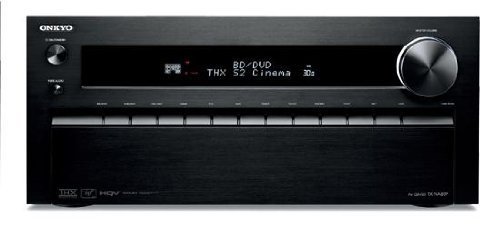
Figi 1: Devan view of the Onkyo TX-NA809 7.1ch AV Receiver. This image displays the main unit, showcasing its black finish and front panel controls.
2. Enfòmasyon sou Sekirite
Pou asire yon operasyon an sekirite epi pou anpeche domaj, swiv prekosyon sa yo:
- Sous pouvwa: Konekte aparèy la sèlman nan yon priz kouran altènatif ki gen vòltaj la.tage espesifye sou panèl la dèyè.
- Vantilasyon: Ensure adequate ventilation. Do not block ventilation openings. Maintain a minimum clearance of 20 cm (8 inches) above the unit and 10 cm (4 inches) on the sides.
- Dlo ak imidite: Pa ekspoze aparèy la anba lapli oswa imidite. Pa mete objè ki plen likid, tankou vaz, sou aparèy la.
- Objè etranje: Pa mete okenn objè etranje nan ouvèti aparèy la.
- Sèvis: Pa eseye fè antretyen aparèy la tèt ou. Konfye tout antretyen bay pèsonèl sèvis kalifye.
- Enpedans oratè: Ensure that the connected speakers have an impedance rating compatible with the receiver.
3. Pake kontni
Verifye ke pake ou a gen atik sa yo:
- Onkyo TX-NA809 AV Receiver
- Kontwòl Remote
- Kòd pouvwa
- Antèn FM andedan kay la
- AM antèn bouk
- Mikwofòn Enstalasyon Oratè
- Manyèl Enstriksyon (dokiman sa a)
- Gid Quick Start
4. Enstalasyon
4.1 Koneksyon fizik
Before making any connections, ensure the receiver and all connected devices are powered off and unplugged from the wall outlet.
- Koneksyon oratè: Connect your 7.1 channel speakers to the corresponding speaker terminals on the rear panel. Ensure correct polarity (+ to + and - to -) for each speaker. The receiver supports a 7.1 channel speaker configuration.
- Koneksyon HDMI:
- Connect your video sources (e.g., Blu-ray player, game console, cable box) to the HDMI IN ports (8 available).
- Connect your TV or projector to one of the HDMI OUT ports (2 available).
- Koneksyon odyo dijital: For devices without HDMI, use optical or coaxial digital audio cables. The receiver has 3 optical and 3 coaxial digital audio inputs.
- Koneksyon USB: Konekte aparèy USB nan pò USB a pou lèktur medya yo.
- Rezo Koneksyon: Connect an Ethernet cable to the LAN port for network features and firmware updates.
- Koneksyon pouvwa: Apre tout lòt koneksyon yo fin fèt, branche kòd kouran an nan reseptè a epi answit nan yon priz miray.
Figure 2: Illustrative rear panel connections of the Onkyo TX-NA809. This image represents the various input and output ports for audio, video, and network connections.
4.2 Inisyal Konfigirasyon
After connecting all components, power on your TV and the TX-NA809 receiver. Follow the on-screen setup wizard to configure basic settings such as speaker calibration, network settings, and input assignments. Use the included speaker setup microphone for automatic speaker calibration (Audyssey MultEQ XT32).
5. Operasyon Enstriksyon
5.1 Operasyon debaz
- Limen/Etenyen: Peze a POUVWA bouton sou panèl la devan oswa kontwòl remote.
- Seleksyon Antre: Sèvi ak la ENTRÈ SELEKSYON buttons on the front panel or remote to choose your desired audio/video source (e.g., BD/DVD, GAME, TV/CD).
- Kontwòl Volim: Ajiste volim nan lè l sèvi avèk la MÈT VOLIM bouton sou panèl devan an oswa VOLIM +/- bouton sou remote la.
- Bèbè: Peze a BÈN bouton sou telekòmand lan pou fèmen odyo a tanporèman.
5.2 Karakteristik avanse
- Kontwòl aplikasyon: The TX-NA809 supports control via a dedicated app for Android and iOS devices. Download the Onkyo Remote App from your device's app store. Ensure your receiver is connected to the same network as your smartphone.
- Mòd son: The receiver supports various surround sound formats including Dolby TrueHD, DTS-HD Master Audio, and THX Select2 Plus. Use the MÒD KOUTE buttons on the remote to cycle through available sound modes.
- Lyen HDMI: Utilize the HDMI Link feature for synchronized power on/off and input switching with compatible HDMI-CEC devices. Refer to your TV and source device manuals for HDMI-CEC setup.
- USB lèktur: Connect a USB storage device to the front USB port to play audio files. Navigate through files using the remote control and on-screen display.
6. Antretyen
Bon antretyen asire lonjevite ak pèfòmans reseptè ou a.
- Netwayaj: Wipe the unit with a soft, dry cloth. Do not use abrasive cloths, waxes, or solvents.
- Vantilasyon: Regularly check that the ventilation openings are not obstructed by dust or other materials.
- Kòd pouvwa: Periodically inspect the power cord for any damage. If damaged, contact qualified service personnel for replacement.
NAN. Depanaj
Si ou rankontre pwoblèm, gade solisyon komen sa yo anvan ou kontakte sipò a.
| Pwoblèm | Kòz posib / Solisyon |
|---|---|
| Pa gen pouvwa | Asire w kòd kouran an byen branche nan priz miray la ak nan reseptè a. Tcheke priz kouran an ak yon lòt aparèy. |
| Pa gen son |
|
| Pa gen videyo |
|
| Remote kontwòl pa travay | Replace batteries. Ensure there are no obstructions between the remote and the receiver's IR sensor. |
8. Espesifikasyon
Key technical specifications for the Onkyo TX-NA809 AV Receiver:
- Modèl: TX-NA809
- Mak: Onkyo
- Chanèl: 7.1ch
- Maksimòm pwodiksyon pouvwa: 230W x 7 chanèl
- Pouvwa pwodiksyon nominal: 145W x 7 chanèl
- Supported Surround Sound: Dolby TrueHD, DTS-HD Master Audio, THX Select2 Plus
- Antre Odyo Dijital: Optical x 3, Coaxial x 3
- Antre HDMI: 8
- Sorti HDMI: 2
- Koneksyon: HDMI, USB, Network (Ethernet)
- Metòd kontwòl: Remote Control, Smartphone App (Android/iOS)
- Aparèy konpatib: Smartphones
- Koulè: Nwa
- Pwa atik: 18.3 kg
- Sipò AAC: Wi
9. Garanti ak sipò
For warranty information, please refer to the separate warranty card included with your product or visit the official Onkyo website. For technical support, troubleshooting assistance beyond this manual, or service inquiries, please contact Onkyo customer support through their official channels.
Onkyo Ofisyèl Websit: www.onkyo.com