
1. Entwodiksyon ak souview
The Pro-User DFC530N is an intelligent microprocessor-controlled battery charger designed for 6V and 12V lead-acid batteries, providing a charging current of up to 5.3 Amperes. This charger is suitable for various battery types including lead-acid, gel, wet cell, MF, VRLA, calcium, and AGM, with capacities ranging from 5 Ah to 120 Ah.
The advanced electronics monitor battery status and apply the appropriate charging current. Once fully charged, the charger switches to a maintenance mode, providing a small current to prevent self-discharge, making it ideal for long-term connection, especially for seasonal vehicles. It features spark protection, short-circuit protection, overheating protection, and reverse polarity protection. The charger comes with both battery clamps and ring terminals with quick-release connectors for versatile connection options. It also includes an acoustic signal and LED warning indicators for operational status.
2. Enstriksyon Sekirite
Tanpri li epi konprann tout enstriksyon sekirite yo anvan ou itilize plato a. Si ou pa swiv enstriksyon sa yo, sa ka lakòz chòk elektrik, dife oswa blesi grav.
- Vantilasyon: Always operate the charger in a well-ventilated area. Batteries can produce explosive gases.
- Pwoteksyon je: Wear appropriate eye protection (safety glasses) when working near batteries.
- Etensèl ak flanm dife: Avoid creating sparks or open flames near the battery or charger.
- Dekonekte pouvwa: Always disconnect the AC power supply from the charger before connecting or disconnecting the battery leads.
- Polarite kòrèk: Ensure correct polarity when connecting to the battery (positive to positive, negative to negative). The charger has reverse polarity protection, but incorrect connection should still be avoided.
- Timoun ak bèt kay: Kenbe chajè a ak batri a lwen timoun ak bèt kay.
- Ekipman ki domaje: Do not operate the charger if it has been dropped, damaged, or if the cables are frayed.
- Itilizasyon andedan kay la: This charger is designed for indoor use. While it has an IP65 rating for water resistance, avoid prolonged exposure to rain or extreme moisture.
3. Pake kontni
Verifye ke tout atik yo prezan nan pakè a:
- Pro-User DFC530N Intelligent Battery Charger Unit
- Batri Clamps (Wouj pou Pozitif, Nwa pou Negatif)
- Ring Terminals with Quick-Release Connector
- AC pouvwa kab

Image displaying the Pro-User DFC530N intelligent battery charger along with its included accessories: battery clamps, ring terminals with quick-release connectors, and the AC power cable.
4. Enstalasyon ak Koneksyon
Follow these steps to connect the charger to your battery:
- Prepare batri a: Asire w ke tèminal batri yo pwòp epi yo pa gen korozyon. Si batri a nan yon machin, asire w ke machin nan etenn.
- Chwazi Metòd Koneksyon an: Choose between the battery clamps for temporary connection or the ring terminals for a more permanent setup. Connect your chosen accessory to the charger's quick-release connector.
- Konekte ak batri a:
- Konekte a WOUJ positive (+) lead from the charger to the pozitif (+) tèminal batri a.
- Konekte a NWA negative (-) lead from the charger to the negatif (-) tèminal batri a.
- Konekte ak kouran AC: Plug the charger's AC power cable into a standard electrical outlet. The charger will automatically begin its charging process.

Image showing the Pro-User DFC530N battery charger connected to a vehicle battery under the hood, illustrating a typical charging setup.
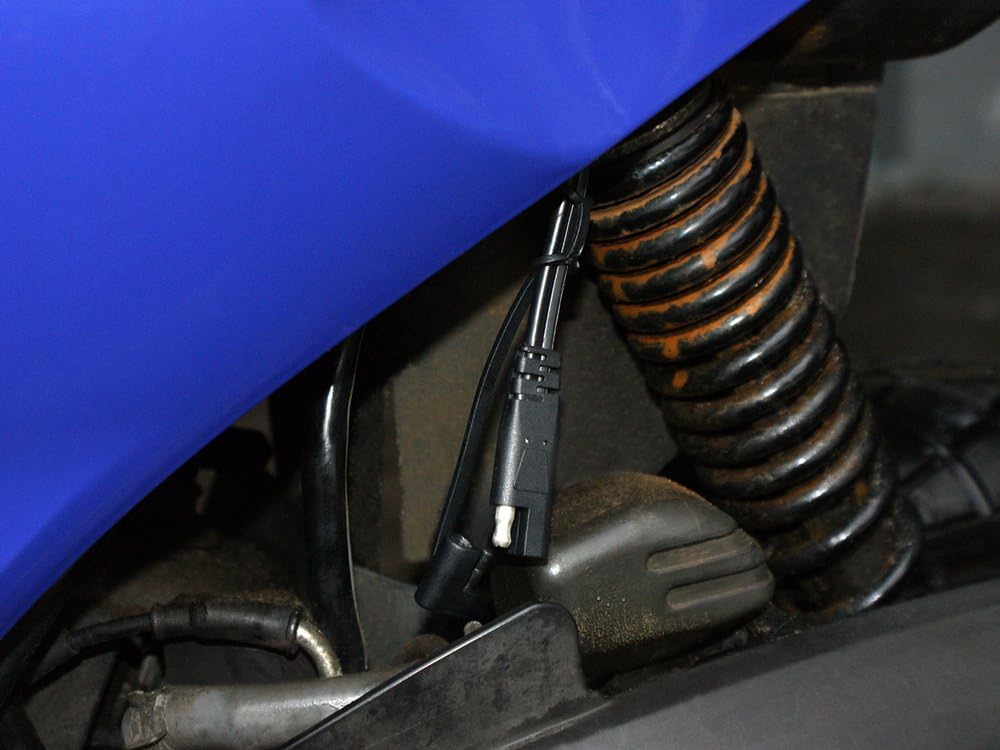
Image demonstrating a permanent connection setup using the ring terminals, secured to a vehicle's battery terminals, with the quick-release connector accessible for charger attachment.
5. Operasyon Enstriksyon
The DFC530N charger operates automatically once connected to the battery and AC power. It features a 4-stage charging process to optimize battery health and longevity.
LED Indicators and Status:

Fèmen view of the Pro-User DFC530N charger's control panel, highlighting the LED indicators for Reverse, Fault, Power, Charging, and Full status, as well as the mode selection buttons.
- Pouvwa ki ap dirije: Illuminates when the charger is connected to AC power.
- CHARGE ki ap dirije: Illuminates when the battery is actively being charged.
- Plen dirije: Illuminates when the battery is fully charged and the charger has switched to maintenance mode.
- FÒT ki ap dirije: Illuminates if an error occurs (e.g., short circuit, overheating). An acoustic signal may also sound.
- REVERSE LED: Illuminates if the battery leads are connected with incorrect polarity. An acoustic signal may also sound.
Pwosesis chaje:
- The charger automatically detects the battery voltage (6V oswa 12V).
- It then proceeds through a multi-stage charging cycle, including desulfation (if needed), bulk charge, absorption, and float/maintenance charge.
- The CHARGING LED will be lit during active charging.
- Once the battery reaches full capacity, the FULL LED will illuminate, and the charger will enter a maintenance mode to prevent overcharging and self-discharge. The charger can remain connected indefinitely in this mode.
6. Antretyen
Bon antretyen asire lonjevite ak fonksyònman an sekirite nan plato ou a:
- Netwayaj: Disconnect the charger from AC power and the battery before cleaning. Wipe the casing ak yon sèk oswa yon ti kras damp twal. Pa sèvi ak solvang oswa pwodui netwayaj abrazif.
- Enspeksyon kab: Regularly inspect the AC power cable and battery leads for any signs of damage, cuts, or fraying. Replace if damaged.
- Depo: Store the charger in a cool, dry place when not in use. Keep the cables neatly coiled.
- Tèminal batri yo: Ensure battery terminals are clean and free of corrosion for optimal charging.
NAN. Depanaj
If you encounter issues with your Pro-User DFC530N charger, refer to the following common problems and solutions:
| Pwoblèm | Kòz posib | Solisyon |
|---|---|---|
| Charger not turning on (no LEDs lit) | No AC power; Faulty outlet; Damaged charger. | Check AC power connection and outlet. Try a different outlet. Inspect charger for damage. |
| FAULT LED is lit / Acoustic signal | Short circuit; Overheating; Internal fault. | Disconnect immediately. Check for short circuits in cables or battery. Allow charger to cool down. If problem persists, contact support. |
| REVERSE LED is lit / Acoustic signal | Koneksyon polarite batri a ki pa kòrèk. | Disconnect AC power. Reconnect battery leads ensuring RED to positive (+) and BLACK to negative (-). |
| Battery not charging (CHARGING LED not lit) | Poor connection; Battery too deeply discharged; Battery fault. | Check all connections for tightness and cleanliness. The charger may not initiate charging if the battery voltage is extremely low. Test battery condition. |
8. Espesifikasyon
Detailed technical specifications for the Pro-User DFC530N Intelligent Battery Charger:
- Modèl: DFC530N
- Nimewo Pati: 16605
- Antre Voltage: 220-240V AC, 50/60Hz (typical for EU market)
- Sòti Voltage: 6V DC / 12V DC (Automatic Detection)
- Chaje aktyèl: Jiska 5.3 Amperes DC
- Kalite batri: All lead-acid batteries (Lead-Acid, Gel, Wet Cell, MF, VRLA, Calcium, AGM)
- Kapasite batri: 5 Ah - 120 Ah
- Kontwòl: Digital control with built-in 12-bit AD processor
- Chaje Stages: 4-stage charging characteristics with automatic maintenance mode
- Karakteristik pwoteksyon: Spark protection, short-circuit protection, overheating protection, reverse polarity protection
- Endikatè: LED status indicators (Power, Charging, Full, Fault, Reverse), Acoustic signal
- Evalyasyon patiraj: IP65 (Waterproof housing)
- Dimansyon (L x W x H): Apeprè 164 x 75 x 43 mm
- Pwa: Apeprè 0.620 kg
- Sètifikasyon: TÜV/GS tested
9. Garanti ak sipò
For warranty information, technical support, or service inquiries, please refer to the warranty card included with your product or contact your retailer or the manufacturer directly. Keep your proof of purchase for warranty claims.