
Entwodiksyon
The Scosche FMT4R FM Transmitter allows you to play audio from your portable music device through your vehicle's FM radio. This device is designed for ease of use, offering 20 selectable frequencies to ensure clear audio transmission. Its compact design and simple operation make it an ideal solution for enjoying your personal music library on the go.
Ki sa ki nan bwat la
Upon opening your Scosche FMT4R package, you should find the following components:
- Scosche FMT4R FM Transmitter unit
- Integrated 3.5mm auxiliary audio cable
- Manyèl Itilizatè (dokiman sa a)

Image: The Scosche FMT4R FM Transmitter, a compact black device with frequency display and an integrated auxiliary cable.
Video: This video demonstrates the contents of the Scosche FMT4R package and provides a visual guide to its features and initial setup steps.
Enstalasyon
- Alimente aparèy la: The FMT4R requires two AAA batteries (not included). Open the battery compartment on the back of the unit and insert the batteries, ensuring correct polarity.
- Connecting to Your Audio Device: Plug the integrated 3.5mm auxiliary cable from the FMT4R into the headphone jack of your portable music device (e.g., smartphone, MP3 player). If your device does not have a 3.5mm jack, an appropriate adapter (e.g., Lightning to 3.5mm for iPhones) will be required (not included).
- Limen: Locate the ON/OFF switch on the side of the FMT4R unit and slide it to the "ON" position. The frequency display will illuminate.
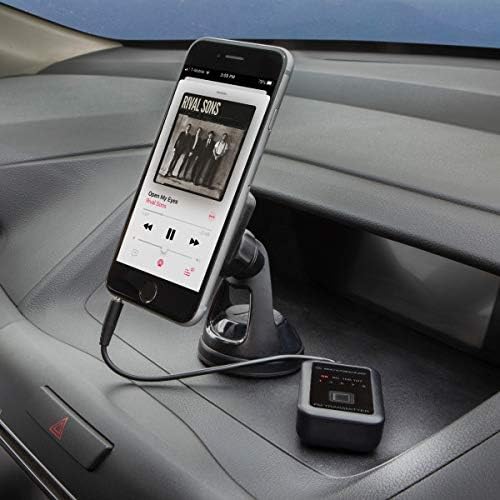
Image: The Scosche FMT4R FM Transmitter connected to a smartphone via its auxiliary cable, positioned in a car's interior.
Enstriksyon Operasyon
- Select a Frequency on the Transmitter: The FMT4R offers 20 transmitting frequencies. Use the frequency selection buttons on the unit to choose an available FM frequency. Look for a frequency that is not currently in use by a local radio station to minimize interference. The selected frequency will be displayed on the unit.
- Konekte radyo machin ou an: Turn on your car's FM radio and tune it to the exact same frequency you selected on the FMT4R.
- Jwe odyo: Start playing music or audio on your connected portable device. The audio will now transmit wirelessly to your car's FM radio.
- Ajiste Volim: Adjust the volume on your portable device and your car radio to achieve the desired listening level.
- Optimize siyal la: If you experience static or poor audio quality, try selecting a different frequency on the FMT4R and tuning your car radio to match.
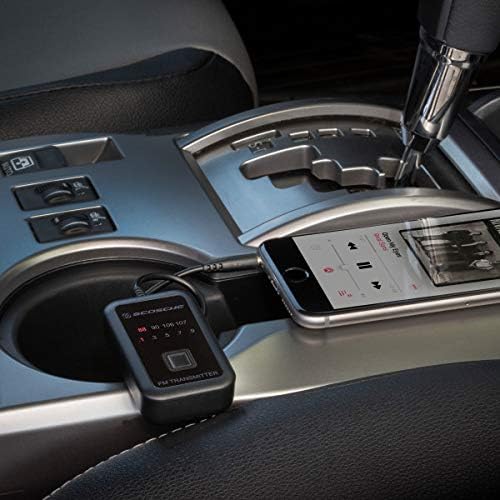
Image: The Scosche FMT4R FM Transmitter placed in a car's center console, connected to a smartphone, demonstrating its use in a vehicle environment.
Antretyen
To ensure the longevity and optimal performance of your Scosche FMT4R FM Transmitter, follow these simple maintenance guidelines:
- Kenbe aparèy la pwòp lè w siye l avèk yon twal mou epi sèk. Evite itilize pwodui chimik ki agresif oswa pwodui netwayaj abrazif.
- Store the transmitter in a cool, dry place when not in use.
- Retire pil yo si ou pa pral itilize aparèy la pou yon peryòd tan pwolonje pou anpeche flit.
- Handle the auxiliary cable gently to prevent damage to the connector or wiring.
Depanaj
If you encounter issues with your FMT4R, refer to the following common troubleshooting steps:
- No Audio/Static:
- Ensure the FMT4R is turned ON and has fresh batteries.
- Verify that the auxiliary cable is securely plugged into both the transmitter and your audio device.
- Confirm that your car radio is tuned to the exact same frequency as the FMT4R.
- Try selecting a different frequency on the FMT4R. Some frequencies may have more interference in certain areas.
- Increase the volume on both your audio device and your car radio.
- Kalite odyo pòv:
- Change the transmitting frequency on the FMT4R to find a clearer channel.
- Ensure your audio device's volume is not set too high, which can cause distortion.
- Check for strong local FM radio stations that might be interfering with your selected frequency.
- Aparèy pa limen:
- Check if the batteries are inserted correctly and are not depleted. Replace with new AAA batteries if necessary.
- Ensure the ON/OFF switch is fully in the "ON" position.
Espesifikasyon
| Karakteristik | Detay |
|---|---|
| Mak | Scosche |
| Modèl | FMT4R |
| Karakteristik espesyal | Otomatik On/Off |
| Koneksyon Teknoloji | Oksilyè (priz 3.5mm) |
| Sous pouvwa | Battery Powered (Requires 2x AAA batteries) |
| Materyèl | Polikarbonat/Polyuretan tèrmoplastik |
| Frequency Selections | 20 |
Garanti ak sipò
For warranty information or technical support, please refer to the official Scosche websit la oubyen kontakte sèvis kliyan yo dirèkteman. Kenbe resi acha w la kòm prèv acha pou nenpòt reklamasyon garanti.
Official Scosche Websit: www.scosche.com