
Edifier M1360
Edifier M1360 Wired Multimedia Speaker System User Manual
Modèl: M1360
1. Entwodiksyon
Mèsi pou acha aasing the Edifier M1360 Wired Multimedia Speaker System. This 2.1 speaker system is designed to provide a convenient and high-quality audio solution for various multimedia applications, including computers, laptops, gaming consoles, and MP3 players. Featuring upward-angled satellites and a downward-angled subwoofer, the system delivers clear sound with steady bass output. The wired remote control offers easy volume adjustment and includes a headphone jack for private listening.
2. Enfòmasyon enpòtan sou sekirite
- Li enstriksyon sa yo byen anvan ou itilize pwodwi a.
- Kenbe manyèl sa a pou referans nan lavni.
- Pa ekspoze aparèy la anba lapli oswa imidite pou evite dife oswa chòk elektrik.
- Pa bloke okenn ouvèti vantilasyon. Enstale li dapre enstriksyon manifakti a.
- Pa enstale tou pre okenn sous chalè tankou radyatè, rejis chalè, recho, oswa lòt aparèy (tankou amplifiers) ki pwodui chalè.
- Pwoteje kòd elektrik la pou yo pa mache oswa kwense, sitou nan priz, resipyan konvenyans, ak pwen kote yo sòti nan aparèy la.
- Itilize sèlman atachman/akseswa manifakti a espesifye.
- Deploge aparèy sa a pandan tanpèt zèklè oswa lè li pa itilize pou yon peryòd tan ki long.
- Refere tout sèvis yo bay pèsonèl sèvis kalifye. Reparasyon nesesè lè aparèy la domaje nenpòt fason, tankou kòd kouran oswa ploge domaje, likid koule oswa objè tonbe nan aparèy la, aparèy la te ekspoze a lapli oswa imidite, li pa fonksyone nòmalman. , oswa li te tonbe.
3. Pake kontni
Tanpri verifye sa ki nan pakè w la. Si gen nenpòt atik ki manke oswa ki domaje, kontakte machann ou an.
- 1x Edifier M1360 Subwoofer
- 2x Oratè Satelit
- 1x Wired Remote Control
- 1x 3.5mm Audio Input Cable
- 1x Manyèl Itilizatè (dokiman sa a)
4. Pwodwi souview
4.1 Eleman Sistèm
- Subwoofers: Houses the main amplifier and bass driver. Connects to the satellite speakers and the audio source.
- Oratè satelit: Two compact speakers for mid-range and high-frequency audio.
- Kontwòl remote filaire: Features a volume dial, power switch, and headphone output.
4.2 Idantifikasyon konpozan

Figi 1: Devan view of the Edifier M1360 speaker system, showing the central subwoofer, two angled satellite speakers, and the wired remote control unit.
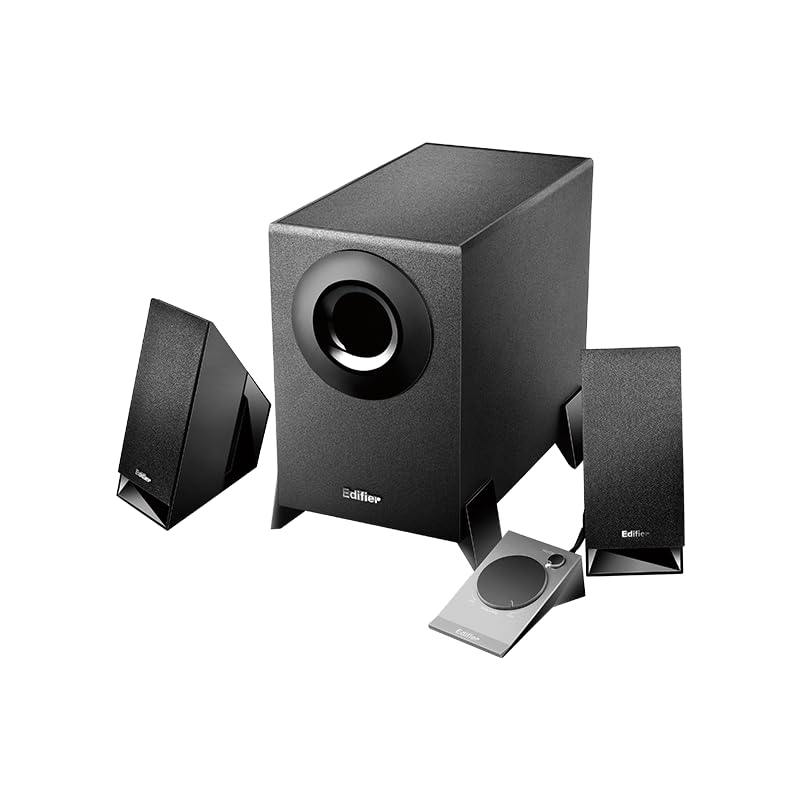
Figure 2: Another perspective of the Edifier M1360 speaker system, highlighting the compact design of the satellite speakers and the wired remote's placement.
5. Enstalasyon
5.1 Plasman
- Place the subwoofer on the floor or a sturdy surface near your computer or audio source.
- Position the satellite speakers on either side of your monitor or listening area, ensuring they are angled towards you for optimal sound.
- Ensure adequate ventilation around all components.
5.2 Koneksyon
- Connect the satellite speakers to the corresponding output jacks on the back of the subwoofer. Ensure the left and right speakers are connected correctly.
- Connect the wired remote control cable to the dedicated port on the subwoofer.
- Connect the 3.5mm audio input cable from the "AUDIO IN" port on the subwoofer to the audio output (headphone jack) of your computer, laptop, MP3 player, or other audio source.
- Plug the power cord of the subwoofer into a standard AC power outlet.
6. Operasyon Enstriksyon
6.1 Power On/Off
- To turn on the speaker system, press the power button located on the wired remote control. The power indicator light will illuminate.
- To turn off the speaker system, press the power button again. The power indicator light will turn off.
6.2 Kontwòl Volim
- Rotate the large dial on the wired remote control clockwise to increase the volume.
- Rotate the large dial counter-clockwise to decrease the volume.
6.3 Sòti ekoutè
- To listen privately, plug your headphones into the 3.5mm headphone jack on the wired remote control.
- When headphones are connected, the speaker output will automatically mute.
- Unplug the headphones to resume audio playback through the speakers.
7. Antretyen ak Swen
- Netwayaj: Use a soft, dry cloth to clean the surfaces of the speakers and subwoofer. Do not use liquid cleaners or aerosol sprays.
- Vantilasyon: Ensure that the ventilation openings on the subwoofer are not blocked. Proper airflow prevents overheating.
- Depo: Si w ap sere sistèm nan pou yon peryòd tan pwolonje, dekonekte l nan kouran an epi sere l nan yon kote ki fre epi sèk, lwen limyè solèy dirèk ak tanperati ekstrèm.
- Evite imidite: Keep the speaker system away from water, humidity, and other liquids.
NAN. Depanaj
| Pwoblèm | Kòz posib | Solisyon |
|---|---|---|
| Pa gen son |
|
|
| Son defòme |
|
|
| Yon oratè pa travay |
|
|
9. Espesifikasyon
| Karakteristik | Detay |
|---|---|
| Non modèl | M1360 |
| Kalite Oratè | Miltimedya |
| Konfigirasyon chanèl son antoure | 2.1 |
| Koneksyon Teknoloji | Wired (3.5mm stereo input) |
| Audio Sòti Mode | Stereo |
| Oratè maksimòm pwodiksyon pouvwa | 8.5 Watts |
| Subwoofer Dyamèt | 5 pous |
| Dyamèt tweeter | 1 pous |
| Siyal-a-bwi Pwopòsyon | 85 dB |
| Repons Frekans | 20 KHz (Note: This is likely the upper limit, not the full range. Common for speakers to list only max freq.) |
| Aparèy konpatib | Smartphone, Laptop, Desktop, Gaming Console, MP3 Player |
| Dimansyon pwodwi | 6.4P x 11.2W x 14H santimèt |
| Pwa atik | 2.5 kg (2500 gram) |
| Sous pouvwa | AC |
| Koulè | Nwa |
| Peyi orijin | Lachin |
10. Garanti ak sipò
For detailed warranty information and customer support, please refer to the warranty card included with your product packaging or visit the official Edifier websit.
Manufacturer: Edifier
Importer: Nikita Distributors - Green Terrace Building, Lane Number 5, South Koregaon Park, Pune 411001, MH, India
Ask a question about this manual
Ask about setup, troubleshooting, compatibility, parts, safety, or missing instructions. Manuals+ will review the question and use this page’s manual context to help answer it.