
Oster CKSTBR9050
Oster Expressbake Bread Maker Instruction Manual
Model: CKSTBR9050-NP | Brand: Oster
Entwodiksyon
Welcome to the world of homemade bread with your new Oster Expressbake Bread Maker. This appliance is designed to simplify the bread-making process, offering a variety of settings for different bread types, doughs, and even jams. Enjoy fresh, delicious bread with minimal effort.
Pwodwi souview ak Karakteristik kle yo
The Oster Expressbake Bread Maker (CKSTBR9050-NP) is a versatile kitchen appliance designed for ease of use and consistent results. It features a compact design and intuitive controls.
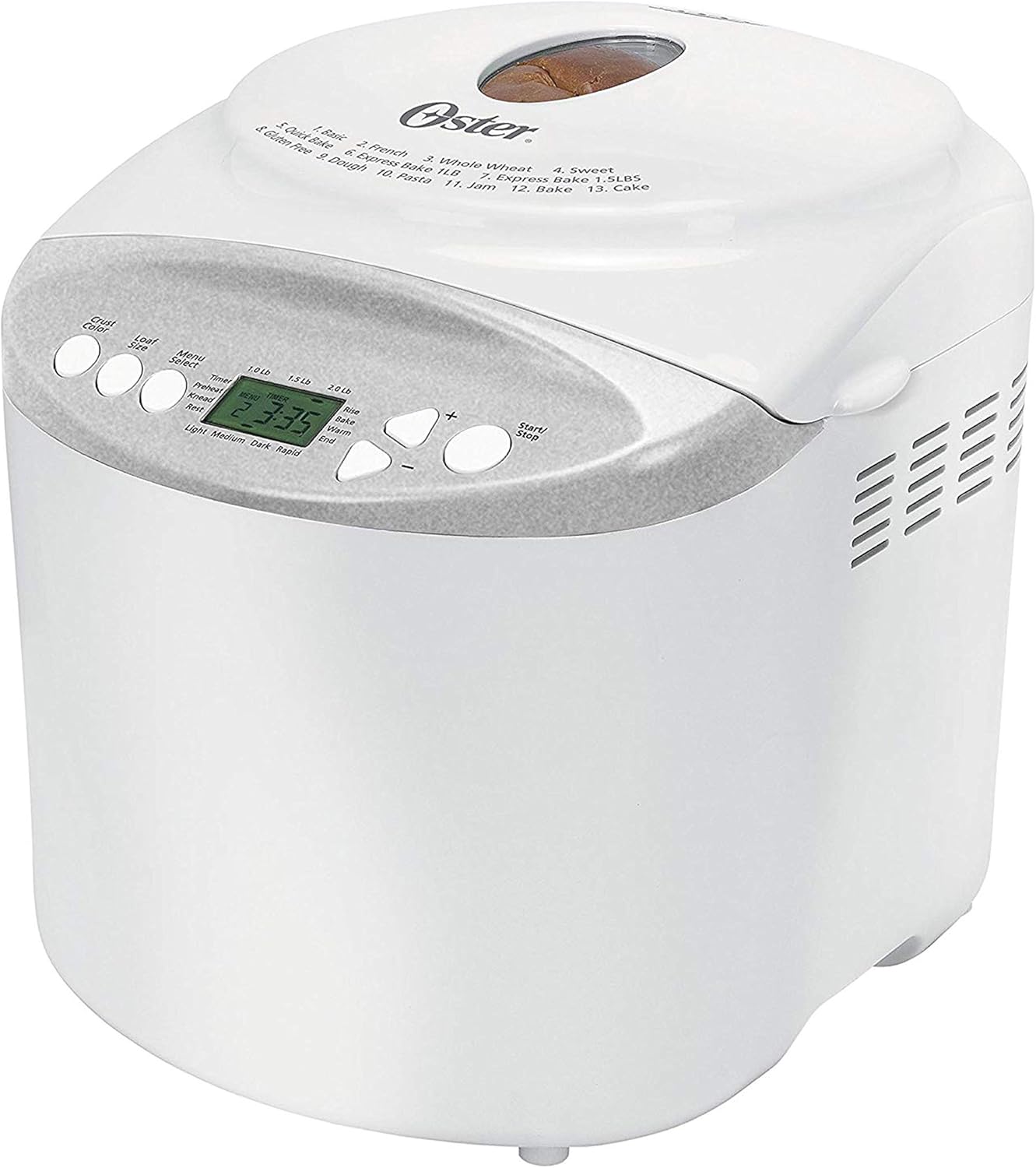
Devan view of the Oster Expressbake Bread Maker, showing the control panel and viewfenèt ing.

Entèn view highlighting the removable lid, nonstick aluminum pan, and easy-to-read LCD display.
Karakteristik kle:
- 2-Pound Loaf Capacity: Ideal for families, allowing for larger bread batches.
- 13 Anviwònman: Offers a wide range of options for various breads, doughs, and jams.
- Gluten-Free Setting: Dedicated program for preparing gluten-free bread.
- Express Bake Setting: Bakes bread in under an hour for quick results.
- Crust Color Selection: Choose from light, medium, or dark crusts.
- Minitè pwogramasyon 13 èdtan: Allows for delayed baking, so you can wake up to fresh bread.
- Pwodwi pou Telefòn pratik: Includes a measuring cup and spoon.
Product Features Video: A Closer Look
Videyo sa a bay yon vizyon detaye souview of the Oster Expressbake Bread Maker, showcasing its various components and features, including the bread pan, kneading paddle, and control panel. It highlights the ease of use and the different settings available.
Gid Enstalasyon
- Debake: Carefully remove all packaging materials from the bread maker and its accessories.
- Netwayaj: Before first use, wash the bread pan and kneading paddle with warm, soapy water. Wipe the exterior of the unit with a damp twal. Asire w tout pyès yo byen sèk anvan ou monte yo.
- Plasman: Place the bread maker on a stable, flat, heat-resistant surface, away from direct sunlight and heat sources. Ensure adequate ventilation around the unit.
- Install Bread Pan: Insert the kneading paddle onto the shaft inside the bread pan. Place the bread pan into the bread maker, ensuring it clicks securely into place.
- Koneksyon pouvwa: Ploge kòd elektrik la nan yon priz elektrik ki gen tè.

The included measuring cup and spoon are essential for accurate ingredient measurement.

The control panel displays the 13 available settings for various bread types and functions.
Enstriksyon Operasyon
Swiv etap sa yo pou w reyisi kwit pen:
- Ajoute engredyan: Always add liquid ingredients first, followed by dry ingredients. Create a small well in the dry ingredients for the yeast, ensuring it does not come into direct contact with liquids or salt initially.
- Chwazi pwogram: Press the "Menu Select" button to choose from the 13 available settings (e.g., Basic, French, Whole Wheat, Sweet, Gluten-Free, Express Bake, Dough, Jam, Cake).
- Choose Loaf Size: Press the "Loaf Size" button to select your desired loaf size (1.0 lb, 1.5 lb, or 2.0 lb).
- Chwazi koulè kwout la: Press the "Crust Color" button to choose your preferred crust shade (Light, Medium, or Dark).
- Kòmanse kwit: Press the "Start/Stop" button to begin the baking cycle. The machine will automatically knead, rise, and bake the bread.
- Delayed Baking (Optional): To use the 13-hour programmable timer, add ingredients, then set the desired delay time before pressing "Start/Stop".
Konsèy enpòtan pou pi bon rezilta:
- Ensure all ingredients are at room temperature unless otherwise specified in the recipe.
- Measure ingredients precisely. Use the provided measuring cup and spoon for accuracy.
- During the kneading cycle, use a rubber spatula to scrape down any flour from the sides of the pan to ensure all ingredients are incorporated.
- Avoid opening the lid during the baking cycle, especially during the rising phase, as this can affect the bread's texture.
Antretyen ak netwayaj
Proper maintenance ensures the longevity and optimal performance of your bread maker.
- Apre chak itilizasyon: Unplug the bread maker and allow it to cool completely before cleaning.
- Moulen pen ak palèt petrir: Remove the bread pan and kneading paddle. Wash them with warm, soapy water. Do not use abrasive cleaners or scouring pads, as this can damage the nonstick coating. Rinse thoroughly and dry completely.
- Eksteryè: Siye deyò machin pen an ak yon twal mou.amp twal. Pa plonje aparèy la nan dlo oswa nan okenn lòt likid.
- Kouvèti: The inner lid is detachable for easy cleaning. Wipe it down with a damp twal.
- Depo: Store the bread maker in a dry, cool place when not in use.
Depanaj
If you encounter issues with your bread maker, refer to the common problems and solutions below:
| Pwoblèm | Kòz posib | Solisyon |
|---|---|---|
| Bread is too dense or flat | Too much liquid, old yeast, or incorrect ingredient order. | Reduce liquid slightly. Ensure yeast is fresh. Always add liquids first, then dry ingredients, with yeast last in a well. |
| Bread did not rise | Inactive yeast, water too hot/cold, or too much salt/sugar. | Check yeast expiration. Use water between 77°-85°F. Measure salt and sugar accurately. |
| Palèt petrir kole nan pen | Ensidan komen. | Allow bread to cool. Use the provided metal hook to carefully remove the paddle. |
| Machin pa kòmanse | Not plugged in, lid not closed, or incorrect program selection. | Ensure power cord is securely plugged in. Close the lid firmly. Verify program settings. |
Espesifikasyon pwodwi
- Nimewo Modèl: CKSTBR9050
- Koulè: Blan
- Kapasite pen: Jiska 2 liv
- Kantite pwogram: 13
- Dimansyon pwodwi: 12.1"D x 13.5"W x 13.2"H
- Pwa atik: 8 liv
- Manifakti: Oster
- UPC: 750343688389, 034264440203
- Premye dat disponib: 17 janvye 2011

Detailed dimensions of the Oster Expressbake Bread Maker.
Garanti ak sipò
For detailed warranty information and customer support, please refer to the official user guide provided with your product or visit the Oster website. A digital version of the user guide is often available for download.
Pou plis asistans, ou ka al gade tou nan Gid itilizatè (PDF).
Ask a question about this manual
Ask about setup, troubleshooting, compatibility, parts, safety, or missing instructions. Manuals+ will review the question and use this page’s manual context to help answer it.