
1. Entwodiksyon
This manual provides detailed instructions for the installation, operation, and maintenance of your Rosewill R101-P-BK-450W MicroATX Mid Tower Computer Case. Please read this manual thoroughly before beginning installation to ensure proper setup and safe operation. Keep this manual for future reference.
Enfòmasyon sou Sekirite
- Always disconnect the power supply from the wall outlet before performing any installation or maintenance inside the computer case.
- Manyen tout konpozan yo avèk prekosyon pou evite domaj akòz elektrisite estatik. Konsidere itilize yon braslè ponyèt anti-estatik.
- Ensure all cables are properly routed and secured to avoid interference with cooling fans or other moving parts.
- Do not block ventilation openings on the case. Proper airflow is crucial for component longevity.
2. Pake kontni
Verify that all items listed below are present in your package. If any items are missing or damaged, please contact Rosewill customer support.

Imaj 2.1: Contents of the Rosewill R101-P-BK-450W package, including the computer case, power cable, and various installation screws and accessories.
- Rosewill R101-P-BK-450W MicroATX Mid Tower Computer Case with integrated 450W Power Supply
- Pouvwa kab
- Accessory Kit (screws, standoffs, cable ties)
- Manyèl Itilizatè (dokiman sa a)
3. Enstalasyon ak Enstalasyon
3.1 Louvri ka a
To access the interior of the case for component installation, remove the side panel. Typically, this involves unscrewing two thumbscrews at the rear of the case and sliding the panel backward.

Imaj 3.1: Enteryè view of the case with the side panel open, revealing the internal structure, drive bays, and pre-installed power supply.
3.2 Enstalasyon mèr
The Rosewill R101-P-BK-450W supports Micro ATX motherboards. Install the necessary standoffs onto the motherboard tray according to your motherboard's mounting holes. Carefully place your motherboard onto the standoffs and secure it with screws.
3.3 Enstalasyon kondwi
The case offers three 5.25" external drive bays and six 3.5" drive bays (two external and four internal).
- 5.25" External Drives (e.g., Optical Drives): Remove the front bezel cover for the desired bay. Slide the drive into the bay from the front and secure it with screws from the side.
- 3.5" External Drives (e.g., Card Readers): Similar to 5.25" drives, remove the appropriate front bezel cover, slide the drive in, and secure.
- 3.5" Internal Drives (e.g., Hard Disk Drives): Slide the hard drive into an available 3.5" internal bay and secure it with screws on both sides.

Imaj 3.2: A closer look at the internal drive bays and the pre-routed power supply cables, illustrating the available space for component installation.
3.4 Koneksyon Alimantasyon
The case comes with a pre-installed 450W power supply. Connect the appropriate power cables to your motherboard (24-pin ATX, 4/8-pin CPU), graphics card, and all installed drives (SATA power, Molex). Ensure all connections are firm and secure.
3.5 Koneksyon Panèl Antre/Sòti Devan an
Connect the front panel cables to the corresponding headers on your motherboard. These include:
- USB 2.0: Connect the USB 2.0 header cable to your motherboard's USB 2.0 header. The case provides two USB 2.0 ports.
- Odyo: Connect the HD Audio or AC'97 cable to your motherboard's audio header for the front headphone and microphone jacks.
- Pouvwa/Reyajiste/LED: Connect the power switch, reset switch, power LED, and HDD activity LED cables to their respective pins on the motherboard's front panel header. Refer to your motherboard manual for exact pin assignments.

Imaj 3.3: The front panel of the case, detailing the accessible power button, reset button, two USB 2.0 ports, and audio input/output jacks.
3.6 Sistèm refwadisman
The Rosewill R101-P-BK-450W includes one 120mm exhaust fan pre-installed at the rear. The case also features a CPU air duct and video card vents to facilitate efficient ventilation and effective system cooling. Ensure these vents are not obstructed.
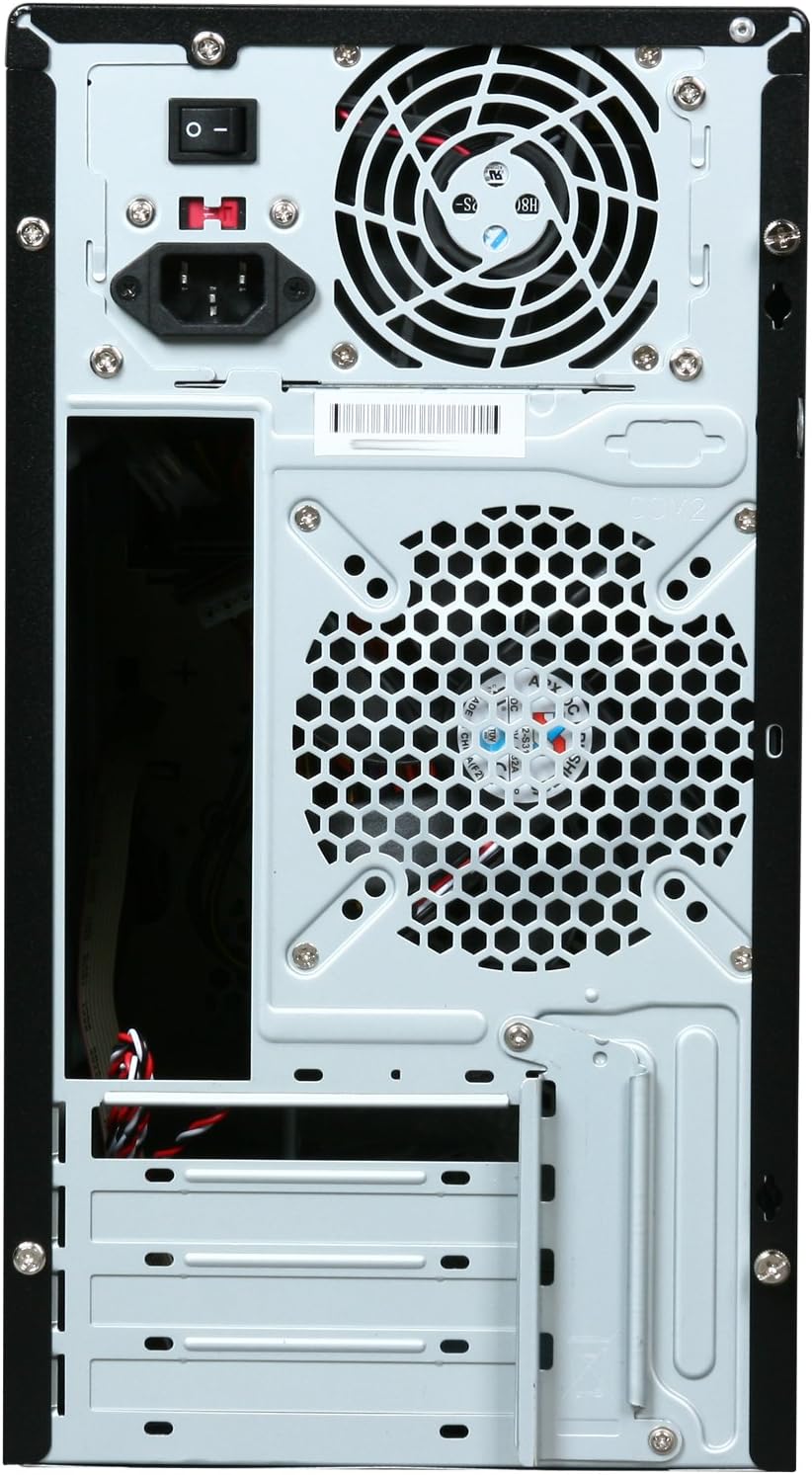
Imaj 3.4: The rear of the case, highlighting the pre-installed 120mm exhaust fan and the power supply unit.
4. Operasyon Enstriksyon
4.1 Limen/Etenyen
- Pou limen: After all components are installed and cables connected, plug the power cable into the power supply and a wall outlet. Press the power button located on the front panel of the case.
- Pou etenn: Use the operating system's shutdown procedure. In case of an unresponsive system, press and hold the power button for several seconds to force a shutdown.
5. Antretyen
5.1 Netwayaj
- Netwaye deyò bwat la regilyèman avèk yon twal mou, damp twal. Evite pwodwi chimik piman bouk yo.
- Periodically open the case and use compressed air to remove dust buildup from internal components, especially fans and heatsinks. Ensure the system is powered off and unplugged before cleaning the interior.
- Clean the fan vents on the side and rear panels to maintain optimal airflow.
NAN. Depanaj
If you encounter issues with your computer system, consider the following common troubleshooting steps:
- Pa gen pouvwa: Ensure the power cable is securely connected to both the power supply and the wall outlet. Check the power switch on the back of the power supply (if present) is in the 'On' position. Verify front panel power switch connections to the motherboard.
- Pa gen ekspozisyon: Confirm that your monitor is connected to the correct video output on your graphics card or motherboard and that the monitor is powered on. Reseat your graphics card and RAM modules.
- Surchof: Ensure all case fans and CPU cooler fans are spinning. Check for dust buildup obstructing airflow. Verify proper thermal paste application on the CPU.
- Bwi ki pa nòmal: Identify the source of the noise. Loose cables, vibrating components, or failing fans can cause unusual sounds.
For more complex issues, consult your motherboard and component manuals or seek assistance from a qualified technician.
7. Espesifikasyon
Below are the technical specifications for the Rosewill R101-P-BK-450W MicroATX Mid Tower Computer Case:
| Karakteristik | Spesifikasyon |
|---|---|
| Nimewo Modèl | R101-P-BK-450W |
| Kalite Ka | MicroATX Mid Tower |
| Mèr konpatibilite | Mikwo ATX |
| External 5.25" Drive Bays | 3 |
| External 3.5" Drive Bays | 2 |
| Bò pou kondwi entèn 3.5" | 4 |
| Front I / O pò | 2 x USB 2.0, Antre/Sòti Odyo |
| Enkli Power Supply | 450W |
| Metòd refwadisman | Air |
| Fanatik enkli | 1 x 120mm Rear Exhaust Fan |
| Dimansyon pwodwi (L x W x H) | 49.53 x 40.01 x 24.13 cm (19.5 x 15.75 x 9.5 pous) |
| Pwa pwodwi | 6.35 kg (14 liv) |
| UPC | 898745013726 |
8. Garanti ak sipò
For warranty information, technical support, or to inquire about replacement parts, please visit the official Rosewill websit la oubyen kontakte depatman sèvis kliyan yo. Kenbe resi acha w la kòm prèv acha.
Rosewill Official Websit: www.rosewill.com