
Entwodiksyon
This manual provides comprehensive instructions for the safe and efficient use of your BlackBerry HS-300 Wireless Bluetooth Headset. Please read this manual thoroughly before operating the device and retain it for future reference. The BlackBerry HS-300 is designed for hands-free communication with compatible Bluetooth-enabled devices.
Kontni pake
Verifye ke pake ou a gen atik sa yo:
- BlackBerry HS-300 Wireless Bluetooth Headset
- Ear hook (optional, for secure fit)
- Ear gels/tips (various sizes for comfort)
- Chaje kab
- Manyèl Itilizatè (dokiman sa a)
Aparèy souview
Familiarize yourself with the components of your BlackBerry HS-300 headset.
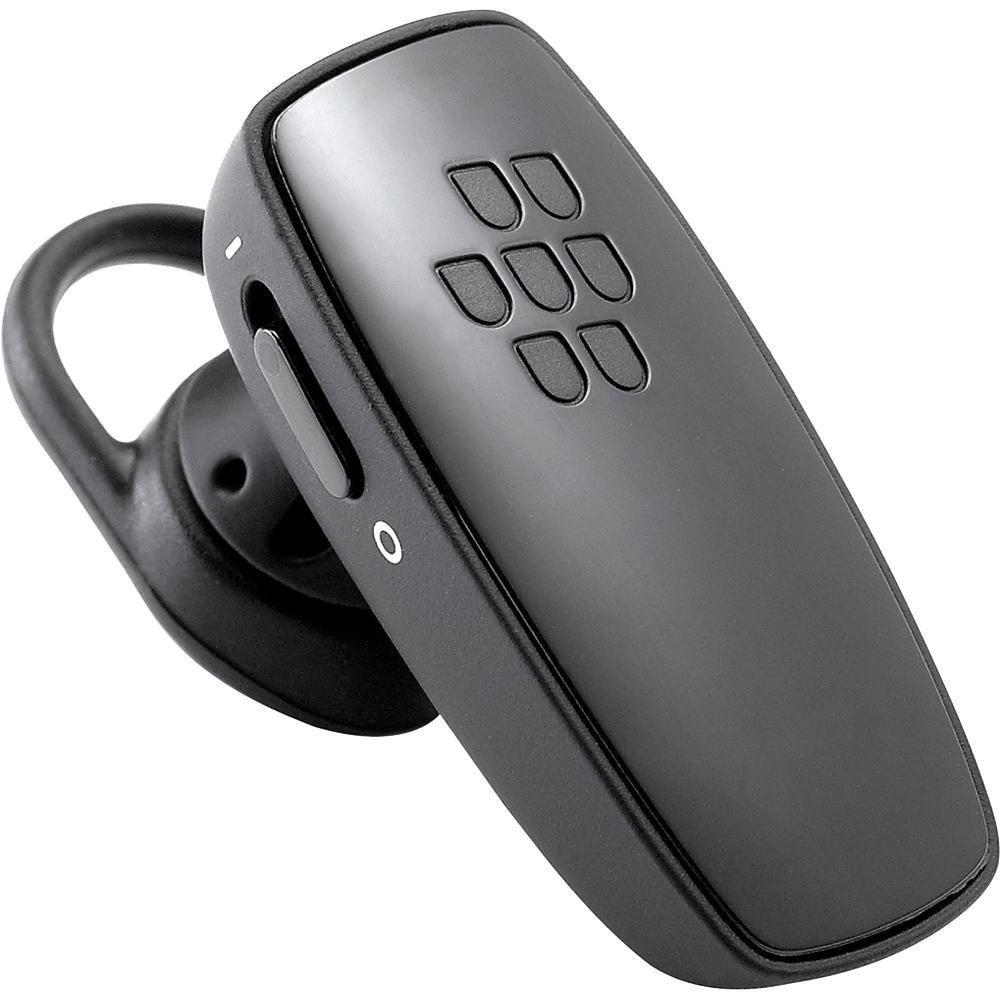
Imaj 1: Devan view of the BlackBerry HS-300 Wireless Bluetooth Headset. The image displays the main body of the headset, featuring the BlackBerry logo (seven-dot pattern) on the front surface. A slender button, likely for volume control or multi-function, is visible on the side. An ear hook is attached, designed to secure the headset over the ear. A small indicator light is also present near the button.
- Bouton milti-fonksyon: Used for answering/ending calls, voice commands, and pairing.
- Bouton kontwòl volim: Adjusts call and media volume.
- Limyè endikatè ki ap dirije: Displays status (power, pairing, charging).
- Mikwofòn: Captures your voice during calls.
- Pouvwa switch: Limen oswa etenn kask la.
- Pò chaje: Connects to the charging cable.
Enstalasyon
1. Chaje Headset la
Before initial use, fully charge your headset. The HS-300 features rapid charge capabilities.
- Connect the charging cable to the headset's charging port and to a compatible USB power source.
- The LED indicator will show the charging status (e.g., solid red for charging, solid blue for fully charged).
- A full charge provides up to 4 hours of talk time.
2. Pairing ak yon Aparèy Bluetooth
To use your headset, it must be paired with a Bluetooth-enabled phone or device.
- Asire kaskèt la etenn.
- Press and hold the Multi-function Button until the LED indicator flashes blue and red alternately. This indicates pairing mode.
- On your phone, enable Bluetooth and search for new devices.
- Select "BlackBerry HS-300" from the list of available devices.
- Si yo mande w yon kòd sekrè, antre "0000" (kat zewo).
- Once paired, the LED indicator will flash blue periodically.
Enstriksyon Operasyon
Power On/Off
- Pou limen: Slide the Power Switch to the 'On' position. The LED indicator will flash blue.
- Pou etenn: Slide the Power Switch to the 'Off' position. The LED indicator will turn off.
Fè ak Resevwa Apèl
- Reponn yon apèl: Peze bouton milti-fonksyon an yon fwa.
- Fini yon apèl: Peze bouton milti-fonksyon an yon fwa pandan yon apèl.
- Rejte yon apèl: Peze epi kenbe bouton milti-fonksyon an pou apeprè 2 segonn.
- Fè yon apèl: Konpoze nimewo a sou telefòn ou. Apèl la ap transfere otomatikman nan kas ekoutè a si li konekte.
- Voice Dialing (if supported by phone): Press the Multi-function Button once when not on a call.
Kontwòl Volim
- Use the Volume Control Buttons on the headset to adjust the call or media volume.
Antretyen
- Netwaye kas ekoutè a regilyèman avèk yon twal mou epi sèk.
- Avoid exposing the headset to extreme temperatures, moisture, or corrosive substances.
- Sere kas ekoutè a nan yon kote ki fre epi sèk lè w pa ap itilize li.
- Pa eseye demonte oswa modifye kas ekoutè a, paske sa ap anile garanti a epi li ka domaje li.
Depanaj
| Pwoblèm | Solisyon |
|---|---|
| Kas ekoutè a pa limen. | Ensure the headset is charged. Connect it to a power source using the charging cable. |
| M pa ka konekte kas ekoutè a ak telefòn mwen an. |
|
| Pa gen odyo oswa bon jan kalite odyo a pa bon. |
|
| Kas ekoutè a dekonekte souvan. |
|
Espesifikasyon
| Karakteristik | Detay |
|---|---|
| Nimewo Modèl | HS-300 |
| Koneksyon | Bluetooth Wireless (Version 2.1) |
| Tan pale | Jiska 4 èdtan |
| Chaje | Rapid charge capable |
| Kontwòl | Volume control, Multi-function button |
| Mikwofòn | Entegre |
| Faktè fòm | On-ear (single ear) |
| Pwa | Apeprè 3.2 ons |
| Dimansyon | 2.5 x 2 x 6.5 pous (apeprè) |
Garanti ak sipò
For warranty information and technical support, please refer to the documentation provided at the time of purchase or visit the official BlackBerry support websit la. Kenbe prèv acha ou pou reklamasyon garanti.
Sipò sou entènèt: www.blackberry.com/support