
Entwodiksyon
The GIGABYTE GM-M7600 is a wireless precision optical mouse designed for comfortable and reliable use. This manual provides instructions for setting up, operating, maintaining, and troubleshooting your device.
Kontni pake
Tanpri verifye sa ki nan pake a pou asire w tout atik yo la:
- GIGABYTE GM-M7600 Wireless Optical Mouse
- Portable Nano USB Receiver
- 2 x AAA pil
Enstalasyon
1. Enstale pil
The GM-M7600 mouse requires two AAA batteries for operation. The batteries are included in the package.
- Jwenn kouvèti konpatiman batri a anba sourit la.
- Dousman glise oswa leve kouvèti a pou ouvri konpatiman an.
- Insert the two AAA batteries, ensuring the positive (+) and negative (-) terminals align correctly with the markings inside the compartment.
- Fèmen kouvèti lòj batri a byen.
2. Konekte Reseptè USB a
The mouse connects to your computer via a portable Nano USB receiver.
- Locate the Nano USB receiver. It may be stored inside the mouse's battery compartment or packaged separately.
- Plug the Nano USB receiver into an available USB port on your computer (Laptop or Personal Computer).
- Your operating system (e.g., Windows XP, Linux) should automatically detect and install the necessary drivers. This process may take a few moments.
- Yon fwa chofè yo enstale, sourit la pare pou itilize.
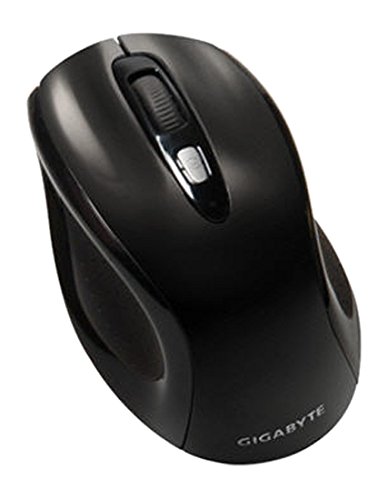
Figi 1: GIGABYTE GM-M7600 Wireless Optical Mouse. This image displays the ergonomic design of the mouse, highlighting its form factor and the location of its buttons. The Nano USB receiver is typically stored within the mouse or connected to a computer's USB port.
Enstriksyon Operasyon
1. Powering On / Off
The mouse typically has a power switch on its underside. Slide the switch to the 'ON' position to activate the mouse. Slide it to 'OFF' when not in use to conserve battery life.
2. Ajiste DPI (Sansiblite)
The GM-M7600 features an adjustable DPI switch, allowing you to change the mouse sensitivity between 800 DPI and 1600 DPI. This switch is usually located near the scroll wheel. Press the DPI button to toggle between the two sensitivity settings.
3. Fonksyon debaz sourit la
- Klike Goch: Bouton prensipal pou chwazi atik, ouvri files, ak kominike avèk lojisyèl.
- Klike sou dwa: Bouton segondè pou jwenn aksè nan meni kontèks ak opsyon adisyonèl.
- wou woulo liv: Itilize pou defile nan dokiman yo ak web paj yo. Li kapab fonksyone tou kòm yon bouton klike nan mitan.
Antretyen
1. Netwayaj
Pou kenbe pèfòmans ak aparans optimal:
- Disconnect the mouse from your computer and turn off the power switch.
- Sèvi ak yon ti moso twal mou, ki san pèl dampRense avèk dlo oswa yon solisyon netwayaj dou pou siye sifas sourit la.
- Evite itilize pwodui chimik ki fò, pwodui netwayaj abrazif, oubyen flite likid dirèkteman sou sourit la.
- Clean the optical sensor area on the underside of the mouse with a dry cotton swab to remove any dust or debris.
2. Ranplasman batri
When the mouse performance degrades or it stops responding, it may be time to replace the batteries.
- Etenn sourit la lè l sèvi avèk bouton pouvwa a.
- Open the battery compartment as described in the 'Installing Batteries' section.
- Retire ansyen pil AAA yo.
- Mete de nouvo pil AAA, respekte polarite ki kòrèk la (+/-).
- Close the battery compartment and turn the mouse back on.
Depanaj
If you encounter issues with your GIGABYTE GM-M7600 mouse, try the following solutions:
- Sourit la pa reponn:
- Asire w sourit la mache.
- Tcheke si pil yo byen enstale epi yo gen ase chaj. Ranplase yo si sa nesesè.
- Ensure the Nano USB receiver is securely plugged into a working USB port on your computer. Try a different USB port.
- Rekòmanse òdinatè w lan.
- Mouvman kurseur iregilye:
- Netwaye detèktè optik ki anba sourit la.
- Asire w ke w ap itilize sourit la sou yon sifas ki apwopriye. Evite sifas ki reflete anpil limyè oswa transparan.
- Check for any wireless interference. Move the mouse closer to the receiver or away from other wireless devices.
- DPI switch not working:
- Asire w ke sourit la limen epi li konekte.
- Peze bouton DPI a byen fèm.
Espesifikasyon
| Non modèl | GM-M7600 |
| Mak | GIGABYTE |
| Koneksyon Teknoloji | 2.4GHz Radio Frequency Wireless |
| Mouvman Deteksyon | Optik |
| DPI reglabl | 800 / 1600 DPI |
| Kantite bouton | 3 (Left, Right, Scroll Wheel/Middle Click) |
| Sous pouvwa | 2 x batri AAA (enkli) |
| Kalite Reseptè | Portable Nano USB Receiver |
| Aparèy konpatib | Laptop, òdinatè pèsonèl |
| Sistèm operasyon sipò | Linux, Windows XP |
| Materyèl patiraj | Plastic with Rubberized Finish |
| Koulè | Nwa |
Garanti ak sipò
For warranty information and technical support, please refer to the warranty card included with your product or visit the official GIGABYTE websit. Kenbe resi acha ou pou reklamasyon garanti.