
1. Entwodiksyon
This manual provides essential information for the safe and effective operation of your Canon PowerShot SX130IS digital camera. Please read it thoroughly before using the camera and keep it for future reference.

Figi 1: Devan view of the Canon PowerShot SX130IS Digital Camera.
2. Enstalasyon
2.1. Enstale pil
The PowerShot SX130IS operates on AA-size batteries. For optimal performance and longevity, it is recommended to use rechargeable AA batteries.
- Open the battery compartment cover, typically located on the bottom of the camera.
- Mete de pil gwosè AA, asire w ke polarite a kòrèk (+/-) jan yo endike anndan konpatiman an.
- Fèmen kouvèti lòj batri a byen.
2.2. Mete yon kat memwa
The camera supports SD, SDHC, and SDXC memory cards (not included). A memory card is required to store photos and videos.
- Louvri kouvèti fant kat memwa a, anjeneral li toupre konpatiman batri a.
- Mete kat memwa a avèk etikèt la anfas devan kamera a jiskaske li fè yon klik pou l antre nan plas li.
- Fèmen kouvèti fant kat memwa a byen fèm.
2.3. Mete Dat ak Lè
Lè w ap itilize l pou premye fwa oubyen apre w fin chanje pil yo, ou ka bezwen mete dat la ak lè a.
- Limen kamera a.
- If prompted, follow the on-screen instructions to set the date, time, and time zone.
- Use the directional buttons to navigate and the FUNC.SET/OK button to confirm selections.
3. Itilizasyon Kamera a
3.1. Power On/Off
Peze a ON/OFF bouton ki sitiye anlè kamera a pou limen oswa etenn li. Lantiy la ap lonje lè l limen.
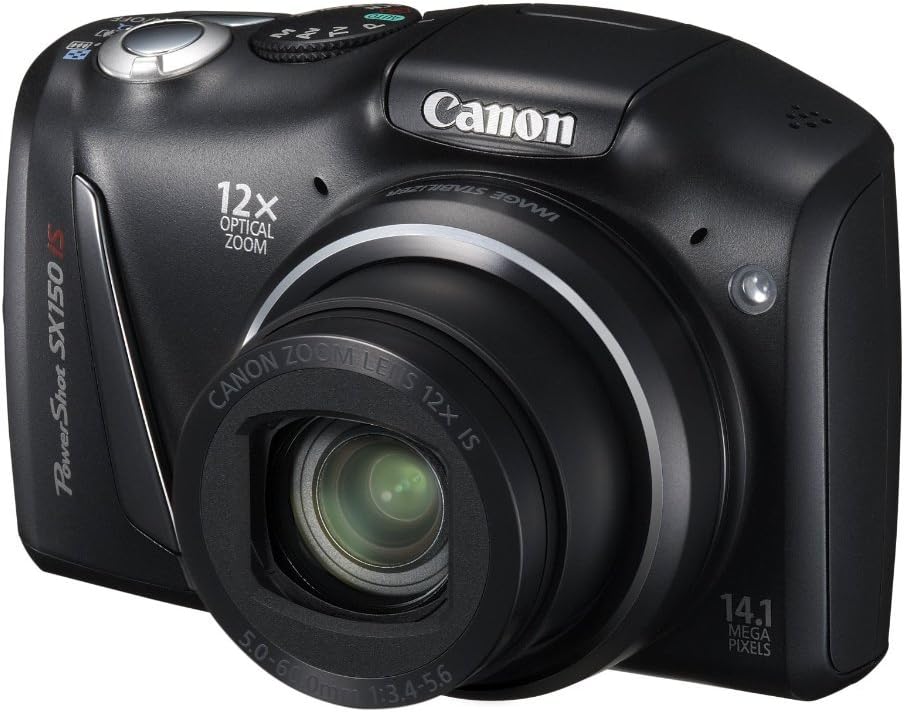
Figi 2: Angle view of the camera, highlighting the top controls including the ON/OFF button and mode dial.
3.2. Pran foto
Pou pran yon foto:
- Select a shooting mode using the mode dial (e.g., OTO for automatic settings).
- Ankadre foto ou a avèk ekran LCD 3.0 pous la.
- Peze bouton deklanchè a mwatye pou fè fokus. Kad fokus la ap vin vèt lè ou fin fè fokus la.
- Peze bouton deklanchè a nèt pou pran foto a.
3.3. Anrejistreman videyo
The camera can record 720p HD video with stereo sound.
- Turn the mode dial to the movie mode icon (usually a small movie camera symbol).
- Press the movie button (often a red dot or movie camera icon) to start recording.
- Peze bouton fim nan ankò pou sispann anrejistreman an.
3.4. Using the Optical Zoom
The camera features a 12x wide-angle optical zoom with Optical Image Stabilizer.
- Use the zoom lever, typically located around the shutter button, to zoom in (telephoto) or zoom out (wide-angle).
- The Optical Image Stabilizer helps reduce blur caused by camera shake, especially at higher zoom levels.
3.5. Itilizasyon Flash la
The camera has a built-in pop-up flash for low-light conditions.
- In certain shooting modes, the flash may pop up automatically.
- You can manually activate or deactivate the flash by pressing the flash button (lightning bolt icon) and selecting the desired mode (Auto, On, Off, Slow Synchro).
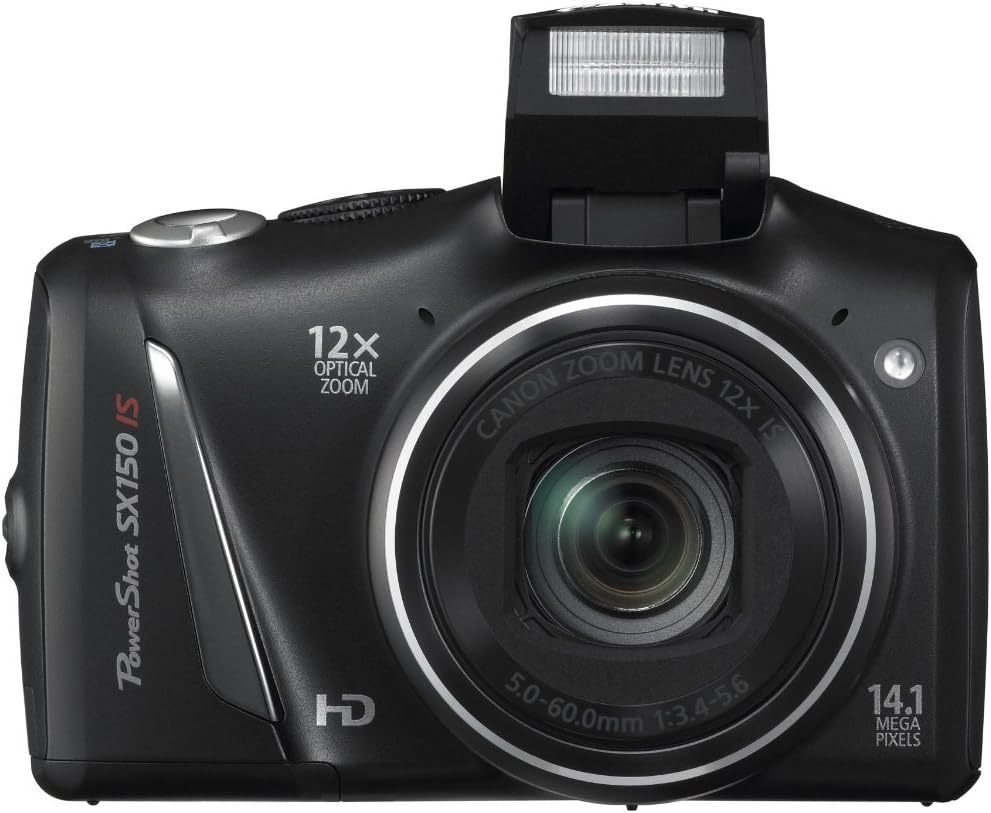
Figi 3: Devan view kamera a ak flash ki soti nan aparèy la deyò.
3.6. Scene Modes and Smart AUTO
The PowerShot SX130IS offers various scene modes and an advanced Smart AUTO system to optimize settings for different shooting situations.
- Oto entelijan: Automatically selects from 28 predefined shooting situations to ensure optimal image quality.
- Mòd sèn: Includes creative options like Miniature Effect for Movies and Fisheye Effect for artistically distorted stills. Select these via the mode dial or menu.
- Smart Flash Exposure: Analyzes lighting conditions to apply the correct flash, preventing over or underexposed images.
3.7. Reviewfoto ak videyo
Pou view your captured images and videos:
- Peze a Lektur button (usually an arrow icon).
- Use the directional buttons to scroll through your media.
- Peze a FUNC.SET/OK bouton pou view a video or zoom into a photo.
4. Antretyen
4.1. Swen Jeneral
- Kenbe kamera a pwòp lè w siye l avèk yon twal mou epi sèk.
- Evite ekspoze kamera a nan tanperati ekstrèm, imidite, oswa pousyè.
- Protect the lens and LCD screen from scratches.
4.2. Swen batri
- Always use high-quality batteries. Rechargeable batteries are recommended for cost-effectiveness and environmental reasons.
- Retire pil yo si ou pa pral itilize kamera a pou yon peryòd tan pwolonje.
NAN. Depanaj
5.1. "No Memory Card" Error
If this message appears, ensure the memory card is inserted correctly and fully seated in its slot. If the issue persists, try a different compatible memory card.
5.2. Batri a dire kout
Battery life can vary significantly based on usage (e.g., frequent flash use, video recording, reviewing images). If you experience consistently short battery life:
- Ensure you are using fresh, high-quality alkaline batteries or fully charged rechargeable batteries.
- Consider using higher capacity rechargeable batteries.
- Reduce flash usage and LCD screen brightness if possible.
5.3. Dust in Lens
If dust appears on images, it may be on the lens. Avoid attempting to clean the internal lens elements yourself. Consult a professional camera service center for cleaning.
5.4. Video Playback Issues
The camera records videos in .mov format. If you encounter issues playing videos on a computer, ensure you have the necessary codecs or a compatible media player installed.
6. Espesifikasyon
| Karakteristik | Spesifikasyon |
|---|---|
| Dimansyon pwodwi | 4.45 x 1.81 x 2.87 pous |
| Pwa atik | 10.9 ons |
| Nimewo Modèl Atik | SX130 |
| Batri | Pil ityòm metal obligatwa (enkli) |
| Manifakti | Kamera Canon Etazini |
| Lang | angle |
| Montaj konpatib | Canon |
| Aspè rapò | 16:9 |
| Teknoloji Capteur Foto | CCD |
| Sipòte File Fòma | JPEG, RAW |
| Estabilizasyon Imaj | Optik |
| Maksimòm Longè Fokal | 336 Milimèt |
| Zoom optik | 12 x |
| Ouverture maksimòm | 3.5 Milimèt |
| Elaji ISO Minimòm | 80 |
| Metering Deskripsyon | Multi, Sant-pondéré, Spot |
7. Garanti ak sipò
For warranty information, technical support, or service inquiries, please refer to the official Canon website or contact Canon customer service directly. Keep your purchase receipt as proof of purchase.
8. Videyo pwodwi yo
Pa gen okenn videyo ofisyèl vandè ki disponib pou pwodui sa a kounye a.