
1. Entwodiksyon
This manual provides comprehensive instructions for the installation, operation, and maintenance of your Jensen AWM965 AM/FM|CD|DVD|MP3/USB Wallmount Stereo. The AWM965 is a versatile 12-volt unit designed for wall mounting, featuring an AM/FM electronic tuner, CD and DVD player, and a front USB input for MP3, WMA, and JPEG file playback. It also includes three stereo high-level speaker output zones and a remote control for convenient operation.

Figi 1.1: Devan view of the Jensen AWM965 Wallmount Stereo, showing the display, control knobs, and various buttons.
2. Enfòmasyon sou Sekirite
Please read all safety instructions carefully before operating the unit. Failure to follow these instructions may result in injury or damage to the unit. Keep this manual for future reference.
- Pwovizyon pou pouvwa: This unit operates on a 12V DC negative ground power supply. Ensure correct voltage and polarity during installation.
- Enstalasyon: Professional installation is recommended. Ensure all wiring is secure and properly insulated to prevent short circuits.
- Imidite: Pa ekspoze aparèy la anba lapli oswa imidite pou evite dife oswa chòk elektrik.
- Netwayaj: Sèvi ak yon twal mou epi sèk pou netwaye. Evite pwodui netwayaj abrazif oswa solvan.
- Sèvis: Pa eseye fè antretyen aparèy sa a tèt ou. Konfye tout antretyen bay pèsonèl kalifye.
3. Lis anbalaj
Verifye ke tout atik yo prezan nan pake a anvan ou kontinye ak enstalasyon an.
- Jensen AWM965 Wallmount Stereo Unit
- Remote kontwòl ak batri
- 20-Pin Power/A/B Speaker Mating Pigtail
- Aux Audio/Video Cable
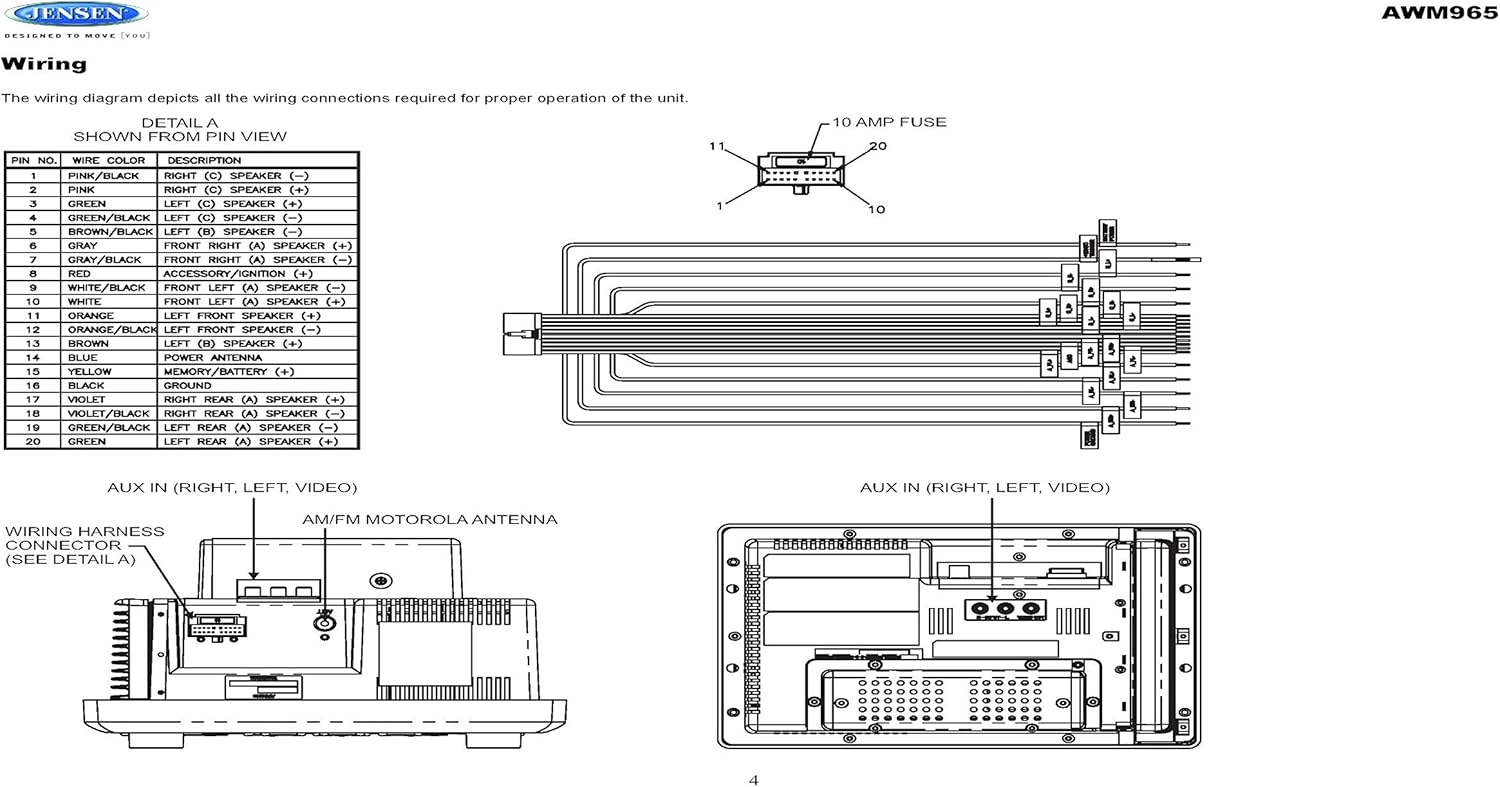
Figure 3.1: Diagram illustrating the components included in the Jensen AWM965 package, including the main unit, remote control, wiring harness, and auxiliary cables.

Figure 3.2: Image showing the included remote control, 20-pin wiring harness, and auxiliary audio/video cable.
4. Enstalasyon
4.1 Chwazi Kote Montaj la
It is important to select an appropriate mounting location for the AWM965 to ensure optimal performance and longevity. Consider the following:
- Avoid places exposed to heat-radiating appliances such as electric heaters.
- Do not mount adjacent to other equipment that radiates significant heat.
- Ensure the location is well-ventilated and not dusty.
- Evite kote imid oswa imid.
4.2 Preparing the Opening
Use the provided mounting hole diagram to measure and cut an opening in the mounting surface. After cutting, mount the unit using four M3x20mm screws.
4.3 Monte radyo a
Route the power, speaker, and antenna cables through the hole. Connect them to the unit as outlined in the wiring diagram. After ensuring correct connections, perform a test operation.
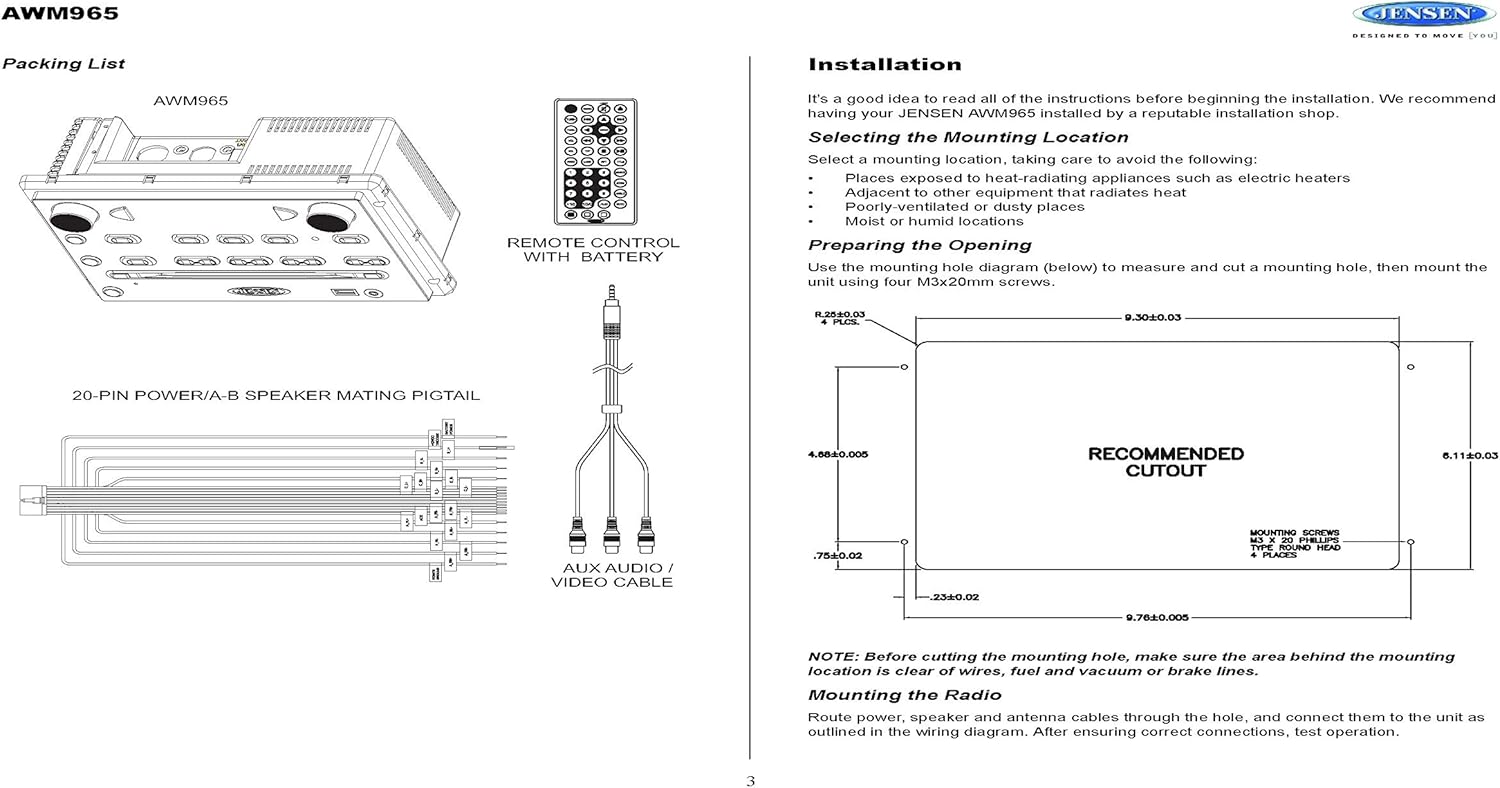
Figure 4.1: Detailed diagram showing the product dimensions (10.43"W x 7.01"H x 5"D) and the recommended cutout dimensions for installation (9.30"W x 6.11"H).
4.4 fil elektrik
The wiring diagram below depicts all the connections required for proper operation of the unit. Ensure all connections are secure and correctly matched to prevent damage.
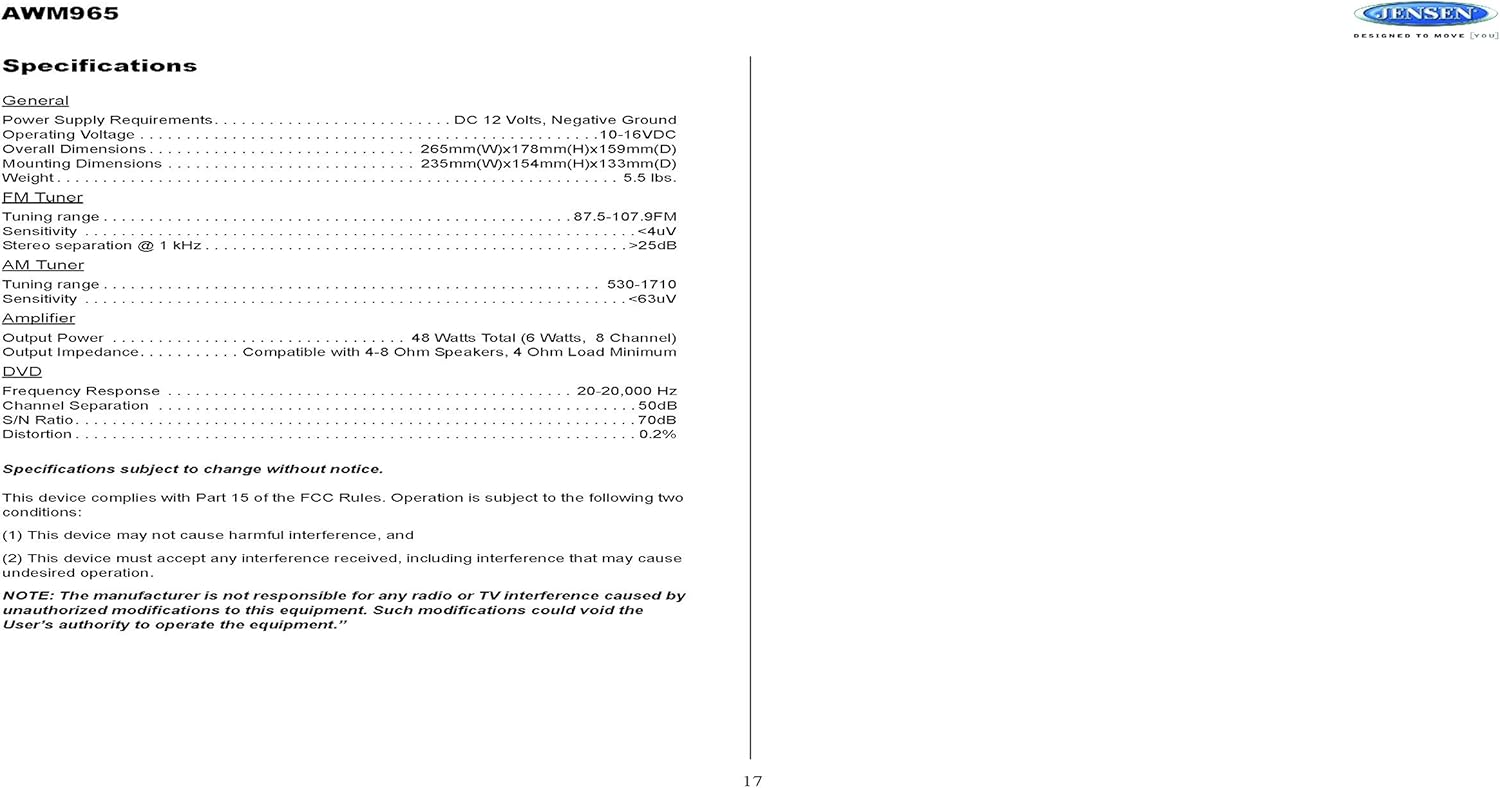
Figure 4.2: Detailed wiring diagram for the Jensen AWM965, showing the 20-pin connector pin assignments for power, ground, accessory, antenna, and speaker outputs (Right/Left, Front/Rear, A/B/C zones).
Wiring Harness Pin Details:
| PIN No. | Koulè Fil | Deskripsyon |
|---|---|---|
| 1 | WOZ / NWA | DWA (C) Oratè (-) |
| 2 | ROZ | DWA (C) Oratè (+) |
| 3 | VÈT | GÒCH (C) Oratè (+) |
| 4 | VÈT / NWA | GÒCH (C) Oratè (-) |
| 5 | MAWON / NWA | GÒCH (B) Oratè (-) |
| 6 | MAWON | GÒCH (B) Oratè (+) |
| 7 | GREY / NWA | DEVAN DWA (A) Oratè (-) |
| 8 | WOUJ | ACCESSORY / IGNITION (+) |
| 9 | BLAN / NWA | ANVAN GÒCH (A) Oratè (-) |
| 10 | BLAN | ANVAN GÒCH (A) Oratè (+) |
| 11 | ZRANJ | Oratè DEVAN GÒCH (+) |
| 12 | ORANJ / NWA | Oratè DEVAN GÒCH (-) |
| 13 | MAWON | DWA (B) Oratè (+) |
| 14 | BLE | ANTENN POUVWA |
| 15 | JÒN | MEMORY / BATTERY (+) |
| 16 | NWA | TÈ |
| 17 | VYOLET | DWA DÈYÈ (A) OPRATÈ (+) |
| 18 | VIOLET / BLACK | DWA DWA (A) Oratè (-) |
| 19 | VÈT / NWA | GÒCH DÈYÈ (A) Oratè (-) |
| 20 | VÈT | GÒCH DÈYÈ (A) Oratè (+) |
5. Operasyon Enstriksyon
5.1 Kontwòl Panel Front
Familiarize yourself with the controls on the front panel for easy operation.

Figi 5.1: Close-up view of the Jensen AWM965 front panel, highlighting the display, volume knob, power button, tuning/track buttons, and various function buttons for AUX, AS/PS, speaker zones, and media playback.
- Bouton VOL (Volim): Rotate to adjust volume. Push to access audio menu.
- POUVWA bouton: Peze pou limen oswa etenn inite a.
- T/F CLOCK Button: Press to display or set the clock.
- TUN/TRK (Tune/Track) Buttons: Use for tuning radio stations or navigating tracks on media.
- Bouton AUX: Chwazi sous antre oksilyè a.
- AS/PS (Auto Store/Preset Scan) Button: Automatically stores strong radio stations or scans through presets.
- A, B, C (Speaker Zone) Buttons: Activates or deactivates speaker output zones.
- ANTRE bouton: Konfime seleksyon yo.
- Bouton LOUD: Activates/deactivates loudness compensation.
- Bouton bèbè: Mutes/unmutes audio output.
- 1-6 bouton: Radio station presets, track functions (RPT, RDM, G.LANG).
- ALARM SET / ON/OFF Buttons: Sets and activates/deactivates the alarm clock.
- DVD MENU Button: Accesses the DVD menu.
- Disc Eject Button: Ejects a loaded disc.
- Pò USB: Konekte aparèy USB yo pou li epi chaje dosye medya.
5.2 Operasyon debaz
- Limen/Etenyen: Peze a POUVWA bouton.
- Ajisteman Volim: Vire a VOL bouton.
- Seleksyon sous: Peze a MÒD button (if available, or cycle through sources using a dedicated button or menu).
5.3 Operasyon Radyo (AM/FM)
- Akor: Peze a TUN/TRK buttons to manually tune or hold to seek.
- Estasyon Prereglaj: Press and hold a numbered button (1-6) to store the current station. Press briefly to recall.
- Auto Store / Preset Scan: Sèvi ak la AS/PS button for automatic station management.
5.4 CD/DVD/MP3/USB Playback
- Chaje disk: Insert a disc into the slot with the label side up. The unit will automatically begin playback.
- USB lèktur: Insert a compatible USB flash drive into the front USB port. The unit supports MP3, WMA, and JPEG formats.
- Kontwòl Lekti: Sèvi ak la TUN/TRK buttons for track navigation (skip forward/backward). Use numbered buttons for repeat (RPT) or random (RDM) playback.
- DVD meni: Peze a DVD MENI button to access the disc's menu.
- Chaje USB: The front USB port supports charging of iPod and other USB-based devices.
5.5 Clock and Alarm Features
- Mete revèy la: Peze epi kenbe la T/F CLOCK button to enter clock setting mode. Use the TUN/TRK buttons to adjust hours and minutes, and ANTRE pou konfime.
- Revèy Alam: Sèvi ak la SET ALARM button to configure the alarm time and the ON/OFF button to activate or deactivate it.
- Revèy dòmi: Refer to the full manual for detailed instructions on setting the sleep timer.
5.6 Antre oksilyè
Connect external audio/video devices to the front 3.5mm line-level input using the provided Aux Audio/Video Cable. Press the AUX button to select this source.
5.7 Kontwòl Remote
The included wireless remote control provides convenient access to most functions. Ensure the battery is correctly installed.
Figure 5.2: Image of the Jensen AWM965 remote control, showing buttons for power, menu, tune, volume, enter, source, program, language, repeat, title, zoom, angle, and numeric keypad.
6. Antretyen
6.1 Netwaye inite a
Wipe the front panel and cabinet with a soft, dry cloth. For stubborn stains, dampen the cloth lightly with water. Never use harsh chemicals, abrasive cleaners, or solvents as they may damage the finish.
6.2 Swen Disk
Handle discs by their edges to avoid fingerprints. Keep discs clean and free of scratches. Store discs in their cases when not in use.
NAN. Depanaj
If you experience problems with your AWM965, consult the following common issues and solutions before contacting support.
- Pa gen pouvwa: Check the 12V DC power connection and ensure the unit's fuse (10 AMP) is not blown. Verify proper grounding.
- Pa gen son: Check speaker connections and ensure speaker zones (A, B, C) are activated. Verify volume level and mute status.
- Disc Error: Ensure the disc is clean, free of scratches, and inserted correctly. Try a different disc.
- Resepsyon radyo ki pa bon: Check the antenna connection. Ensure the antenna is fully extended and positioned for best reception.
- Aparèy USB pa rekonèt: Ensure the USB device is formatted correctly and contains compatible files (MP3, WMA, JPEG). Try a different USB device.
8. Espesifikasyon
Detailed technical specifications for the Jensen AWM965 unit.
| Kategori | Spesifikasyon |
|---|---|
| Pwovizyon pou pouvwa | 12V DC, Negatif Ground |
| Opere Voltage | 10-16VDC |
| Dimansyon jeneral | 265mm(W) x 178mm(H) x 159mm(D) / 10.4"W x 7"H x 5"D |
| Mounting dimansyon | 235mm(W) x 154mm(H) x 133mm(D) / 9.25"W x 6.06"H x 5.25"D |
| Pwa | 0.9 liv (apeprè) |
| Ranje akor FM | 87.5-107.9MHz |
| FM sansiblite | <4uV |
| FM Stereo Separation @ 1 kHz | > 25dB |
| AM Akor Range | 530-1710kHz |
| AM sansiblite | <63uV |
| Amppi fò Sòti Pouvwa | 48 Watts Total (8 Channel) |
| Enpedans Sòti | Compatible with 4-8 Ohm Speakers |
| DVD Frequency Response | 20-20,000 Hz |
| DVD Channel Separation | 50dB |
| DVD S/N Ratio | 70dB |
| DVD Distortion | 0.2% |
| Fòma disk konpatib | CD, CD-R, CD-RW, MP3, DVD, DVD+/-RW |
| Karakteristik espesyal | Adjustable LCD Dimmer, Front USB (MP3/WMA/JPEG, Charging), Front 3.5mm Line-Level Video/Audio Input, 1 Composite Video Out, 1 Stereo Audio Input |
Espesifikasyon yo sijè a chanje san avètisman.
8.1 Konfòmite FCC
Aparèy sa a konfòm ak Pati 15 Règ FCC yo. Operasyon an sijè a de kondisyon sa yo:
- Aparèy sa a pa ka lakòz entèferans danjere.
- Aparèy sa a dwe aksepte nenpòt entèferans resevwa, enkli entèferans ki ka lakòz operasyon endezirab.
NOTE: The manufacturer is not responsible for any radio or TV interference caused by unauthorized modifications to this equipment. Such modifications could void the user's authority to operate the equipment.
9. Enfòmasyon sou Garanti
Jensen products are designed and manufactured to the highest quality standards. This product is covered by a limited warranty against defects in materials and workmanship. The specific terms and duration of the warranty are typically provided with the product packaging or can be found on the manufacturer's official websit la. Tanpri konsève prèv acha ou a pou reklamasyon garanti.
10. Sipò
If you require further assistance or encounter issues not covered in this manual, please contact Jensen customer support. You can typically find contact information (phone number, email, or support portal) on the official Jensen websit oswa nan anbalaj pwodwi a.
When contacting support, please have your product model number (AWM965) and a detailed description of the issue ready.