
1. Entwodiksyon
The Antelope Audio Isochrone Trinity is a high-definition master clock designed for professional audio environments. It provides precise synchronization for digital audio systems, ensuring optimal performance and sound quality. This manual details the setup, operation, and maintenance of your Isochrone Trinity unit.
Karakteristik kle yo enkli:
- Universal high-definition synchronization for superior audio.
- Advanced 4th Generation Acoustically Focused Clocking (AFC) with 64-bit DSP.
- Military-grade stability with temperature-controlled crystal oscillators.
- Support for audio up to 384kHz, varispeed functionality, and nine independent generators.
- Atomic input and USB connectivity for remote control and firmware upgrades.

Figi 1: Devan view of the Antelope Audio Isochrone Trinity Master Clock.
2. Enstalasyon
2.1 Debalaj ak enspeksyon
Carefully remove the Isochrone Trinity from its packaging. Inspect the unit for any signs of damage that may have occurred during transit. Retain the original packaging for future transport or storage.
2.2 Montaj etajè
The Isochrone Trinity is designed for standard 19-inch rack mounting. Secure the unit using appropriate rack screws. Ensure adequate ventilation around the unit to prevent overheating.
2.3 Koneksyon Panèl Dèyè
The rear panel provides all necessary input and output connections for integrating the Isochrone Trinity into your audio system.
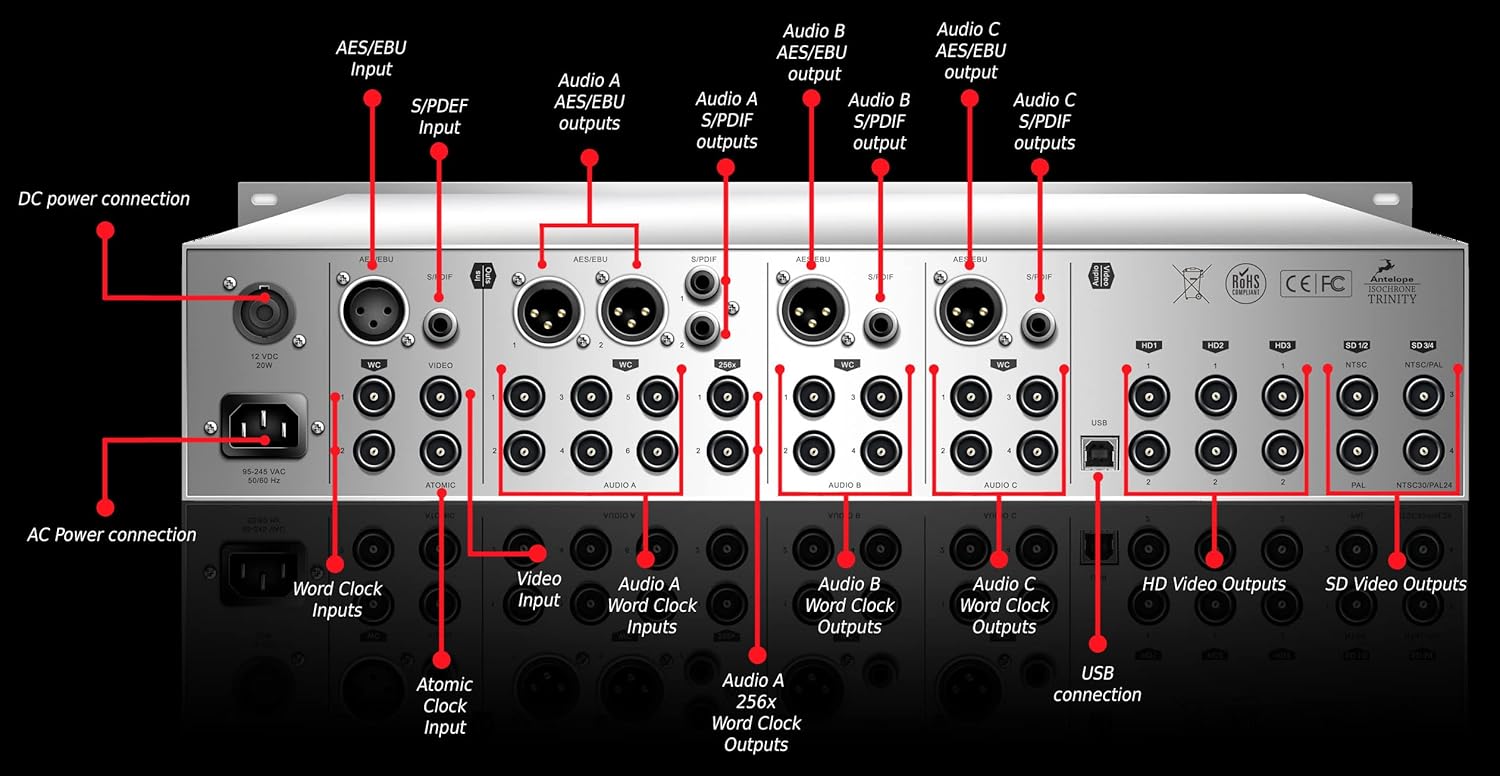
Figure 2: Rear panel connections of the Antelope Audio Isochrone Trinity Master Clock.
- Koneksyon pouvwa AC: Connect the provided power cable to this input and a suitable AC power source.
- Koneksyon pouvwa DC: An alternative DC power input (12VDC, 20W).
- Antre revèy atomik: For connecting an external atomic clock source for ultimate precision.
- Word Clock Inputs: BNC connectors for external word clock synchronization.
- Videyo Antre: BNC connector for video synchronization.
- Audio A/B/C Word Clock Outputs: Multiple BNC outputs for distributing word clock signals to other devices.
- Audio A/B/C 256x Word Clock Outputs: Dedicated BNC outputs for 256x word clock signals.
- AES/EBU Inputs/Outputs: XLR connectors for AES/EBU digital audio signals.
- S/PDIF Inputs/Outputs: RCA connectors for S/PDIF digital audio signals.
- Koneksyon USB: For remote control, preset management, and firmware updates via a computer.
- HD Video Outputs: BNC connectors for High Definition video synchronization.
- SD Video Outputs: BNC connectors for Standard Definition video synchronization (NTSC/PAL).
2.4 Premye pouvwa-up
After making all necessary connections, connect the power cable. The unit will perform a self-test. The front panel display will illuminate, indicating the unit is operational.
3. Operasyon Enstriksyon
The front panel of the Isochrone Trinity provides intuitive controls for managing synchronization settings.

Figure 3: Front panel controls of the Antelope Audio Isochrone Trinity Master Clock.
- Bouton pouvwa: Limen epi etenn aparèy la.
- AC/DC Power Indicator: Illuminates to show power status.
- SOURCE Encoder Knob: Selects the synchronization source.
- Sample Rate Encoder Knob: Adjusts the output sample rate. The current rate is shown on the Triple Display.
- Audio Channel Edit Button: Selects which audio channel (A, B, or C) to edit.
- Ekspozisyon trip: Montre aktyèl laample rates for Audio A, B, and C.
- Display Dimmer Knob: Adjusts the brightness of the front panel display.
- HD Select Encoders: Controls for High Definition video synchronization settings.
- VARISPEED Select Button: Engages or disengages varispeed mode.
- Split Mode: Allows independent control of different output groups.
- Pull Up/Down Buttons: Ajiste s laample rate by small percentages (e.g., +/- 0.1% for USA, +/- 4% for European standards).
- ATOMIC Lock Light: Indicates when the unit is successfully locked to an atomic clock source.
- W.C. Lock Light: Indicates when the unit is successfully locked to an external word clock source.
- Over Clock Light: Indicates an over-clocking condition.
- Info bouton: Provides access to system information or settings.
- SD Video Select Button: Selects Standard Definition video synchronization format (NTSC/PAL).
3.1 Basic Synchronization
- Ensure all audio devices are connected to the appropriate Word Clock or AES/EBU/S/PDIF outputs of the Trinity.
- Sèvi ak la SOUS Encoder bouton to select the desired clock source (e.g., Internal, Atomic, Word Clock Input).
- Ajiste a Sample Rate Encoder Knob yo mete s ki nesesè yoampto pou sistèm ou an.
- Obsève a ATOMIC Lock Light or W.C. Lock Light to confirm successful synchronization.
3.2 Karakteristik avanse
For detailed information on Varispeed, Split Mode, and HD/SD video synchronization, refer to the comprehensive online manual available on the Antelope Audio website. The USB connection allows for software control and advanced configuration.
4. Antretyen
The Antelope Audio Isochrone Trinity is designed for reliable operation with minimal maintenance.
- Netwayaj: Sèvi ak yon twal mou epi sèk pou netwaye deyò aparèy la. Evite pwodui netwayaj abrazif oswa solvan.
- Anviwònman: Operate the unit in a clean, dry environment, away from direct sunlight, excessive heat, and moisture. Ensure proper ventilation.
- Mizajou mikrolojisyèl: Periodically check the Antelope Audio website for firmware updates. Updates can be installed via the USB connection.
NAN. Depanaj
If you encounter issues with your Isochrone Trinity, consider the following troubleshooting steps:
- Pa gen pouvwa:
- Check that the power cable is securely connected to both the unit and the power outlet.
- Verifye priz kouran an fonksyonèl.
- No Lock Indication:
- Ensure the selected clock source (Internal, Atomic, Word Clock) is correctly configured.
- If using an external source, verify the cable connections and the external device's output.
- Tcheke s laample rate settings on both the Trinity and connected devices.
- Audio Glitches/Dropouts:
- Confirm all devices in the audio chain are synchronized to the Isochrone Trinity.
- Check for proper termination of Word Clock signals if applicable.
- Ensure all cables are in good condition and securely connected.
- Pwoblèm koneksyon USB:
- Eseye yon pò USB diferan oswa yon kab.
- Ensure the correct drivers are installed on your computer.
- Restart both the Isochrone Trinity and your computer.
If problems persist, consult the Antelope Audio support resources or contact their customer service.
6. Espesifikasyon
| Karakteristik | Detay |
|---|---|
| Mak | Antelope Audio |
| Modèl | Isochrone Trinity (Model No. 853744004168) |
| Clocking Technology | 4th Generation Acoustically Focused Clocking (AFC), 64-bit DSP |
| Kalite osilator | Temperature-Controlled Crystal Oscillators |
| Max Sample Rate | 384 kHz |
| Jeneratè | 9 Independent Generators |
| Antre | Atomic Clock, Word Clock, Video, AES/EBU, S/PDIF, USB |
| Sòti yo | Word Clock (Audio A/B/C, 256x), AES/EBU, S/PDIF, HD Video, SD Video |
| Koneksyon | USB |
| Dimansyon | 19"W x 9"H (Rack-mountable) |
| Pwa | 10.1 liv |
| Sous pouvwa | Corded Electric (AC/DC 12VDC, 20W) |
| Kalite ekspozisyon | Multi Display (Digital) |
7. Garanti ak sipò
For information regarding the warranty period and terms for your Antelope Audio Isochrone Trinity, please refer to the warranty card included with your product or visit the official Antelope Audio websit.
For technical support, product registration, or to download the latest drivers and firmware, please visit the Antelope Audio support page: Antelope Audio Support.