
Entwodiksyon
This manual provides comprehensive instructions for the installation, operation, and maintenance of your Aiphone 2-Call DA Series Door Station, model DA-2DS. Please read this manual thoroughly before attempting to install or operate the unit to ensure correct usage and to prevent damage.
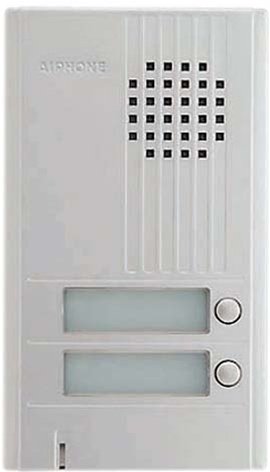
Imaj: Devan view of the Aiphone DA-2DS 2-Call Door Station. This silver unit features two call buttons for multi-tenant or multi-location communication.
Enfòmasyon sou Sekirite
Obsève prekosyon sekirite sa yo pou evite blesi ak domaj nan ekipman an:
- Toujou dekonekte kouran an anvan ou fè nenpòt fil elektrik oswa antretyen.
- Ensure all wiring is compliant with local electrical codes and regulations.
- Do not expose the unit to excessive moisture or extreme temperatures.
- Use only specified power supplies and accessories.
- Enstalasyon ta dwe fèt pa pèsonèl kalifye.
Kontni pake
Verifye ke tout atik yo prezan nan pakè a:
- Aiphone DA-2DS Door Station Unit
- Montage vis ak lank
- Manyèl Enstriksyon (dokiman sa a)
Enstalasyon
Montaj
Select a suitable mounting location, typically near the entrance, at a height that allows easy access for all users. Ensure the surface is flat and secure. Use the provided mounting screws and anchors to firmly attach the door station to the wall.
Fil elektrik
Connect the door station to the indoor master station using appropriate wiring. The DA-2DS requires a 2-wire connection for each call button to the corresponding indoor station. Refer to the wiring diagram provided with your indoor master station for specific connection points. Ensure all connections are secure and insulated.
Premye pouvwa-up
After all wiring is complete and verified, apply power to the system. Test each call button to ensure proper communication with the indoor stations.
Enstriksyon Operasyon
Fè yon apèl
To initiate a call from the door station, press the desired call button. This will activate the corresponding indoor master station, which will then ring to alert the occupant.
Reponn yon apèl
When a call is initiated from the door station, the indoor master station will ring. The occupant can answer the call by pressing the talk button on the indoor station. Two-way communication will then be established.
Antretyen
Netwayaj
Clean the exterior of the door station periodically with a soft, damp cloth. Do not use abrasive cleaners, solvents, or strong chemicals, as these can damage the finish and internal components.
Chèk regilye
Periodically check the mounting screws for tightness and ensure all wiring connections remain secure. Test the call buttons and communication functionality regularly to ensure proper operation.
Depanaj
| Pwoblèm | Kòz posib | Solisyon |
|---|---|---|
| No sound from door station | Loose wiring connection; faulty speaker/microphone | Check wiring connections at both door and master stations. If problem persists, contact support. |
| Call button does not activate indoor station | Incorrect wiring; faulty button | Verify wiring connections for the specific call button. Test button functionality. |
| Interference or poor audio quality | Improper wiring; electrical interference | Ensure wiring is correctly installed and shielded if necessary. Check for nearby sources of electrical interference. |
Espesifikasyon
- Modèl: DA-2DS
- Manifakti: Aiphone
- Nimewo Pati: DA-2DS
- Pwa atik: 3 liv
- Koulè: Ajan
- Kantite pake atik: 1
- Batri enkli: Non
- Dat premye disponib: 8 me 2008
Enfòmasyon sou Garanti
Aiphone products are designed for reliability and performance. This product is covered by a limited warranty against defects in materials and workmanship. For specific warranty terms and conditions, please refer to the warranty card included with your purchase or visit the official Aiphone websit la. Kenbe prèv acha ou pou reklamasyon garanti.
Sipò
For technical assistance, troubleshooting, or service inquiries, please contact Aiphone customer support. You can find contact information, including phone numbers and online resources, on the official Aiphone website. When contacting support, please have your model number (DA-2DS) and a description of the issue ready.