
1. Entwodiksyon
Thank you for choosing the SHARP KC850U Air Purifier and Humidifier. This appliance is designed to improve indoor air quality and maintain optimal humidity levels in medium-sized rooms. It combines a multi-stage filtration system with Plasmacluster Ion Technology to effectively reduce airborne particles, odors, and maintain a comfortable environment.
Please read this manual thoroughly before operating the unit to ensure safe and efficient use. Keep this manual for future reference.
2. Enfòmasyon sou Sekirite
To reduce the risk of electric shock, fire, or injury, always follow basic safety precautions when using electrical appliances:
- Pa opere aparèy la ak yon kòd oswa ploge ki domaje.
- Pa mete aparèy la toupre sous chalè oswa anba limyè solèy dirèk.
- Asire w mete inite a sou yon sifas ki estab ak nivo.
- Pa bloke antre oswa priz lè.
- Debranche aparèy la anvan ou netwaye li oswa fè nenpòt antretyen.
- Pa plonje inite a nan dlo oswa lòt likid.
- Kenbe lwen timoun ak bèt kay.
- Use only genuine SHARP replacement parts and filters.
3. Pwodwi souview
The SHARP KC850U integrates air purification and humidification functions into a single unit. Key components include the air intake, air outlet, control panel, dust and humidity sensors, and water tank.

Figi 3.1: Devan view of the SHARP KC850U Air Purifier and Humidifier, showing the control panel and display.
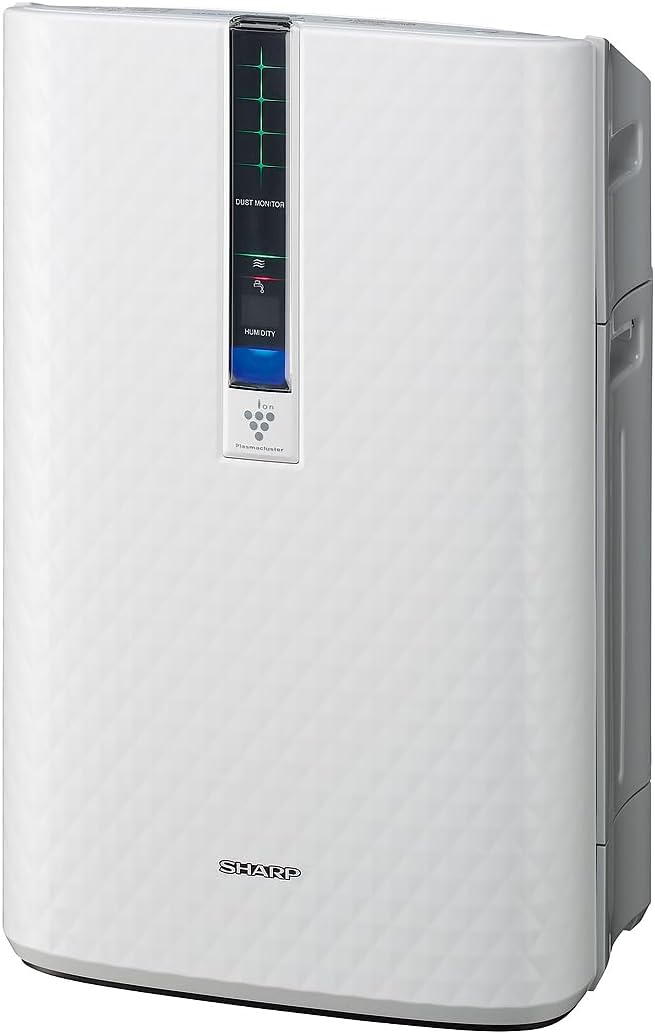
Figi 3.2: Side view of the SHARP KC850U, illustrating its compact design.
Kontwòl Panel ak Display
The unit features an intuitive control panel and a display that provides real-time information on air quality and humidity levels.

Figi 3.3: Top view of the control panel, showing buttons for power, fan speed, modes, and light control.
- Bouton pouvwa: Limen oswa etenn inite a.
- Bouton vitès fanatik: Cycles through Max, Med, and Low fan speeds.
- bouton mòd: Selects operating modes including Auto, Pollen, and Quick Clean.
- Limyè bouton: Adjusts the brightness of the display lights (Bright, Dim, Off).
- Dust Monitor: Visual indicator of air impurity levels (e.g., green for clean, red for high impurity).
- Ekspozisyon imidite: Montre pousantaj imidite relatif aktyèl latage.
4. Enstalasyon
4.1 Debake
- Ak anpil atansyon retire inite a nan anbalaj li yo.
- Retire tout materyèl pwoteksyon yo ak sache plastik yo.
- Ensure all filters are properly installed before first use. Refer to the Maintenance section for filter installation details.
4.2 Plasman
For optimal performance, place the air purifier in a location where air can circulate freely. Avoid placing it directly against a wall or furniture that might obstruct air intake or output.
- Recommended for use in bedrooms, living rooms, studies, or exercise rooms.
- Ensure at least 12 inches (30 cm) of clear space around the unit.
- Place on a firm, level surface.
4.3 Filling the Water Tank (for Humidification)
If you intend to use the humidification function, fill the water tank:
- Remove the water tank from the side of the unit.
- Open the tank cap and fill with clean tap water.
- Securely close the cap and reinsert the water tank into the unit.
5. Operasyon Enstriksyon
5.1 Power On/Off
Peze a Pouvwa bouton pou limen oswa etenn inite a.
5.2 Seleksyon vitès vantilatè
Peze a Vitès fanatik button repeatedly to cycle through the available fan speeds:
- Max: Highest air purification and humidification.
- Med: Moderate operation.
- Ba: Quiet operation, suitable for sleeping (as quiet as 23 dBA).
5.3 Seleksyon mòd
Peze a Mode button repeatedly to select an operating mode:
- Mòd oto: The unit automatically adjusts fan speed and humidification based on sensor readings for air quality and humidity.
- Mòd polèn: Optimized for pollen removal.
- Quick Netwaye Mode: Releases high-density Plasmacluster ions for rapid air purification.
5.4 Plasmacluster Ion Technology
The Plasmacluster Ion Technology actively disperses positive and negative ions into the air to help reduce microscopic pollutants. This function operates automatically with the unit. A slight clicking sound may be audible during operation, which is normal.
5.5 Montre kontwòl limyè
Peze a Limyè button to adjust the brightness of the display indicators:
- Klere: Full illumination.
- Dim: Reduced illumination.
- Off: Display lights are off, suitable for dark rooms.

Figi 5.1: Display showing 'Lo' for low humidity and green dust monitor indicators.

Figi 5.2: Display showing 'Hi' for high humidity and red dust monitor indicators, indicating higher impurity levels.
6. Antretyen
Regular maintenance ensures optimal performance and extends the lifespan of your SHARP KC850U. Always unplug the unit before cleaning or replacing filters.
6.1 Filter System Overview
The KC850U utilizes a triple filtration system:
- Pre-filtè ki ka lave: Traps large airborne particles like dust and pet dander.
- Activated Carbon Deodorizing Filter: Helps reduce common household odors.
- Vrè filtè HEPA: Captures 99.97% of particles 0.3 microns and larger.
- Humidifying Filter: Used for the humidification function.

Figi 6.1: Diagram showing the air purification process through the humidifying filter, True HEPA filter, carbon filter, and pre-filter.
6.2 Netwayaj ak Ranplasman Filtè
- Pre-filtre: Clean regularly by vacuuming or washing with water. Allow to dry completely before reinstallation.
- Activated Carbon Deodorizing Filter: May be washed. Refer to the filter's specific instructions for cleaning frequency and method. Replace as needed, typically every 2-5 years depending on usage and environment.
- Vrè filtè HEPA: This filter is not washable. Replace typically every 2-5 years, depending on usage and environment. The unit will indicate when replacement is due.
- Humidifying Filter: Clean regularly to prevent mineral buildup. Replace as needed, typically every 2-5 years depending on water quality and usage.
Actual filter life may vary significantly based on air quality, usage frequency, and environmental conditions.
6.3 Netwayaj jeneral
- Siye eksteryè inite a ak yon mou, damp twal.
- Clean the dust and humidity sensors periodically to ensure accurate readings.
- Clean the water tank and humidifying tray regularly to prevent mold or bacteria growth.
NAN. Depanaj
If you encounter issues with your SHARP KC850U, refer to the following common problems and solutions:
| Pwoblèm | Kòz posib | Solisyon |
|---|---|---|
| Inite pa limen. | Power cord not properly plugged in; no power at outlet. | Check power connection; test outlet with another device. |
| Air purification/humidification is ineffective. | Filters are dirty or clogged; water tank is empty (for humidification). | Clean or replace filters as per Maintenance section; refill water tank. |
| Unusual noise (e.g., clicking). | Normal operation of Plasmacluster Ion generator; foreign object in fan. | A slight clicking is normal. If noise is excessive, unplug and check for obstructions. |
| Odor persists or unit emits strange smell. | Carbon filter saturated; new unit odor; mold in water tank. | Replace carbon filter; new unit odor will dissipate; clean water tank and humidifying filter. |
| Humidity level not increasing. | Water tank empty; humidifying filter dirty or damaged. | Refill water tank; clean or replace humidifying filter. |
Si pwoblèm nan pèsiste apre ou fin eseye solisyon sa yo, tanpri kontakte sèvis kliyan SHARP.
8. Espesifikasyon
| Karakteristik | Spesifikasyon |
|---|---|
| Nimewo Modèl | KC850U |
| Mak | Sharp |
| Koulè | Blan |
| Dimansyon pwodwi (D x W x H) | 10.5" x 14.87" x 23.11" |
| Pwa atik | 20.5 liv |
| Sifas Planche Rekòmande | 254 Square Feet (4.8 air changes/hour) |
| Nivo bri | 23 dBA (Quiet Sleep setting) to 36 dB (typical) |
| Gwosè Retansyon Patikil | 0.3 Micrometer (HEPA filter) |
| Kalite kontwolè | Kontwòl bouton |
| Wattage | 50 wat |
| CADR (Smoke / Dust / Pollen) | 164 / 164 / 174 |
| Sètifikasyon | Klasifikasyon ENERGY STAR, Teste pa AHAM Verifide, Sètifye CARB |

Figi 8.1: Dimensions of the SHARP KC850U unit.

Figi 8.2: Room coverage diagram, showing 254 sq. ft. for 4.8 air changes per hour.
9. Garanti ak sipò
9.1 Enfòmasyon sou Garanti
The SHARP KC850U Air Purifier and Humidifier comes with a 1-ane garanti limite. Please retain your proof of purchase for warranty claims. For detailed terms and conditions, refer to the warranty card included with your product or visit the official SHARP websit.
9.2 Sipò pou Kliyan
For technical assistance, troubleshooting beyond this manual, or to inquire about replacement parts and filters, please contact SHARP customer support. Contact information can typically be found on the SHARP official websit la oubyen sou anbalaj pwodwi a.