
1. Entwodiksyon
The VTech Learning Fun Tool Box is an interactive educational toy designed for young children aged 12 to 36 months. This toy encourages role-play and introduces basic concepts such as shapes, numbers, and colors through engaging activities. It includes realistic tool play pieces and features two distinct modes of play: Learning Mode and Play Mode.
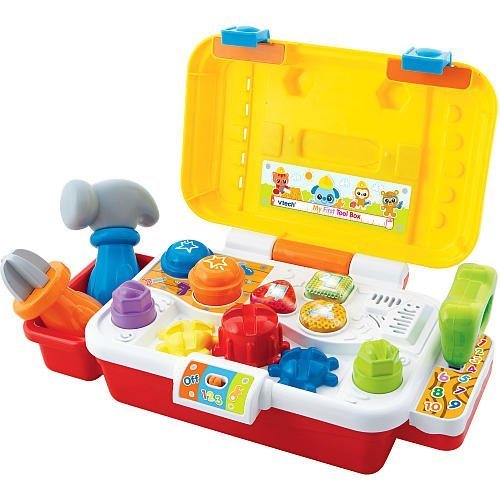
Image 1.1: The VTech Learning Fun Tool Box, a colorful toy featuring a yellow toolbox with a red handle, a blue screwdriver, a green wrench, a red hammer, and a yellow saw. The front of the toolbox includes three light-up buttons and interactive elements like gears and bolts.
2. Pake kontni
Asire w tout atik ki nan lis anba a yo nan pake w la:
- 1 x VTech Learning Fun Tool Box unit
- 1 x zouti tournevis
- 1 x Wrench tool
- 1 x Saw tool
- 1 x Hammer tool
- Manyèl Enstriksyon (dokiman sa a)
3. Karakteristik kle
- Realistic Role-Play Tools: Includes a screwdriver, hammer, wrench, and saw for imaginative play.
- Eleman entèaktif: Features three gears, two bolts, two nails, and three light-up buttons for engaging interaction.
- Konsepsyon pòtab: Equipped with an exterior handle for easy carrying.
- Educational Play Modes: Offers two modes of play to teach shapes, numbers, and colors.
- Apwopriye laj: Apwopriye pou timoun 12 mwa ak plis.
4. Enstalasyon
4.1 Enstalasyon batri
The VTech Learning Fun Tool Box requires batteries for operation. Locate the battery compartment on the underside of the unit. Use a screwdriver to open the compartment cover. Insert the required batteries, ensuring correct polarity (+/-). Replace the cover and secure it with the screw. Always use new batteries of the recommended type for optimal performance.
5. Operasyon Enstriksyon
5.1 Power On/Off
To turn the unit on, slide the power switch, typically located on the side or back of the toolbox, to the 'ON' position. To conserve battery life, slide the switch to the 'OFF' position when the toy is not in use.
5.2 Mòd jwe
The Learning Fun Tool Box features two primary play modes:
- Mòd aprantisaj: In this mode, the toy introduces shapes, numbers, and colors. Pressing the light-up buttons or interacting with the tools (screwdriver, wrench, hammer, saw) will trigger educational phrases and sounds related to these concepts.
- Mòd jwe: This mode encourages imaginative play with realistic tool sounds and phrases. Children can pretend to fix things, turn gears, tighten bolts, and tap nails, enhancing their role-play experience.
Switch between modes by pressing a dedicated mode button or by specific interactions as indicated by the toy's voice prompts.
5.3 Tool Interaction
- tournevis: Use the screwdriver to turn the gears on the toolbox, activating sounds and phrases.
- Kle: Use the wrench to interact with the bolts, triggering specific responses.
- mato: Tap the nails with the hammer for sound effects.
- Saw: Engage the saw with designated areas for sawing sounds.
6. Antretyen
6.1 Netwayaj
To clean the VTech Learning Fun Tool Box, wipe the surface with a slightly damp cloth. Do not immerse the toy in water or use harsh cleaning agents, as this may damage the electronic components. Ensure the toy is completely dry before storage or further use.
6.2 Depo
Store the toy in a cool, dry place away from direct sunlight and extreme temperatures. If the toy will not be used for an extended period, remove the batteries to prevent leakage and potential damage.
NAN. Depanaj
7.1 No Power or Intermittent Sound
- Tcheke si switch pouvwa a nan pozisyon 'ON'.
- Asire w ke pil yo byen enstale ak polarite ki kòrèk la.
- Ranplase pil ki fin vye oswa ki fin itilize yo ak pil nèf.
- Clean the battery contacts if they appear dirty.
7.2 Incorrect Responses or Malfunctions
- Turn the unit off and then on again to reset it.
- Ensure that the tools are being used with the correct interactive points on the toolbox.
- If issues persist, refer to the VTech customer support for further assistance.
8. Espesifikasyon
| Non mak | VTech |
| Nimewo Modèl | 80-113100 |
| ASIN | B002T37EF0 |
| Nimewo Idantifikasyon Komès Mondyal la | 03417761131008 |
| Manifakti Laj Minimòm | 12 Mwa |
| Manifakti Maksimòm Laj | 36 Mwa |
| Dimansyon atik (L x W x H) | 10.24 x 4.33 x 4.53 pous |
| Pwa atik | 2.5 liv |
| Kalite Materyèl | Plastik |
| Objektif edikasyon | Rekonesans koulè |
9. Garanti ak sipò
9.1 Enfòmasyon sou Garanti
VTech products are manufactured to high-quality standards. For specific warranty details, please refer to the warranty card included with your purchase or visit the official VTech websit la. Kenbe prèv acha ou pou reklamasyon garanti.
9.2 Sipò pou Kliyan
If you have any questions, require technical assistance, or need to report a problem with your VTech Learning Fun Tool Box, please contact VTech customer support. Contact information can typically be found on the VTech official websit la oubyen sou anbalaj pwodwi a.