
1. Entwodiksyon
This manual provides detailed instructions for the installation, operation, and maintenance of your AZZA Solano 1000R CSAZ-1000R Full Tower Computer Case. Please read this manual thoroughly before beginning installation to ensure proper setup and to maximize the performance and longevity of your system components.
2. Pwodwi Features
- Optimized Thermal Management: Features multiple fans for superior cooling, including a 230mm top fan, a 230mm side fan, two 140mm front fans, and a 120mm rear fan.
- Bottom-Mounted Power Supply: Designed for improved thermal separation and stability, allowing installation facing up or down.
- Advanced Cable Management: Pre-drilled motherboard tray and ample space behind for organized cable routing, enhancing airflow and aesthetics.
- Tool-Less Design: Thumb screws for easy installation of optical drives and hard disk drives.
- Antre/Sòti Devan Pratik: USB and audio ports, along with an eSATA port, located on the top panel for easy access.
- Enteryè Spacious: Full tower design accommodates large components, including extended graphics cards and tall CPU coolers.
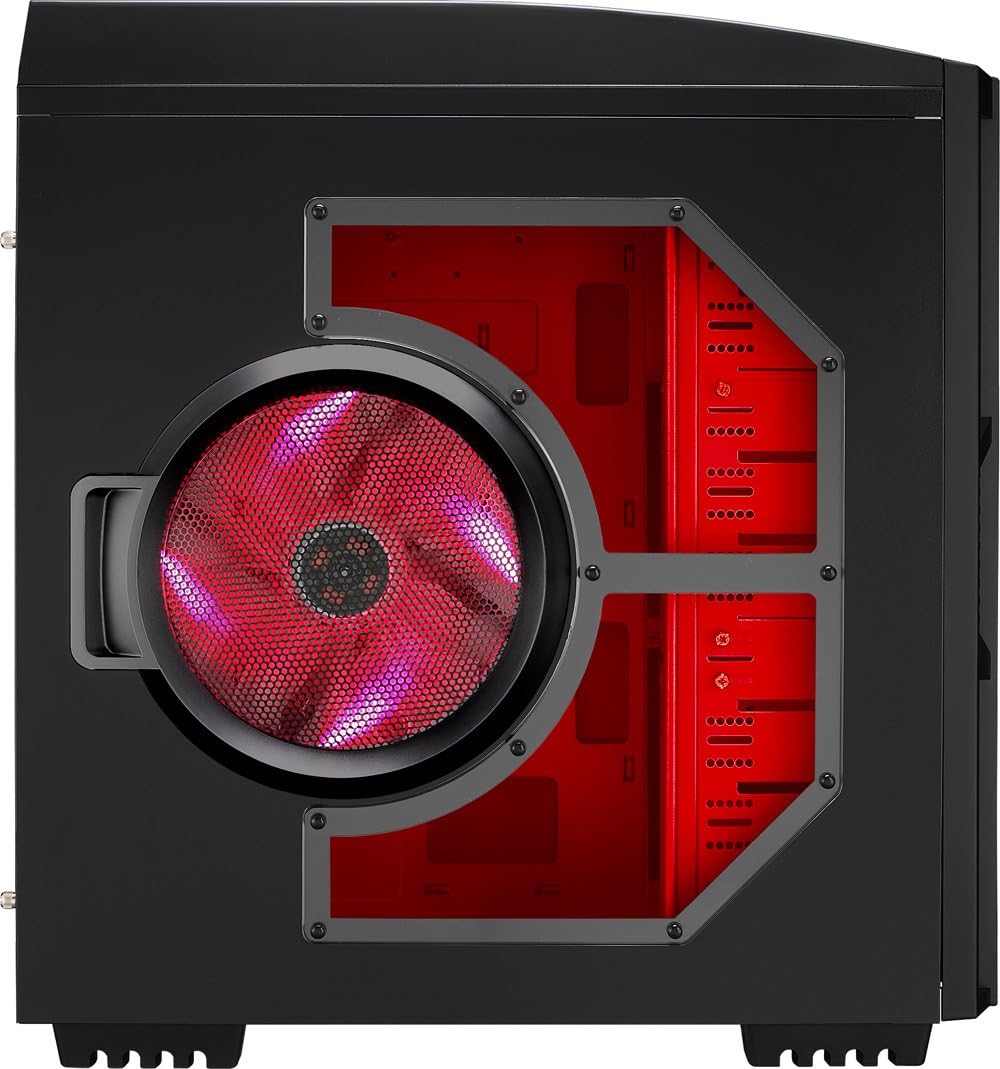
- Konsepsyon ayestetik: Black exterior with a vibrant red painted interior and red LED fans.
3. Pake kontni
Tanpri verifye ke tout atik yo prezan nan pakè ou a:
- AZZA Solano 1000R CSAZ-1000R Full Tower Case
- Bwat akseswa (ki gen ladan l vis, distansè, lyen kab, elatriye)
- Manyèl Itilizatè (dokiman sa a)
4. Konpozan souview
4.1 Ekstèn Views
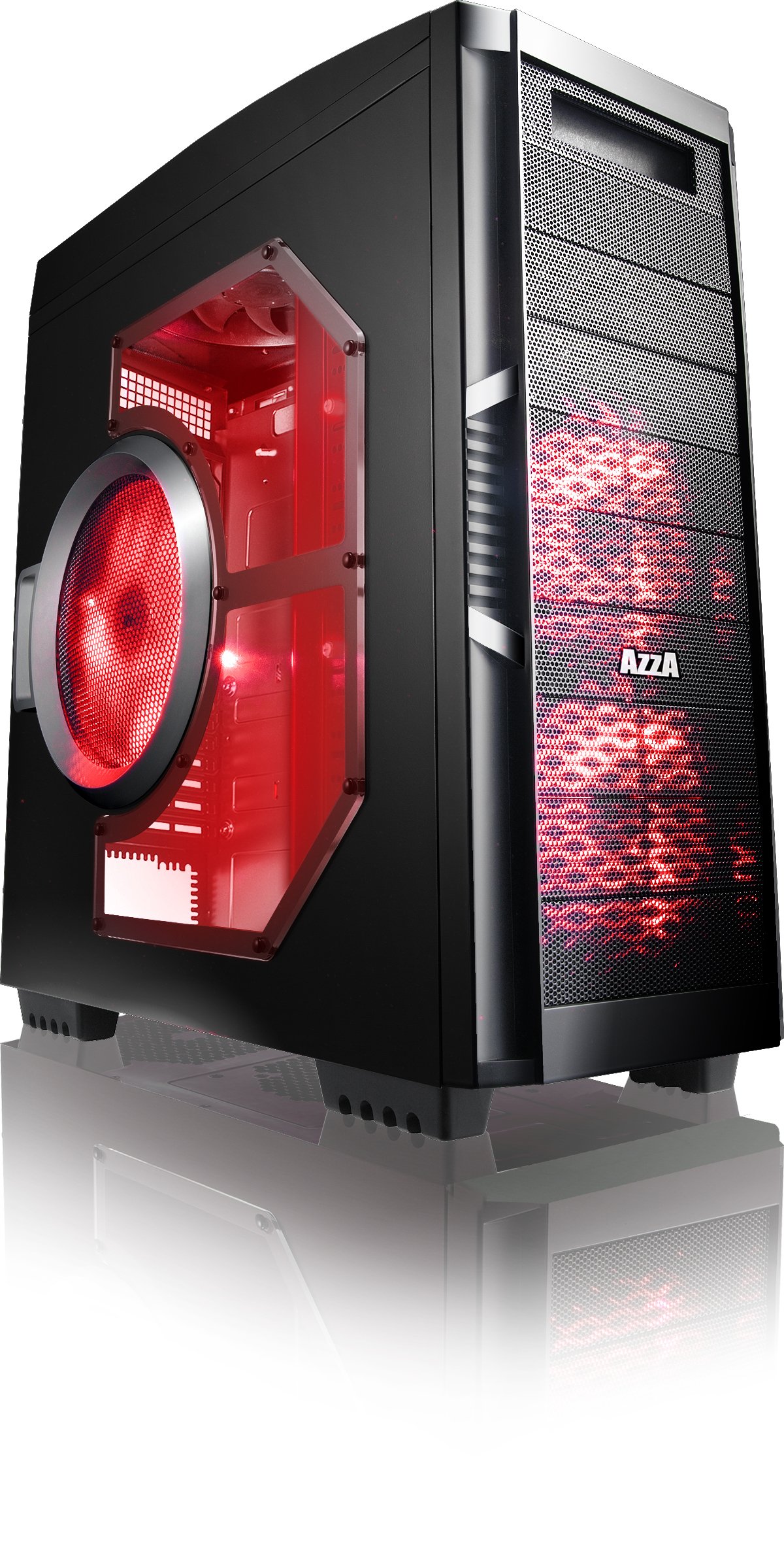
Figi 4.1: Devan view of the AZZA Solano 1000R case, showcasing the red LED fans on the front and side panel.

Figi 4.2: Devan view of the AZZA Solano 1000R case, highlighting the two 140mm red LED intake fans behind the mesh panel.

Figi 4.3: Side view of the AZZA Solano 1000R case, showing the large 230mm red LED side panel fan and the transparent window.

Figure 4.4: Top-front angled view of the AZZA Solano 1000R case, showing the top ventilation grille, front I/O panel with USB and audio ports, and power button.
Figi 4.5: Dèyè view of the AZZA Solano 1000R case, displaying the red interior, rear exhaust fan, and expansion slots.
4.2 Entèn Views

Figi 4.6: Enteryè view of the AZZA Solano 1000R case with the left side panel removed, revealing the red painted motherboard tray, drive bays, and cable routing cutouts.

Figure 4.7: Angled interior view of the AZZA Solano 1000R case, focusing on the multiple 5.25" and 3.5" drive bays.

Figure 4.8: Angled interior view of the AZZA Solano 1000R case, showing the rear 120mm exhaust fan, expansion slots, and the extensive drive bay structure.

Figi 4.9: Enteryè view of the AZZA Solano 1000R case with the right side panel removed, showing the space behind the motherboard tray for cable management.
5. Gid Enstalasyon
Anvan ou kòmanse enstalasyon an, asire w espas travay ou a pwòp epi li pa gen elektrisite estatik. Li rekòmande pou w mete yon braslè ponyèt anti-estatik.
5.1 Prepare Ka a
- Mete bwat la sou yon sifas plat epi ki estab.
- Remove the side panels by unscrewing the thumb screws at the rear of the case and sliding the panels backward.
5.2 Enstalasyon mèr
- Install the I/O shield provided with your motherboard into the opening at the rear of the case.
- Align the motherboard with the pre-installed standoffs. If necessary, install additional standoffs according to your motherboard's form factor.
- Carefully place the motherboard onto the standoffs, ensuring the I/O ports align with the shield.
- Secure the motherboard with the appropriate screws from the accessory box.
5.3 Enstalasyon ekipman pou pouvwa a
- Position the power supply unit (PSU) in the bottom-rear compartment of the case. You can orient it with the fan facing up or down, depending on your cooling preference and PSU design.
- Fikse PSU a nan bwat la avèk vis ki vini ak ekipman pouvwa a.
5.4 Enstalasyon Disk Depo (HDD/SSD)
- For 3.5" HDDs, slide the drive into an available drive bay until it clicks into place. Use the provided thumb screws for additional security if desired.
- For 2.5" SSDs, an adapter bracket (not included) may be required to fit into the 3.5" bays. Secure the SSD to the adapter, then install the adapter into a 3.5" bay.
- Connect the SATA data and power cables to your installed drives.
5.5 Optical Drive Installation
- Remove the desired 5.25" front bay cover from the case.
- Slide the optical drive into the bay from the front until it aligns with the screw holes.
- Secure the optical drive using the provided thumb screws.
- Connect the SATA data and power cables to the optical drive.
5.6 Enstalasyon Kat Ekspansyon
- Retire kouvèti fant ekspansyon ki nesesè yo nan dèyè bwat la.
- Insert your graphics card or other expansion card into the appropriate PCIe/PCI slot on your motherboard.
- Secure the card with the provided screw or tool-less latch mechanism.
5.7 Jesyon kab
Utilize the cutouts and space behind the motherboard tray to route and organize your cables. This improves airflow and gives your build a cleaner appearance. Use cable ties from the accessory box to bundle cables.
5.8 Konekte Antre/Sòti Panèl Devan an
Connect the front panel cables (USB, Audio, Power Switch, Reset Switch, Power LED, HDD LED) to the corresponding headers on your motherboard. Refer to your motherboard manual for exact header locations.
6. Operasyon
6.1 Power On/Off
Press the power button located on the top panel to turn your system on or off. A power LED will illuminate when the system is active.
6.2 Kontwòl fanatik
The case features a fan speed control switch (L/M/H) at the rear, primarily for the top, side, and rear fans. Adjust this switch to balance cooling performance and noise levels according to your preference.
7. Antretyen
7.1 Netwayaj
Regular cleaning helps maintain optimal airflow and component longevity.
- Eksteryè: Siye sifas eksteryè yo ak yon mou, damp twal. Evite pwodui netwayaj abrazif.
- Filtè Pousyè: The case includes mesh filters at the bottom. Periodically remove and clean these filters to prevent dust buildup.
- Enteryè: Use compressed air to remove dust from inside the case, especially from fans and heatsinks. Ensure the system is powered off and unplugged before cleaning the interior.
NAN. Depanaj
- Sistèm nan pa limen: Ensure all power cables (24-pin ATX, 8-pin CPU, GPU power) are securely connected. Verify the PSU switch is in the 'ON' position. Check front panel power switch connection to the motherboard.
- Vantilatè yo pa vire: Check fan power connections to the motherboard or fan controller. Ensure the fan speed switch is not set to 'Off' or 'Low' if fans are not spinning at all.
- Side Panel Not Closing: If a large CPU cooler or tall components prevent the side panel from closing, especially due to the side fan, consider relocating the side fan to the exterior of the panel if possible, or ensure your cooler fits within the case's clearance specifications.
- Cable Management Difficulty: If the rear panel bulges due to thick cables, try rerouting cables more efficiently or using flatter cables where possible.
9. Espesifikasyon
| Karakteristik | Detay |
|---|---|
| Nimewo Modèl | CSAZ-1000R |
| Kalite Ka | Full Tower |
| Koulè | Nwa/Wouj |
| Dimansyon pwodwi (L x W x H) | 19.7 x 8.1 x 21.5 pous (500 x 206 x 546 mm) |
| Pwa atik | 24 liv (10.89 kg) |
| Metòd refwadisman | Air |
| Kalite montaj ekipman pouvwa | Anba mòn |
| Total pò USB | 2 (USB 2.0) + 1 (eSATA) |
| Hard Disk Form Factor Support | 3.5 pous |
| Fanatik enkli | 2x 230mm (Top, Side), 2x 140mm (Front), 1x 120mm (Rear) |
10. Garanti ak sipò
For warranty information and technical support, please refer to the official AZZA websit la oubyen kontakte détayan lokal ou a. Kenbe prèv acha ou pou reklamasyon garanti.