
Entwodiksyon
The Iomega Prestige Desktop Hard Drive USB 2.0 offers a simple and reliable solution for expanding your storage capacity. This manual provides essential information for setting up, operating, and maintaining your device.

Image: The Iomega Prestige 500 GB External Hard Drive, silver, standing upright on a desk with its included stand, positioned next to a computer monitor, lamp, and keyboard.
Kontni pake
- Iomega Prestige 500 GB USB 2.0 Desktop External Hard Drive
- USB NAN KA
- Adaptè pouvwa
- Desktop kanpe
- Gid Quick Start
Karakteristik pwodwi
- Kapasite: 500 GB for ample depo done.
- Entèfas: USB 2.0 pou yon konpatibilite laj.
- Konsepsyon: Stylish dark silver brushed aluminum construction with included stand for vertical placement.
- Fasilite pou itilize: Plug-and-play functionality.
- Pouvwa: External power adapter for stable operation.
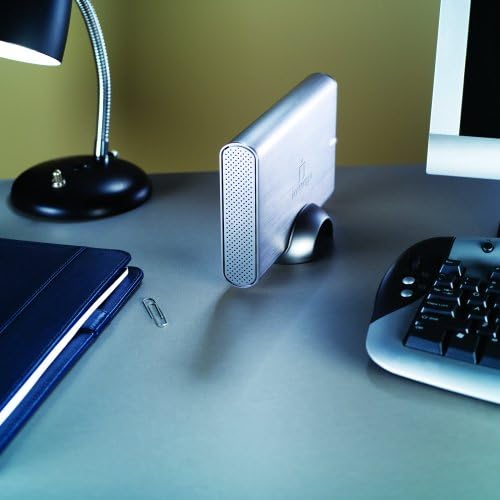
Imaj: Devan view of the Iomega Prestige External Hard Drive, showcasing its brushed silver finish and the Iomega logo, with the stand visible at the bottom.
Enstalasyon
1. Koneksyon fizik
- Place the hard drive on a stable, flat surface, or use the included stand for vertical orientation. Ensure adequate ventilation.
- Connect the power adapter to the hard drive's power input port and then plug it into a wall outlet.
- Connect one end of the USB 2.0 cable to the USB port on the hard drive.
- Konekte lòt bout kab USB 2.0 la nan yon pò USB ki disponib sou òdinatè w la.
- Press the power button on the hard drive to turn it on. The power indicator light should illuminate.
2. Initial Setup (Windows/macOS)
The drive is pre-formatted for Windows. For macOS, reformatting is required.
Pou Windows:
The drive should be automatically detected and appear as a new drive letter in "My Computer" or "This PC". No additional drivers are typically required.
Pou macOS:
- Connect the drive as described above.
- Louvri "Itilite Disk" (Aplikasyon > Itilite > Itilite Disk).
- Select the Iomega drive from the sidebar.
- Click "Erase".
- Choose a format (e.g., "Mac OS Extended (Journaled)") and a scheme (e.g., "GUID Partition Map").
- Klike sou "Efase" ankò pou konfime. Warning: This will delete all data on the drive.
Opere Aparèy la
1. Transfè Done
Pou transfere files, simply drag and drop them to and from the Iomega drive icon on your computer. You can also use copy and paste functions.
2. Retire san danje
Always safely eject the hard drive before disconnecting it or turning off its power to prevent data corruption.
Pou Windows:
- Click the "Safely Remove Hardware and Eject Media" icon in the system tray.
- Select the Iomega drive from the list.
- Wait for the "Safe to Remove Hardware" message before disconnecting.
Pou macOS:
- Drag the Iomega drive icon from your desktop to the Trash icon in the Dock (the Trash icon will change to an Eject icon).
- Alternatively, right-click (or Control-click) the drive icon and select "Eject".
Antretyen
- Swen fizik: Keep the drive in a clean, dry environment. Avoid extreme temperatures and direct sunlight.
- Vantilasyon: Ensure the drive's ventilation holes are not obstructed to prevent overheating.
- Sovgad done: Regularly back up critical data from your external drive to another location to prevent data loss.
- Mizajou mikrolojisyèl: Check the official Iomega support websit la pou nenpòt mizajou firmwèr ki disponib pou modèl ou a.
Depanaj
Kondwi pa detekte:
- Asire w adaptè kouran an byen konekte epi kondwi a limen.
- Verify the USB cable is firmly connected to both the drive and the computer.
- Eseye yon pò USB diferan sou òdinatè w lan.
- Teste avèk yon lòt kab USB si ou genyen.
- Rekòmanse òdinatè w lan.
Vitès transfè ki ba:
- Ensure you are using a USB 2.0 port on your computer.
- Evite transfere anpil ti files simultaneously; compressing them into an archive can improve speed.
- Fèmen lòt aplikasyon ki ta ka ap itilize resous sistèm yo.
Kondwi a fè bri dwòl:
A slight hum is normal. However, if you hear clicking, grinding, or loud scraping sounds, immediately back up any accessible data and discontinue use. Contact support if necessary.
Espesifikasyon
| Nimewo Modèl | 34270 |
| Kapasite depo dijital | 500 GB |
| Entèfas Disk Difisil | USB 2.0 |
| Koneksyon Teknoloji | USB |
| Disk Disk Fòm Faktè | 3.5 pous |
| Vitès wotasyon disk difisil | 7200 RPM |
| Pousantaj Transfè Done | Up to 480 Megabytes Per Second (USB 2.0) |
| Gwosè memwa kach enstale a | 8 MB |
| Aparèy konpatib | Desktop PC |
| Koulè | Ajan |
| Pwa atik | 2.45 liv (apeprè 1.11 kg) |
Garanti ak sipò
The Iomega Prestige Hard Drive comes with a 3-ane garanti with product registration. For technical support, warranty claims, or further assistance, please visit the official Iomega support websit oswa kontakte sèvis kliyan yo.
For the most up-to-date support information, please refer to www.iomega.com/support (Nòt: Sa a se yon espas rezève URL, please refer to your product's official documentation for the correct support link.)