
Entwodiksyon
This manual provides instructions for the LaCie Little Big Disk Quadra, a portable external hard drive designed for high-speed data storage and transfer. It features multiple interfaces for broad compatibility and a compact design, making it suitable for various computing environments.
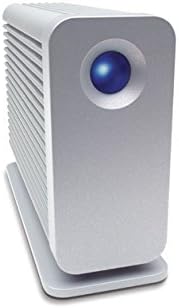
Image: The LaCie Little Big Disk Quadra external hard drive, showcasing konsepsyon kontra enfòmèl ant ak elegant li yo.

Image: The LaCie Little Big Disk Quadra held in a hand, illustrating its portability and small form factor.
Enstalasyon
Kontni pake
The LaCie Little Big Disk Quadra package typically includes:
- LaCie Little Big Disk Quadra unit
- FireWire 400 adapter
- LaCie Setup Assistant software
- Enfòmasyon sou garanti
- Necessary connection cables (e.g., eSATA, FireWire 800, USB 2.0)
Konekte Aparèy la
The Little Big Disk Quadra offers multiple connectivity options: eSATA 3Gbits, 2x FireWire 800, and USB 2.0. Ensure your computer has the necessary ports for your preferred connection type.
- Connect the appropriate data cable (eSATA, FireWire 800, or USB 2.0) from the Little Big Disk Quadra to an available port on your computer.
- If using FireWire 800, the device can often be bus-powered, meaning it draws power directly from the FireWire port. For other connections or if additional power is required, connect the power adapter (if included and necessary for your specific setup).
- The device is designed for plug-and-play functionality with Mac OS X 10.5 Leopard and Windows Vista. For initial setup, formatting, or advanced configuration, run the included LaCie Setup Assistant software.

Imaj: Dèyè view of the LaCie Little Big Disk Quadra, displaying its eSATA, FireWire 800, and USB 2.0 connection ports.

Image: The LaCie Little Big Disk Quadra connected to a laptop computer, demonstrating a typical setup.
Opere Aparèy la
Transfè Done
For optimal performance and high-speed data transfer, connect the Little Big Disk Quadra via eSATA or FireWire 800. These interfaces provide significantly faster burst transfer rates compared to USB 2.0, making them ideal for demanding applications.
Backup and Restoration
The bundled EMC Retrospect Express software facilitates easy backup and restoration of your projects and critical data. Install and configure this software according to its instructions to ensure your data is protected.
Karakteristik avanse
- Daisy-Chaining: The device supports daisy-chaining directly to digital video cameras via FireWire, allowing for streamlined workflows.
- Bootability: The Little Big Disk Quadra offers bootability via FireWire for Mac systems and eSATA for Windows systems, providing flexibility for operating system management.
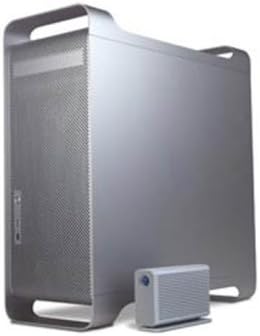
Image: The LaCie Little Big Disk Quadra positioned next to a desktop computer, ready for data operations.
Antretyen
The LaCie Little Big Disk Quadra incorporates a unique, fanless cooling system designed by Neil Poulton. The aluminum casing acts as a large heat sink, efficiently dissipating heat away from the internal drive. This design contributes to quiet operation and enhanced reliability by preventing overheating.
To ensure the longevity and optimal performance of your device:
- Keep the device in a well-ventilated area, ensuring that the heat sink fins are not obstructed.
- Handle the device with care to prevent physical shocks or drops, which can damage the internal hard drive.
- Always safely eject or unmount the drive from your operating system before disconnecting it to prevent data corruption.
Depanaj
If you encounter issues with your LaCie Little Big Disk Quadra, consider the following troubleshooting steps:
Aparèy pa rekonèt
- Tcheke Koneksyon: Ensure all cables (data and power, if applicable) are securely connected to both the device and your computer.
- Eseye pò diferan: Connect the device to a different port on your computer to rule out a faulty port.
- Sous pouvwa: If using FireWire, confirm your FireWire port is providing sufficient bus power. If an external power adapter is available and your setup requires it, ensure it is connected.
- Rekòmanse òdinatè: A simple restart of your computer can often resolve recognition issues.
- Disk Management/Utility: Check your computer's Disk Management (Windows) or Disk Utility (Mac) to see if the drive is detected but requires formatting or initialization.
Vitès transfè done ki ba
- Ensure you are using eSATA or FireWire 800 connections for maximum performance. USB 2.0 offers lower transfer speeds.
- Verify that your computer's ports and cables support the desired interface speed.
Espesifikasyon
| Karakteristik | Detay |
|---|---|
| Dimansyon pwodwi | 3.35 x 1.57 x 5.51 pous |
| Pwa atik | 1.43 liv |
| Nimewo Modèl Atik | 301400U |
| Kapasite depo dijital | 1024 GB (1 TB) |
| Entèfas Disk Difisil | USB 1.1 (Note: Product description indicates USB 2.0, FireWire 800, eSATA) |
| Koneksyon Teknoloji | Firewire, USB, eSATA |
| Mak | LaCie |
| Disk Disk Fòm Faktè | 3.5 pous |
| Deskripsyon Hard Disk | Disk difisil mekanik |
| Aparèy konpatib | Desktop |
| Kalite enstalasyon | Ploge nan |
| Itilizasyon espesifik pou pwodwi | Sovgad |
| Manifakti | LaCie |
| Dat Premye Disponib | 5 jen 2008 |
Enfòmasyon sou Garanti
The LaCie Little Big Disk Quadra comes with a 3-year limited warranty. Please refer to the included warranty documentation for full terms, conditions, and details on how to claim warranty service.
Optional data recovery plans are available for purchase separately to provide additional protection for your stored data.
Sipò
For further assistance, technical support, or to download the latest software and drivers for your LaCie Little Big Disk Quadra, please visit the official LaCie support websit.
You can also find additional product information and resources on the LaCie Store.