
Entwodiksyon
This manual provides detailed instructions for the proper setup, operation, and maintenance of your Kodak EasyShare M893IS Digital Camera. Please read this manual thoroughly before using your camera to ensure optimal performance and longevity.
1. Enstalasyon
1.1. Enstalasyon ak Chaje Batri
The Kodak EasyShare M893IS uses a rechargeable Lithium-Ion battery. Ensure the battery is fully charged before first use.
- Jwenn pòt konpatiman batri a anba oswa sou kote kamera a.
- Slide the latch to open the compartment.
- Insert the Li-Ion battery with the contacts facing inward, ensuring it clicks into place.
- Fèmen pòt konpatiman batri a byen fèm.
- Connect the camera to a power source using the provided USB cable for in-camera charging. The charging indicator light will show the charging status.

Figi 1.1: Side view of the camera, indicating the general location of the battery compartment.
1.2. Enstalasyon Kat Memwa
The camera supports SD/SDHC memory cards (not included). A memory card is required to store photos and videos.
- Open the battery compartment door. The memory card slot is usually located next to the battery.
- Insert the SD/SDHC card into the slot with the metal contacts facing the correct direction (refer to the diagram inside the compartment). Push until it clicks into place.
- Fèmen pòt lòj batri a.
2. Itilizasyon Kamera w la
2.1. Camera Controls Overview
Familiarize yourself with the main controls of your Kodak EasyShare M893IS camera.

Figi 2.1: Devan view of the camera. Key components include the lens, flash, and microphone.
- Bouton pouvwa: Located on the top panel, turns the camera on/off.
- Bouton vole: Peze mwatye pou konsantre, nèt pou pran yon foto.
- Levier Zoom: Controls the 3x optical zoom and 5x digital zoom.
- Kadran/Bouton Mòd: Selects shooting modes (e.g., Auto, Program, Scene modes).
- Ekran LCD: Ekran 2.7 pous pou ankadre foto, reviewimaj, epi navige nan meni yo.
- Directional Pad/OK Button: Itilize pou navigasyon meni ak seleksyon.
- Bouton meni: Aksè a paramèt ak opsyon kamera a.
- Review/Playback Button: Displays captured photos and videos.
- Efase bouton: Removes unwanted images or videos.
- Bouton pataje: For easy sharing options (if configured).
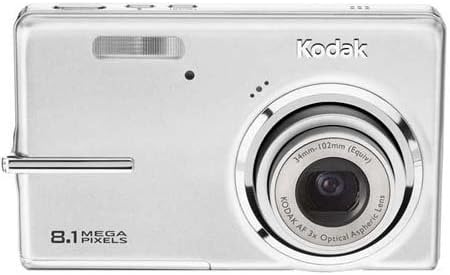
Figi 2.2: Dèyè view of the camera, showing the 2.7-inch LCD and control buttons.
2.2. Pran foto
- Turn on the camera by pressing the Power button.
- Select your desired shooting mode using the Mode dial/button. Common modes include:
- oto: Kamera a ajiste paramèt yo otomatikman pou pifò sitiyasyon yo.
- Mòd sèn: Specific settings for various scenarios like 'Night mode' or 'Sports'.
- Frame your shot using the LCD screen. Use the zoom lever to adjust the 3x optical zoom or 5x digital zoom.
- Press the Shutter button halfway down to allow the camera to focus (Contrast Detection Auto Focus, Multi-zone, Center Spot options available). A green frame indicates focus lock.
- Press the Shutter button fully to capture the image. The camera features optical image stabilization to reduce blur.
- For low-light conditions, adjust the flash mode (Auto, On, Off, Slow Synch) or utilize the High ISO (up to 1600) setting.
2.3. Anrejistreman videyo
- Switch the camera to video recording mode (refer to your camera's mode dial/menu for the video icon).
- Frame your subject on the LCD screen.
- Press the Shutter button to start recording. Press it again to stop.
- Videos are recorded in VGA resolution (640 x 480 at 15 fps or 320 x 240 at 30 fps) in MJPEG format.
2.4. Reviewing and Managing Media
- Peze Re aview/Playback button to view foto ou ak videyo.
- Use the directional pad to scroll through your media.
- To delete an unwanted item, select it and press the Delete button. Confirm deletion when prompted.
- Connect the camera to a computer via USB to transfer files.
3. Antretyen
3.1. Netwaye Kamera a
- Lantiy: Use a soft, lint-free cloth specifically designed for camera lenses. Gently wipe in a circular motion. Avoid using harsh chemicals.
- Ekran LCD: Wipe with a soft, dry microfiber cloth. For stubborn smudges, slightly dampSiye twal la avèk dlo oswa yon pwodui netwayaj ekran.
- Kò kamera: Sèvi ak yon twal mou epi sèk pou siye pousyè ak anprent dwèt.
3.2. Swen batri
- Sere batri a nan yon kote ki fre, sèk lè li pa itilize.
- Evite dechaje batri a nèt souvan pou pwolonje dire lavi li.
- Si w ap sere kamera a pou yon peryòd tan pwolonje, retire batri a.
3.3. Depo
Store the camera in a protective case or bag to prevent scratches and damage from dust or moisture. Avoid extreme temperatures.
NAN. Depanaj
| Pwoblèm | Kòz posib | Solisyon |
|---|---|---|
| Kamera a pa limen. | Batri a dechaje oswa li pa byen mete. | Charge the battery. Ensure the battery is inserted correctly with contacts aligned. |
| Foto yo twoub. | Kamera a ap tranble, sijè a ap deplase, oswa move fokus. | Hold the camera steady. Ensure the subject is within the camera's focus range. Use optical image stabilization. Increase ISO in low light. |
| Mesaj "Erè Kat Memwa". | Memory card is full, corrupted, or incorrectly inserted. | Insert a new or empty SD/SDHC card. Reinsert the card. Format the card (this will erase all data). |
| Flash la pa tire. | Flash la sou "Off" oubyen pil la fèb. | Change flash mode to "Auto" or "On". Charge the battery. |
| Pa ka transfere foto nan òdinatè. | Incorrect USB connection or driver issues. | Ensure USB cable is securely connected to both camera and computer. Try a different USB port. Check computer's device manager for driver issues. |
5. Espesifikasyon
| Karakteristik | Detay |
|---|---|
| Non modèl | Easyshare M893IS |
| Rezolisyon Capteur foto | 8.1 MP |
| Zoom optik | 3x |
| Zoom dijital | 5x |
| Estabilizasyon Imaj | Optik |
| Gwosè ekran | 2.7 pous LCD |
| Sipòte File Fòma | JPEG (Stills), MJPEG (Video) |
| Rezolisyon videyo | 640 x 480 (15 fps), 320 x 240 (30 fps) |
| ISO sansiblite | ISO elaji minimòm 80, ISO elaji maksimòm 1600 |
| Minimòm vitès vole | 4 segonn |
| Maksimòm vitès vole | 1/2000 Segond |
| Mòd Flash | Auto, On, Off, Slow Synch |
| Kalite batri | Lityòm Ion |
| Koneksyon | USB |
| Compatible Flash Memory | SD, SDHC (jiska 32 GB) |
| Pwa atik | 0.35 liv |
| Koulè | Ajan |
6. Enfòmasyon sou Garanti
Your Kodak EasyShare M893IS Digital Camera is covered by a 1-ane garanti limite apati dat acha a. Garanti sa a kouvri domaj fabrikasyon ak atizan konn fè nan itilizasyon nòmal. Li pa kouvri domaj ki koze pa move itilizasyon, aksidan, modifikasyon san otorizasyon, oswa kòz ekstèn.
Please retain your proof of purchase for warranty claims. For detailed terms and conditions, refer to the warranty card included with your product or visit the official Kodak support websit.
7. Sipò pou Kliyan
If you encounter any issues not covered in the troubleshooting section or require further assistance, please contact Kodak Customer Support.
- Sipò sou entènèt: Vizite sipò ofisyèl Kodak la websit pou kesyon yo poze souvan, chofè, ak telechaje lojisyèl.
- Sipò nan telefòn: Gade anbalaj pwodwi w la oswa Kodak la websit pou nimewo kontak rejyonal yo.
- When contacting support, please have your camera model (M893IS) and serial number ready.