
1. Entwodiksyon
The Cherub WMT-568T is a versatile musical instrument accessory designed to assist musicians in developing and maintaining accurate intonation. This device combines a chromatic tuner, a metronome, and a tone generator, offering comprehensive tools for practice and performance. Its primary function is to help users play in tune by providing real-time feedback and reference tones.
Karakteristik kle:
- Chromatic Tuner: Accurately detects and displays the pitch of your instrument.
- Metwonòm: Provides a steady beat with adjustable tempo and rhythm patterns, including voice counting.
- Dèlko Ton: Produces reference tones across a wide range, useful for ear training and intonation practice.
- Intonation Training: Specifically designed to help users learn to play in tune.
2. Enstalasyon
2.1. Enstalasyon batri
The WMT-568T requires two (2) AAA batteries for operation. These are typically included with the device.
- Jwenn kouvèti konpatiman batri a sou dèyè aparèy la.
- Glise oswa deklipe kouvèti a pou ouvri konpatiman an.
- Mete de pil AAA, asire w polarite ki kòrèk la (+ ak -) jan yo endike anndan konpatiman an.
- Ranplase kouvèti lòj batri a byen.
Nòt: If the unit does not power on, check battery polarity or replace with fresh batteries. Remove batteries if the unit will not be used for an extended period to prevent leakage.
2.2. Powering On / Off
Press and hold the power button (usually marked with a power symbol) for a few seconds to turn the unit on or off.
2.3. Konekte Pwodwi
The WMT-568T may include an earbud and a contact microphone. These can be connected to the respective jacks on the unit for private listening or enhanced tuning accuracy in noisy environments.
- Ekoutè: Plug into the headphone jack for audio output.
- Contact Microphone: Plug into the input jack for direct instrument vibration pickup, improving tuning precision.
3. Operasyon Enstriksyon
The WMT-568T features an intuitive interface with dedicated buttons for mode selection and parameter adjustment.
3.1. Seleksyon mòd
Use the "Mode" button to cycle through the available functions: Tuner, Metronome, and Tone Generator.
3.2. Tuner Function
In Tuner mode, the display will show the detected note and an indicator for pitch accuracy.
- Select Tuner mode.
- Jwe yon sèl nòt sou enstriman ou.
- Observe the display:
- The note name (e.g., C, D, E) will be shown.
- A needle or indicator will move to show if the pitch is flat, sharp, or in tune. Adjust your instrument until the indicator is centered.
- Kalibrasyon: If needed, adjust the A4 reference frequency (e.g., 440Hz) using the dedicated calibration buttons, typically marked "A4" or with up/down arrows.
3.3. Fonksyon Metwonòm
The metronome provides a rhythmic click or voice count to help with timing.
- Select Metronome mode.
- Ajisteman Tempo: Use the tempo up/down buttons to set the desired beats per minute (BPM).
- Beat/Rhythm Selection: Use the beat or rhythm buttons to choose the time signature (e.g., 4/4, 3/4) and rhythm pattern. The WMT-568T also offers voice counting.
- Press the "Start/Stop" button to begin or end the metronome.
- Kontwòl Volim: Adjust the metronome volume using the dedicated volume buttons.
3.4. Tone Generator Function
The tone generator produces specific pitches for ear training or tuning by ear.
- Select Tone Generator mode.
- Use the note selection buttons (often up/down arrows or specific note buttons) to choose the desired pitch.
- The unit will play the selected note continuously.
- Octave/Range Adjustment: Some models allow adjusting the octave or range of the generated tones. Refer to the display for current settings.
3.5. Intonation Training
While not a separate mode, the intonation training aspect is integrated into the tuner and tone generator functions. The device provides feedback on how close your played note is to the target pitch, helping you adjust your playing for better intonation.
Konsèy: Use the tone generator to play a reference pitch, then try to match it precisely on your instrument while observing the tuner's feedback. This iterative process helps develop a strong sense of pitch.
4. Antretyen
4.1. Netwayaj
To clean the unit, use a soft, dry cloth. Do not use abrasive cleaners, solvents, or waxes, as these can damage the casing ak ekspozisyon.
4.2. Depo
Store the WMT-568T in a cool, dry place away from direct sunlight and extreme temperatures. If storing for an extended period, remove the batteries to prevent leakage.
NAN. Depanaj
| Pwoblèm | Kòz posib | Solisyon |
|---|---|---|
| Aparèy pa limen. | Pil ki mouri oswa ki mal mete. | Tcheke polarite pil yo. Ranplase pil yo ak pil nèf. |
| Tuner not detecting pitch accurately. | Ambient noise; microphone not positioned correctly; instrument not producing clear tone. | Move to a quieter environment. Ensure contact microphone is securely attached to the instrument. Play notes clearly and sustain them. |
| Metronome sound is too low or absent. | Volume set too low; earbud/speaker issue. | Increase volume. Check earbud connection. Ensure nothing is blocking the internal speaker. |
| Ekran an fèb oswa li ap tranble. | Ba pouvwa batri. | Ranplase pil. |
6. Espesifikasyon
- Modèl: WMT-568T
- Fonksyon: Tuner, Metronome, Tone Generator
- Akor Range: Kwomatik
- A4 Calibration Range: (Typically 430-450Hz, specific range not provided in source)
- Tan Range: (Typically 30-250 BPM, specific range not provided in source)
- Bat: (Commonly 0-9 beats, specific range not provided in source)
- Pouvwa: 2 x AAA pil (enkli)
- Pwa atik: 5.6 ons
- Ekspozisyon: Non-color screen
- Premye dat disponib: 6 avril 2007
7. Garanti ak sipò
Specific warranty information for the Cherub WMT-568T is not provided in this manual. For details regarding warranty coverage, technical support, or service, please refer to the documentation included with your purchase or contact Cherub customer service directly through their official websit.
Manifakti: cheriben
Modèl: WMT-568T
Pwodwi souview
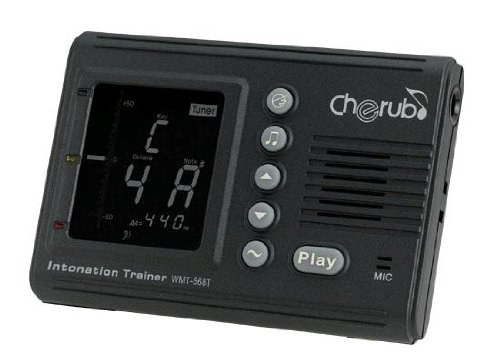
Imaj: Devan view of the Cherub WMT-568T Intonation Trainer, showing its display screen and control buttons. This compact device is designed for musicians to practice tuning, timing, and intonation.