
1. Entwodiksyon
This manual provides detailed instructions for the setup, operation, and maintenance of your Bushnell Onix 200 Portable GPS Navigator. The Onix 200 is designed for outdoor use, offering navigation capabilities with satellite and aerial photos on a 2.7-inch sunlight-readable LCD screen. It features a rugged, waterproof design (IPX7) and 32 MB of internal memory for storing navigational data.
2. Pwodwi souview
2.1 Karakteristik kle
- Navigation with satellite and aerial photos.
- Rugged rubber armor and IPX7 waterproof rating.
- Sunlight-readable 2.7-inch LCD screen.
- Itilizatè Profiles for customized activity settings.
- Night-mode screen viewing opsyon.
- 32 MB internal memory.
- Koneksyon USB.
2.2 Eleman
The Bushnell Onix 200 package typically includes:
- Bushnell Onix 200 GPS Unit
- Mòn ponyèt
- USB kab (pou transfè done ak chaje)
- Manyèl Itilizatè (dokiman sa a)
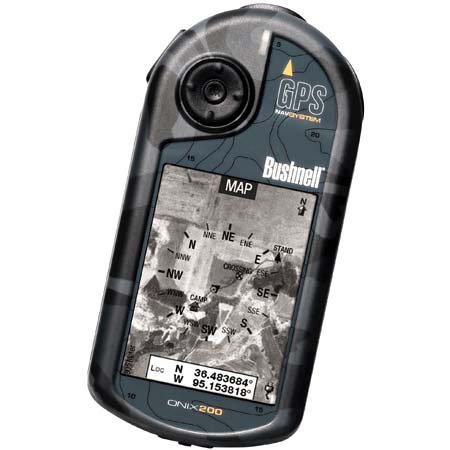
Figure 1: Bushnell Onix 200 handheld GPS unit, showing its rugged design and screen.
3. Enstalasyon
3.1 Enstalasyon batri
The Bushnell Onix 200 does not include batteries. It requires standard AA batteries (not included). To install:
- Jwenn kouvèti konpatiman batri a sou dèyè aparèy la.
- Louvri kouvèti a lè w glise l oswa debloke l dapre mak yo.
- Mete kantite pil AA ki nesesè yo, asire polarite ki kòrèk la (+/-).
- Fèmen kouvèti konpatiman batri a byen fèm pou kenbe sele ki enpèmeyab la.
3.2 Premye Limen ak Paramèt Debaz yo
- Peze epi kenbe bouton pouvwa a jiskaske ekran an limen.
- Upon first use, the device may prompt you to set basic preferences such as language, time zone, and measurement units. Follow the on-screen instructions.
- Allow the device to acquire a GPS signal. This may take several minutes, especially during the first use or after a long period of inactivity. Ensure you are in an open area with a clear view nan syèl la.
3.3 Konekte sou yon òdinatè
Use the provided USB cable to connect the Onix 200 to your computer for data transfer, map updates, or firmware updates. The device is compatible with Windows operating systems.
4. Operasyon Enstriksyon
4.1 Navigation with Satellite/Aerial Photos
The Onix 200 allows you to overlay navigation information directly onto satellite or aerial photographs. This feature provides enhanced situational awareness, especially in unfamiliar terrain.
- Access the map view soti nan meni prensipal la.
- Select the desired map type (e.g., satellite, aerial, USGS map) from the display options.
- Use the touch screen or voice controls to pan, zoom, and interact with the map.
- Your current position will be indicated on the map, along with any loaded waypoints or routes.
4.2 Itilizatè Profiles
The "User Profiles" feature allows you to customize the device's settings and menu options based on your activity (e.g., hiking, fishing, hunting). This streamlines access to relevant functions.
- Navige nan "Pro" afiles" section in the main menu.
- Chwazi yon pwofesyonèl ki egziste dejafile oswa kreye yon nouvo.
- Customize settings such as display preferences, data fields, and shortcut menus for that specific activity.
- Activate the desired profile before starting your activity.
4.3 Mòd lannwit
For low-light conditions, activate the night-mode screen viewing option. This adjusts the display's backlight and color scheme to reduce eye strain and improve visibility in the dark.
- Access display settings from the main menu.
- Toggle the "Night Mode" option to ON.
4.4 Metòd kontwòl
The Onix 200 supports both touch screen and voice control for interacting with the device. Refer to the on-screen prompts and the device's internal help system for specific voice commands.
5. Antretyen
5.1 Netwaye Aparèy la
- Siye ekran an ak eksteryè ak yon mou, damp, twal ki pa gen pèl.
- Do not use abrasive cleaners, solvents, or aerosol sprays, as these can damage the device's finish and screen.
- Ensure all ports are dry before connecting cables.
5.2 Waterproofing Care (IPX7)
The Onix 200 is waterproof to IPX7 standards, meaning it can withstand immersion in water up to 1 meter for 30 minutes. To maintain this rating:
- Ensure the battery compartment cover and any port covers are securely closed before exposure to water.
- Do not intentionally submerge the device beyond its rated depth or duration.
- If the device gets wet, dry it thoroughly before opening any compartments or connecting to power.
5.3 Depo
Store the device in a cool, dry place away from direct sunlight and extreme temperatures when not in use. Remove batteries if storing for extended periods to prevent leakage.
NAN. Depanaj
6.1 Pa gen pouvwa
- Check if batteries are correctly installed and fully charged.
- Ranplase ansyen pil ak nouvo pil.
- Asire w ke bouton pouvwa a byen peze epi kenbe l byen peze.
6.2 Pèt oswa Enpresizyon Siyal GPS
- Asire w ou nan yon zòn ouvè ki klè view of the sky, away from tall buildings, dense foliage, or strong electromagnetic interference.
- Allow the device more time to acquire a signal.
- Perform a soft reset (refer to the device's internal menu for this option, if available).
6.3 Ekran an pa reponn
- Asire w ke ekran an pwòp epi sèk.
- If the touch screen is resistive, apply firm but gentle pressure.
- Rekòmanse aparèy la.
6.4 Device Not Connecting to Computer
- Verifye ke kab USB a byen konekte ak tou de aparèy la ak òdinatè a.
- Eseye yon pò USB diferan sou òdinatè w lan.
- Ensure necessary drivers are installed on your Windows operating system.
For further assistance, please refer to the official Bushnell support resources.
7. Espesifikasyon
| Karakteristik | Spesifikasyon |
|---|---|
| Mak | Bushnell |
| Non modèl | Onix 200 |
| Nimewo Modèl | 36-2000 |
| Gwosè ekran | 2.7 pous |
| Rezolisyon | 160 x 240 |
| Kalite ekspozisyon | LCD |
| Kalite ekran manyen | Rezistan |
| Kapasite Depo memwa | 32 MB |
| Koneksyon Teknoloji | USB |
| Kalite kat jeyografik | Satelit |
| Sipòte Sistèm Navigasyon Satelit | GPS |
| Karakteristik espesyal | Enpèmeyab (IPX7) |
| Metòd kontwòl | Manyen, Vwa |
| Sistèm operasyon | Windows (for PC connection) |
| Dimansyon (W x H x P) | 1.1 x 8.0 x 2.2 pous |
| Pwa atik | 15.2 ons |
| Batri enkli | No (Requires AA) |
| UPC | 029757362001 |
8. Garanti ak sipò
For detailed warranty information, product registration, and technical support, please visit the official Bushnell websit oswa kontakte depatman sèvis kliyan yo.
Ou ka jwenn plis enfòmasyon ak resous sipò nan Magazen Bushnell sou Amazon.