
1. Entwodiksyon
Welcome to the user manual for your new Singing Machine SMVG-620 CD+G Karaoke System. This system is designed to provide hours of entertainment with its CD+G playback capabilities, built-in camera, 5.5-inch monitor, and AM/FM radio. Please read this manual thoroughly before operating your unit to ensure proper use and to maximize your enjoyment.
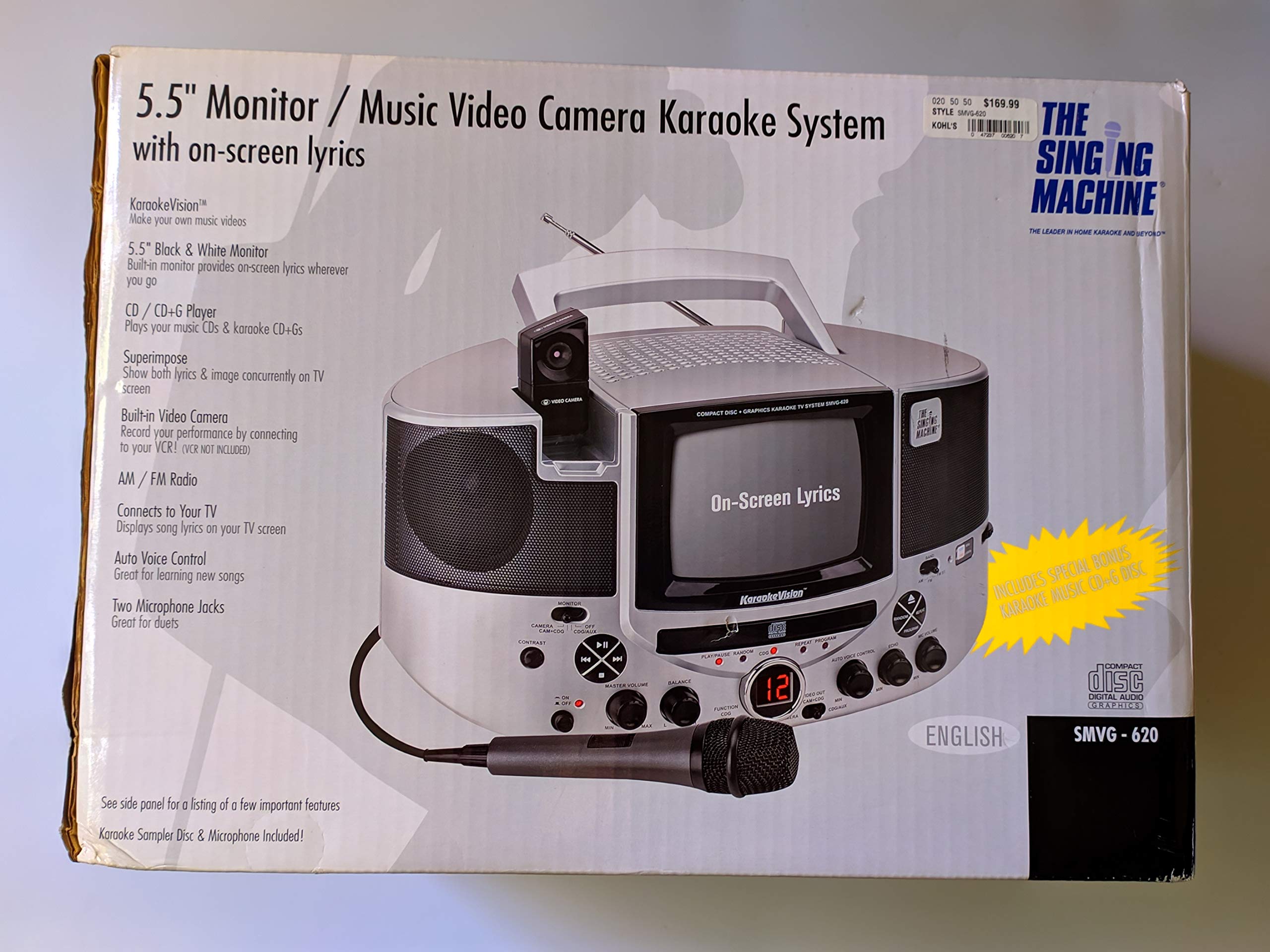
Figi 1.1: The Singing Machine SMVG-620 CD+G Karaoke System.
For optimal performance and safety, always follow the instructions and warnings provided.
2. Enfòmasyon enpòtan sou sekirite
- Li Enstriksyon: Tout sekirite ak enstriksyon operasyon yo ta dwe li anvan aparèy la ap opere.
- Kenbe enstriksyon yo: Enstriksyon sekirite ak operasyon yo ta dwe konsève pou referans nan lavni.
- Fè atansyon avètisman yo: Tout avètisman sou aparèy la ak nan enstriksyon yo opere yo ta dwe respekte.
- Swiv enstriksyon yo: Tout enstriksyon operasyon ak itilizasyon yo ta dwe swiv.
- Dlo ak imidite: Pa sèvi ak aparèy sa a toupre dlo.
- Netwayaj: Netwaye sèlman ak yon twal sèk.
- Vantilasyon: Pa bloke okenn ouvèti vantilasyon. Enstale li dapre enstriksyon manifakti a.
- Chalè: Pa enstale tou pre okenn sous chalè tankou radyatè, rejis chalè, recho, oswa lòt aparèy (tankou amplifiers) ki pwodui chalè.
- Pouvwa-kòd Pwoteksyon: Pwoteje kòd elektrik la pou yo pa mache oswa kwense, sitou nan priz, resipyan konvenyans, ak pwen kote yo sòti nan aparèy la.
- Atachman/akseswa: Itilize sèlman atachman/akseswa manifakti a espesifye.
- Zeklè: Deploge aparèy sa a pandan tanpèt zèklè oswa lè li pa itilize pou yon peryòd tan ki long.
- Sèvis: Refere tout sèvis yo bay pèsonèl sèvis ki kalifye yo. Antretyen obligatwa lè aparèy la te domaje nan okenn fason.
3. Pake kontni
Carefully unpack your Singing Machine SMVG-620 system and ensure all items listed below are present and in good condition.
- SMVG-620 CD+G Karaoke System
- One (1) Microphone
- Sampler CD+G Disc
- Audio/Video RCA Cables
- AC pouvwa adaptè
- Manyèl Enstriksyon

Figi 3.1: Contents of the box, including the microphone, RCA cables, and the instruction manual.
4. Pwodwi souview
Familiarize yourself with the various parts and controls of your SMVG-620 Karaoke System.

Figi 4.1: Dèyè view of the product packaging highlighting key features and components of the SMVG-620 system.
Karakteristik kle:
- 5.5" Black & White Monitor: For on-screen lyrics from CD+G discs.
- Built-in Color Camera: Allows you to see yourself on the monitor or connected TV.
- Dual Microphone Jacks: Connect two microphones for duets (one microphone included).
- Radyo AM/FM: Konekte sou estasyon radyo ou pi renmen yo.
- CD + G jwè: Plays standard audio CDs and CD+Graphics discs.
- Kontwòl Vwa Otomatik (AVC): Helps maintain vocal balance by automatically reducing the main vocal track when you sing.
- Kontwòl eko: Adds depth and resonance to your voice.
- Professional Style Microphone: For clear vocal pickup.
- Sòti odyo/videyo: Connects to your TV for larger screen display and enhanced audio.
5. Enstalasyon
5.1 Koneksyon pouvwa
- Ensure the unit is placed on a stable, flat surface.
- Connect the AC power adapter to the DC IN jack on the back of the SMVG-620 unit.
- Plug the other end of the AC power adapter into a standard wall outlet (AC 120V ~ 60Hz).
5.2 Konekte ak yon Televizyon
Pou view lyrics on a larger screen and enhance audio, connect the SMVG-620 to your television using the supplied Audio/Video RCA cables.
- Locate the AUDIO OUT (white and red) and VIDEO OUT (yellow) jacks on the back of the SMVG-620.
- Connect the white plug of the RCA cable to the white AUDIO OUT jack on the karaoke system and to the white AUDIO IN jack on your TV.
- Connect the red plug of the RCA cable to the red AUDIO OUT jack on the karaoke system and to the red AUDIO IN jack on your TV.
- Connect the yellow plug of the RCA cable to the yellow VIDEO OUT jack on the karaoke system and to the yellow VIDEO IN jack on your TV.
- Turn on your TV and select the correct A/V input source (e.g., AV1, Video 1) that corresponds to the jacks you used.
5.3 Koneksyon Mikwofòn
Plug the microphone into either the MIC 1 or MIC 2 jack on the front of the SMVG-620 unit.
6. Operasyon
6.1 Limen/Etenyen
Peze a POUVWA button located on the front panel to turn the unit ON or OFF.
6.2 CD+G Playback
- Open the CD compartment door and carefully place a CD+G disc (or standard audio CD) onto the spindle with the label side facing up. Close the door.
- Chwazi CD+G mode using the FUNCTION selector.
- Peze a JWE/POZ bouton pou kòmanse lecture.
- Ajiste a MÈT VOLIM bouton an nan nivo koute ou vle a.
- Sèvi ak la SOTE bouton (<< or >>) to navigate between tracks.
- Pou fè yon poz, peze JWE/POZ ankò. Peze ankò pou rekòmanse.
- Pou sispann lèktur, peze la SISPANN bouton.
6.3 Itilizasyon Mikwofòn
- Ensure the microphone is connected to a MIC jack.
- Ajiste a VOLIM MIC knob to control the microphone's output level.
- Vire a EKO knob to add an echo effect to your voice.
- La AUTO VOICE CONTROL (AVC) switch can be toggled ON/OFF. When ON, the original vocal track on a CD+G disc will be reduced when you sing into the microphone.
Radyo 6.4 AM/FM
- Chwazi AM or FM mode using the FUNCTION selector.
- Lonje antèn FM lan pou yon pi bon resepsyon.
- Vire a REGLAGE bouton an pou chwazi estasyon radyo ou vle a.
- Ajiste a MÈT VOLIM bouton.
6.5 Fonksyon Kamera
The built-in camera allows you to display your image on the 5.5-inch monitor or a connected TV.
- Ensure the unit is powered on and connected to a TV if you wish to use an external display.
- The camera feed will automatically display when the unit is in CD+G or Video mode, or when no other video source is active.
7. Antretyen
7.1 Netwaye inite a
- Toujou deploge aparèy la nan priz kouran anvan w netwaye.
- Sèvi ak yon twal mou, sèk pou netwaye sifas eksteryè yo.
- Pa sèvi ak pwodui netwayaj abrazif, sir, oswa solvan paske yo ka domaje fini an.
- Pou lantiy CD a, sèvi ak yon disk netwayaj lantiy CD espesyalize.
7.2 Swen CD
- Manyen CD yo nan kwen yo pou evite mak anprent sou sifas kote y ap jwe yo.
- Kenbe disk yo nan bwat yo lè w pa ap itilize yo pou evite yo reyur.
- Netwaye disk yo ak yon twal mou ki pa gen pousyè, siye yo soti nan sant la pou rive deyò.
NAN. Depanaj
If you encounter any issues with your SMVG-620, please refer to the following common problems and solutions.
| Pwoblèm | Kòz posib | Solisyon |
|---|---|---|
| Pa gen pouvwa | Kòd kouran pa konekte byen. | Asire w adaptè AC a byen branche nan aparèy la ak nan yon priz miray ki fonksyone. |
| Pa gen son ki soti nan moun kap pale | Master Volume is too low. Incorrect function mode selected. | Increase the MASTER VOLUME. Select the correct FUNCTION (CD+G, AM, FM). |
| Pa gen son nan mikwofòn | Mikwofòn nan pa konekte. MIC VOLUME is too low. Chanjman mikwofòn nan sou OFF. | Plug microphone into MIC 1 or MIC 2 jack. Increase the MIC VOLUME. Ensure microphone switch is ON. |
| No video on TV / No lyrics | RCA cables not connected correctly. Incorrect TV input selected. Not a CD+G disc. | Check all RCA cable connections (yellow for video). Select the correct A/V input on your TV. Ensure you are playing a CD+G disc for lyrics. |
| CD sote | Disk se sal oswa grate. Inite a sou yon sifas ki pa estab. | Clean the disc or try another disc. Place the unit on a stable, vibration-free surface. |
9. Espesifikasyon
| Nimewo Modèl | SMVG-620 (SIN SMVG620) |
| Sous pouvwa | AC 120V ~ 60Hz (via AC Adapter) |
| Siveye | 5.5-inch Black & White |
| Konte Oratè | 2 |
| Aparèy konpatib | Televizyon |
| Kalite Medya | CD, CD+G |
| Dimansyon pwodwi (LxWxH) | 35.8 x 20.8 x 19.3 cm (14.1 x 8.2 x 7.6 pous) |
| Pwa atik | 3.9 kg (8.6 liv) |
10. Garanti ak sipò
For warranty information and customer support, please refer to the warranty card included with your product or contact The Singing Machine directly. You may also consult your retailer for details regarding their return and warranty policies.
Manifakti: MACHIN POU KANTE