
1. Entwodiksyon
Thank you for choosing the Pyramid 903G 10 Band Half-DIN Graphic Equalizer Amplifier. This unit is designed to enhance your car audio system by providing precise sound control and amplification. Please read this manual thoroughly before installation and operation to ensure proper use and optimal performance.
2. Enfòmasyon enpòtan sou sekirite
- Enstalasyon pwofesyonèl rekòmande: Due to the complexity of car audio wiring, professional installation is highly recommended. Incorrect wiring can damage the unit or your vehicle's electrical system.
- Sous pouvwa: This unit is designed for 12V DC negative ground systems only. Do not attempt to use it with other voltage sistèm yo.
- Vantilasyon: Ensure adequate ventilation around the unit. The unit can generate heat during operation. Avoid installing in enclosed spaces without airflow.
- Fil elektrik: Always disconnect the vehicle's battery before performing any wiring. Use appropriate gauge wires for power and speaker connections.
- Imidite: Pa ekspoze aparèy la ak imidite oswa dlo.
- Pwoteksyon Fuse: Ensure proper fuse protection is in place for the power supply.
3. Pwodwi souview
3.1 Karakteristik
- Half-DIN Design (1-Inch Tall)
- 10 Band Graphic Equalizer with 12dB Boost/Cut per band
- Pouvwa On/Off switch
- Dual Channel Multi-Colored Power Level Indicators
- 100 Watts x 2 Maximum Output
- 2/4 Speaker Hook-up Capability
- Kontwòl fader
- Common or Floating Ground
- Automatic Overload Sensing Circuit
3.2 Kontni pake a
Tanpri verifye ke tout atik yo prezan:
- Pyramid 903G Equalizer Amplifier Inite
- Materyèl pou monte (vis, sipò)
- Wiring Harness (if included)
- Manyèl Itilizatè (dokiman sa a)
3.3 Kontwòl Panel Front
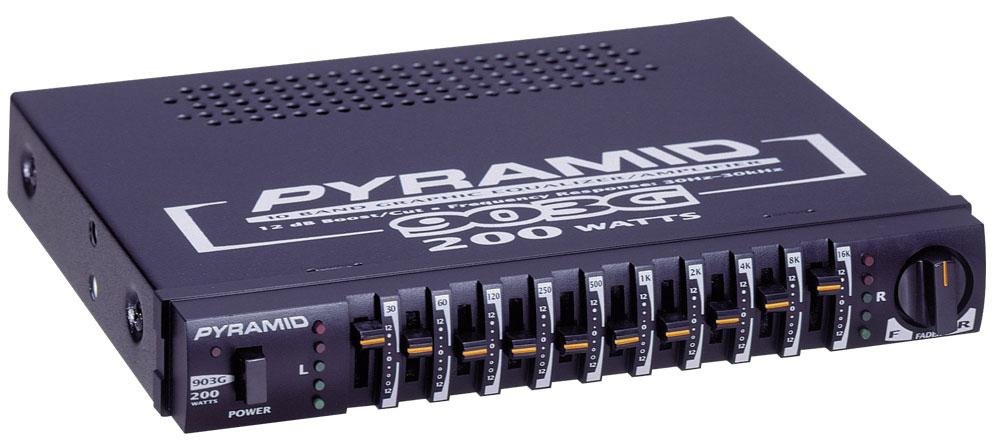
Figi 1: Devan view of the Pyramid 903G Graphic Equalizer Amplifier. This image shows the 10 equalizer bands, power switch, fader control, and multi-colored power level indicators.
- Equalizer Bands (1-10): Sliders for adjusting specific frequency ranges.
- Pouvwa ON / OFF switch: Toggles the unit's power.
- Kontwòl Fader: Adjusts the balance between front and rear speakers.
- Power Level Indicators: Multi-colored LEDs indicating output power levels.
4. Enstalasyon ak fil elektrik
Before beginning installation, ensure the vehicle's battery is disconnected to prevent electrical shorts. This unit is designed for 12V DC negative ground systems.
4.1 Montaj
- The 903G features a Half-DIN design, allowing for flexible installation in various vehicle dashboards or consoles.
- Choose a location that provides adequate ventilation to dissipate heat, as the unit can become warm during operation.
- Secure the unit using the provided mounting hardware.
4.2 Koneksyon fil elektrik
Refer to the wiring diagram (if provided with your unit) for specific connections. The following describes general wiring principles:
- Pouvwa (fil WOUJ): Connect to a switched 12V DC power source (e.g., ignition wire) that turns on and off with the vehicle's ignition. Ensure this connection is fused.
- Tè (fil NWA): Connect securely to a clean, unpainted metal chassis point in the vehicle. A poor ground connection can lead to noise (ground loops).
- Remote Turn-On (BLUE wire - if present): Connect to the remote output of your head unit. This will turn the equalizer on and off with your head unit.
- Antre odyo: Connect the speaker outputs from your head unit to the corresponding input terminals on the 903G. The unit supports 2 or 4 speaker hook-up.
- Sòti Oratè: Connect your vehicle's speakers to the output terminals of the 903G. Ensure correct polarity (+ to + and - to -). The unit supports 4-8 Ohm output impedance.
Note: The unit's wiring may be angled downwards, which can reduce effective wire length. Plan your wire routing accordingly.
5. Operasyon
Once installed and wired correctly, follow these steps to operate your Pyramid 903G:
- Pouvwa sou: Turn on your vehicle's ignition and your head unit. If wired correctly, the 903G should power on automatically or by using its Power ON/OFF switch. The multi-colored power level indicators will illuminate.
- Initial Sound Check: Start with all equalizer bands set to the center (flat) position. Play a familiar audio track.
- Adjust Fader Control: Use the Fader control to balance the sound between your front and rear speakers to your preference.
- Egalizasyon: Adjust the 10 equalizer band sliders to fine-tune the audio frequencies. Each band allows for up to 12dB of boost or cut.
- Lower frequencies (leftmost sliders) control bass.
- Mid-range frequencies (middle sliders) control vocals and instruments.
- Higher frequencies (rightmost sliders) control treble and clarity.
- Monitor Power Level Indicators: The multi-colored LEDs provide a visual indication of the amplifier's output. Avoid consistently high levels that may indicate clipping or distortion.
6. Antretyen
- Netwayaj: Use a soft, dry cloth to clean the unit's exterior. Do not use harsh chemicals or abrasive cleaners.
- Vantilasyon: Periodically check that the ventilation areas are not obstructed by dust or debris.
- Koneksyon: Ensure all wiring connections remain secure. Loose connections can lead to intermittent sound or noise.
NAN. Depanaj
| Pwoblèm | Kòz posib | Solisyon |
|---|---|---|
| Pa gen kouran / Aparèy la pa limen |
|
|
| Pa gen pwodiksyon son |
|
|
| Engine noise (whine, hiss) |
|
|
| Inite a vin twò cho |
|
|
8. Espesifikasyon
| Nimewo Modèl | 903G |
| Design | Half-DIN (1-Inch Tall) |
| Bann Equalizer | 10 Gwoup Mizik |
| Ranfòse / Koupe Range | +/- 12dB per band |
| Maksimòm Sorti pouvwa | 100 Watt x 2 |
| Speaker Hook-up | 2/4 Speaker |
| Repons Frekans | 30Hz - 30kHz |
| Enpedans Sòti | 4-8 Ohm |
| Sistèm pouvwa | 12V DC Tè negatif |
| Dimansyon (L x W x H) | 5-Inch x 7-Inch x 1-Inch (Product) |
| Pwa | 1.7 pounds (Product) |
9. Enfòmasyon sou Garanti
The Pyramid 903G comes with a 1-ANE limited warranty from the date of purchase. This warranty covers manufacturing defects in materials and workmanship under normal use. It does not cover damage resulting from improper installation, accident, misuse, abuse, neglect, unauthorized modification, or normal wear and tear. Please retain your proof of purchase for warranty claims.
10. Sipò pou Kliyan
For technical assistance, troubleshooting, or warranty inquiries, please contact Pyramid customer support. Refer to the official Pyramid websit entènèt la oswa dokiman acha ou a pou jwenn enfòmasyon kontak ki pi resan yo.
Note: When contacting support, please have your product model number (903G) and proof of purchase readily available.