
1. Entwodiksyon
Mèsi pou acha aasing the GPX BCD2004 Boombox. This portable audio system features a top-loading CD player and an AM/FM tuner, designed for versatile audio playback. This manual provides essential information for setting up, operating, and maintaining your device to ensure optimal performance and longevity.
2. Enfòmasyon sou Sekirite
- Li Enstriksyon: Carefully read all operating instructions before using the unit.
- Kenbe enstriksyon yo: Kenbe manyèl sa a pou referans nan lavni.
- Dlo ak imidite: Pa ekspoze aparèy sa a anba dlo k ap degoute oswa k ap voye dlo. Pa mete objè ki plen likid, tankou vaz, sou aparèy la.
- Vantilasyon: Asire bon vantilasyon. Pa bloke okenn ouvèti vantilasyon.
- Chalè: Pa mete l toupre sous chalè tankou radyatè, recho, recho, oswa lòt aparèy (ki gen ladan amplifiers) ki pwodui chalè.
- Sous pouvwa: Use only the power source indicated on the appliance.
- Batri: Follow battery safety guidelines. Do not mix old and new batteries, or different types of batteries. Remove batteries if the unit is not used for extended periods.
- Sèvis: Refere tout sèvis yo bay pèsonèl sèvis kalifye.
3. Pake kontni
Tanpri verifye si atik sa yo enkli nan pakè ou a:
- GPX BCD2004 Boombox Unit
- AC pouvwa kòd
- Manyèl itilizatè
4. Kontwòl ak Karakteristik Plis paseview
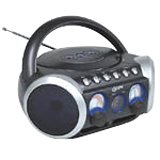
Figi 1: Devan view of the GPX BCD2004 Boombox. This image shows the overall design of the boombox, including the speaker grilles and the general layout of the front panel.
Familiarize yourself with the main controls and features of your boombox:
- Konpatiman CD: Top-loading bay for inserting CDs.
- Chanjman fonksyon: Selects between CD, AM, FM, and OFF modes.
- Kontwòl Volim: Rotary dial to adjust the audio output level.
- Akò Dial: Rotary dial for selecting AM or FM radio frequencies.
- Bouton jwe/poz: Starts or temporarily stops CD playback.
- Bouton Stop: Sispann lekti CD.
- Skip/Search Buttons (◀◀ / ▶▶): Skips to the previous/next track or searches within a track.
- Bouton Pwogram: Used to program a sequence of tracks for CD playback.
- Bouton repete: Repeats the current track or the entire CD.
- AM/FM Antenna: Telescopic antenna for FM reception, internal antenna for AM.
- AC pouvwa Antre: Jack for connecting the AC power cord.
- Lòj batri: Located on the bottom or rear for 'C' batteries.
- Fold-down Carrying Handle: Pou portabilite fasil.
5. Enstalasyon
5.1 Mete aparèy la an fonksyon
Your GPX BCD2004 Boombox can be powered by either AC power or batteries.
AC pouvwa Operasyon
- Ensure the Function Switch is in the OFF position.
- Insert the small end of the AC power cord into the AC power input jack on the back of the unit.
- Plug the other end of the AC power cord into a standard AC wall outlet (120V ~ 60Hz).
Batri pouvwa operasyon
For portable use, the boombox requires 8 'C' size batteries (not included).
- Ensure the Function Switch is in the OFF position.
- Open the battery compartment cover located on the bottom or rear of the unit.
- Insert 8 'C' size batteries, observing the correct polarity (+ and -) as indicated inside the compartment.
- Fèmen kouvèti lòj batri a byen.
- Nòt: When operating on battery power, disconnect the AC power cord from the unit.
6. Operating the CD Player
The GPX BCD2004 is compatible with standard audio CDs, CD-R, and CD-RW discs.
6.1 Chaje yon CD
- Lift the CD compartment door located on the top of the unit.
- Mete yon CD sou aks santral la ak bò etikèt la anlè.
- Gently close the CD compartment door until it clicks shut.
6.2 Lekti CD debaz
- Mete Chanjman Fonksyon an nan pozisyon CD.
- The CD player will begin to read the disc. The track number will typically display.
- Press the PLAY/PAUSE (▶/██) button to start playback.
- Adjust the Volume Control to your desired listening level.
- To pause playback, press the PLAY/PAUSE (▶/██) button. Press it again to resume.
- To stop playback, press the STOP (■) button.
6.3 Skipping and Searching Tracks
- Sote Track: During playback, press the SKIP/SEARCH FORWARD (▶▶) button to go to the next track. Press the SKIP/SEARCH BACKWARD (◀◀) button to go to the beginning of the current track, or press it twice to go to the previous track.
- Search Within Track: During playback, press and hold the SKIP/SEARCH FORWARD (▶▶) or SKIP/SEARCH BACKWARD (◀◀) button to fast forward or rewind through the current track. Release the button to resume normal playback.
6.4 Program Play
Ou ka pwograme jiska 16 mizik pou jwe nan yon lòd espesifik.
- In STOP mode, press the PROGRAM button. The program indicator will flash.
- Use the SKIP/SEARCH buttons (◀◀ / ▶▶) to select your desired first track.
- Press the PROGRAM button again to confirm the selection.
- Repeat steps 2 and 3 to add up to 16 tracks to your program list.
- After programming all desired tracks, press the PLAY/PAUSE (▶/██) button to start programmed playback.
- To clear the program, press the STOP (■) button twice.
6.5 Repeat Play
During CD playback, press the REPEAT button:
- Peze yon fwa pou Repete 1 (repeats the current track).
- Press twice for Repete tout (repeats the entire CD or programmed tracks).
- Press a third time to cancel repeat function.
7. Operating the AM/FM Radio
7.1 Tuning to Radio Stations
- Set the Function Switch to either the AM or FM position.
- Adjust the Tuning Dial to select your desired radio station.
- Adjust the Volume Control to your desired listening level.
7.2 Improving Radio Reception
- Resepsyon FM: Extend the telescopic antenna fully and adjust its position for the best reception.
- Resepsyon AM: The unit has a built-in AM antenna. Rotate the entire boombox for optimal AM reception.
8. Antretyen
8.1 Netwaye inite a
- Siye eksteryè inite a ak yon mou, damp twal. Pa sèvi ak pwodui netwayaj abrazif oswa solvang.
- For the CD lens, use a specialized CD lens cleaner disc or a soft, lint-free cloth specifically designed for optical lenses.
8.2 Swen Batri
- Retire pil yo si ou pa pral itilize aparèy la pou yon peryòd tan pwolonje pou anpeche flit.
- Jete pil yo itilize yon fason responsab selon règleman lokal yo.
NAN. Depanaj
If you experience issues with your boombox, please refer to the following common problems and solutions:
| Pwoblèm | Kòz posib | Solisyon |
|---|---|---|
| Pa gen pouvwa | AC cord not connected; Batteries dead or incorrectly inserted; Function switch OFF. | Check AC cord connection; Replace batteries or check polarity; Set Function switch to CD, AM, or FM. |
| CD a pa ap jwe | CD inserted incorrectly; CD dirty or scratched; CD compartment door open; Function switch not on CD. | Insert CD with label side up; Clean or replace CD; Close CD door securely; Set Function switch to CD. |
| Resepsyon radyo pòv | Antenna not extended/adjusted; Weak signal. | Extend and adjust FM antenna; Rotate unit for AM reception; Try a different location. |
| Pa gen son oswa volim ki ba | Volume too low; Unit in pause mode. | Increase volume; Press Play/Pause button to resume playback. |
10. Espesifikasyon
- Modèl: BCD2004
- Mak: GPX
- CD konpatibilite: CD, CD-R, CD-RW
- Sentonizè radyo: AM/FM
- Sous pouvwa: AC 120V ~ 60Hz or 8 x 'C' Batteries (not included)
- Oratè: 2 Full-range speakers
- Dimansyon (apeprè): 33.02 x 27.94 x 17.02 cm (L x W x H)
- Pwa (apeprè): 2.18 kg
- Karakteristik: 16-track programming, Repeat play, Song skip/search, Fold-down carrying handle
11. Garanti ak sipò
This GPX BCD2004 Boombox comes with a 90-jou garanti apati dat acha orijinal la. Garanti sa a kouvri domaj nan materyèl ak nan fabrikasyon anba itilizasyon nòmal.
For warranty service or technical support, please refer to the contact information provided with your purchase documentation or visit the official GPX website. Please have your model number (BCD2004) and proof of purchase ready when contacting support.