
1. Entwodiksyon
The Extech Instruments HW30 HeatWatch is a multi-function stopwatch designed to provide essential environmental data alongside precise timing capabilities. This device displays digital up/down timer functions, current temperature, humidity, and calculates the heat index, which indicates how hot it feels when humidity is combined with the actual temperature. It is an ideal tool for monitoring conditions in various environments, particularly those with hot weather. Additional features include a 12/24-hour clock, a standard stopwatch, 30 lap/split memory, and a programmable alarm.
2. Karakteristik kle
- Multi-function stopwatch with digital display.
- Integrated up/down timer.
- Real-time temperature display.
- Real-time humidity display.
- Heat Index calculation for perceived temperature.
- 12/24-hour clock display.
- Stopwatch function with 30 lap/split memory.
- Fonksyon alam pwogramasyon.
3. Pake kontni
Verifye ke tout atik yo prezan epi yo an bon kondisyon lè w ap ouvri pake a:
- HW30 HeatWatch Humidity and Temperature Stopwatch
- Lanyard
- 1 x Lithium Metal Battery (installed or separate)
- Enstriksyon Operasyon (manyèl sa a)
4. Pwodwi souview
The HW30 HeatWatch features a robust design with clearly labeled buttons for easy operation and a large LCD for clear readings.

Figi 4.1: Devan view of the Extech HW30 HeatWatch, showing the display and control buttons.

Figi 4.2: Detaye view of the HW30 display, indicating humidity (50%), temperature (86°F), and heat index (88°).
4.1. Kontwòl ak Ekspozisyon
- Bouton START/STOP: Initiates and pauses timing functions.
- Bouton MODE: Cycles through different operating modes (Time, Stopwatch, Humidity/Temperature/Heat Index, Alarm).
- LAP/SPLIT/RESET Button: Records lap/split times or resets the stopwatch.
- Bouton RAPPEL: Accesses stored lap/split memory.
- Ekspozisyon LCD: Shows time, measurements, and function indicators.
5. Enstalasyon
5.1. Enstalasyon batri
The HW30 HeatWatch requires one Lithium Metal battery for operation. The battery is typically included with the device.
- Jwenn kouvèti konpatiman batri a sou dèyè aparèy la.
- Use a small screwdriver or coin to open the battery compartment.
- Insert the Lithium Metal battery, ensuring correct polarity (+/-) as indicated inside the compartment.
- Ranplase kouvèti lòj batri a epi an sekirite li.
Nòt: Jete pil yo itilize yon fason responsab selon règleman lokal yo.
6. Operasyon Enstriksyon
This section details the various functions and modes of the HW30 HeatWatch.
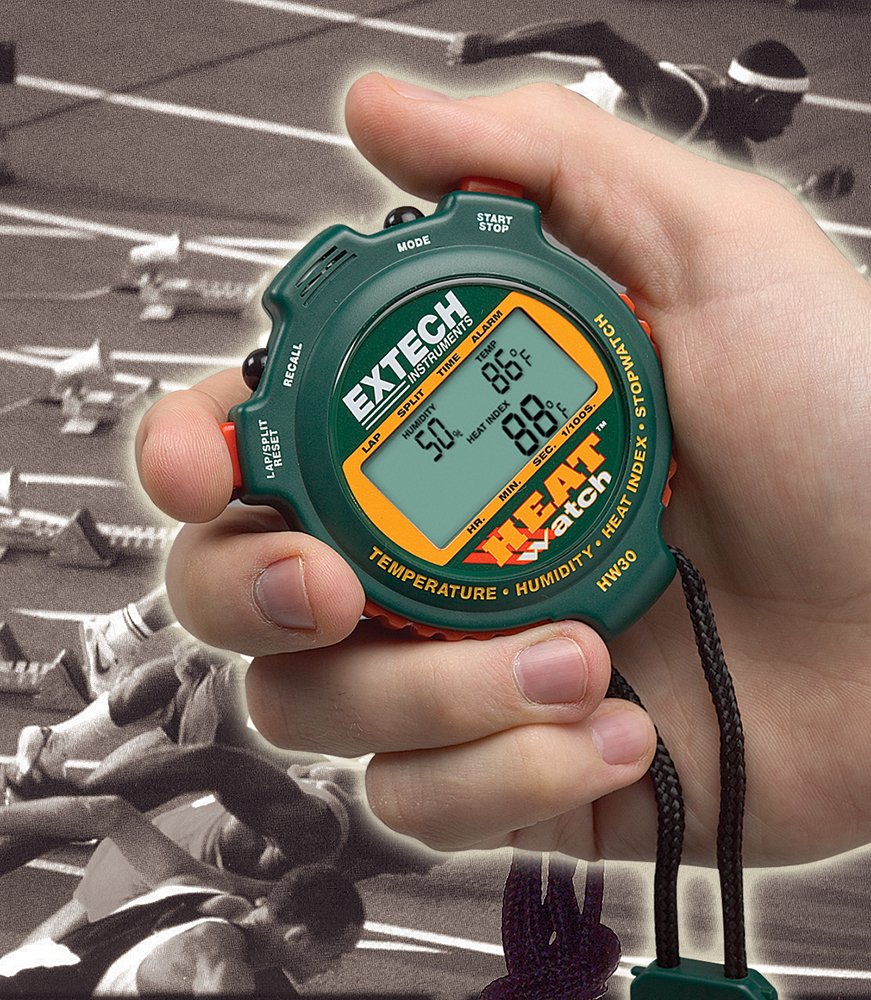
Figure 6.1: The HW30 HeatWatch being held, demonstrating its portable and ergonomic design for active use.
6.1. Operasyon debaz ak seleksyon mòd
Peze a MÒD bouton an pou chanje mòd ekspozisyon sa yo:
- Mòd tan: Montre lè aktyèl la (nan fòma 12 oswa 24 èdtan).
- Mode kronomètr: For timing events, including lap/split functions.
- Humidity/Temperature/Heat Index Mode: Shows environmental readings.
- Mòd alam: For setting and activating the programmable alarm.
6.2. Mete lè ak dat
- Nan Mòd Tan, peze epi kenbe bouton an MÒD button until the time digits begin to flash.
- Sèvi ak la KÒMANSE/KANPE bouton an pou ajiste chif ki ap flache a (èdtan, minit, segonn).
- Peze a LAP/SPLIT/RESET button to move to the next digit or setting (e.g., 12/24-hour format, date).
- Yon fwa tout paramèt yo konfigire, peze bouton an MÒD button to exit setup.
6.3. Using the Stopwatch Functions
- Switch to Stopwatch Mode using the MÒD bouton.
- Peze KÒMANSE/KANPE pou kòmanse distribisyon.
- Peze LAP/SPLIT/RESET to record a lap or split time. The display will momentarily show the recorded time while the stopwatch continues to run in the background.
- Peze KÒMANSE/KANPE ankò pou mete kronomèt la sou poz.
- Pou rekòmanse, peze KÒMANSE/KANPE. Pou reset, peze LAP/SPLIT/RESET pandan kronomèt la mete an poz.
- To recall stored lap/split times, press the RAPPEL button in Stopwatch Mode. Use LAP/SPLIT/RESET to scroll through memory.
6.4. Humidity, Temperature, and Heat Index Measurement
The HW30 automatically measures and displays humidity, temperature, and calculates the heat index in the dedicated mode.
- Switch to Humidity/Temperature/Heat Index Mode using the MÒD bouton.
- The display will show the current humidity percentage, temperature (in °F or °C), and the calculated heat index.
- Allow a few minutes for the sensors to stabilize and provide accurate readings, especially when moving the device between environments with different conditions.
6.5. Mete alam la
- Switch to Alarm Mode using the MÒD bouton.
- Peze epi kenbe la MÒD button until the alarm time digits begin to flash.
- Sèvi ak la KÒMANSE/KANPE button to adjust the flashing digit (hours, minutes).
- Peze a LAP/SPLIT/RESET bouton an pou chanje ant èdtan ak minit.
- Yon fwa ou fin fikse lè alam ou vle a, peze bouton an MÒD bouton pou konfime.
- Pou aktive oswa dezaktive alam lan, peze bouton an KÒMANSE/KANPE button in Alarm Mode. An alarm icon will appear on the display when activated.
7. Antretyen
7.1. Netwayaj
- Siye inite a avèk yon mou, damp twal. Pa sèvi ak pwodui netwayaj abrazif oswa solvang.
- Ensure the device is dry before storage or further use.
7.2. Depo
- Store the HW30 in a cool, dry place away from direct sunlight and extreme temperatures.
- If storing for extended periods, it is recommended to remove the battery to prevent leakage.
7.3. Ranplasman batri
Replace the battery when the display becomes dim or the unit ceases to function. Refer to Section 5.1 for battery installation instructions.
NAN. Depanaj
This section addresses common issues you might encounter with your HW30 HeatWatch.
| Pwoblèm | Kòz posib | Solisyon |
|---|---|---|
| Pa gen ekspozisyon oswa ekspozisyon fèb | Batri fèb oswa mouri; Enstalasyon batri ki pa kòrèk. | Replace the battery; Ensure battery is installed with correct polarity. |
| Lekti tanperati/imidite ki pa egzak | Sensors not stabilized; Extreme environmental conditions. | Allow several minutes for the unit to acclimate to the environment; Ensure sensors are not obstructed. |
| Stopwatch not responding | Unit in incorrect mode; Buttons stuck. | Cycle through modes to Stopwatch Mode; Check for any physical obstructions on buttons. |
| Heat Index reading seems off | Heat index calculation is based on specific algorithms and can vary slightly; Sensor acclimation. | Ensure temperature and humidity readings are stable; Understand that heat index is a calculated value. |
9. Espesifikasyon
Technical specifications for the Extech HW30 HeatWatch Humidity and Temperature Stopwatch:
| Spesifikasyon | Valè |
|---|---|
| Nimewo Modèl | HW30 |
| Dimansyon pwodwi | 3.1 x 2.6 x 0.8 pous (7.9 x 6.6 x 2.0 cm) |
| Pwa atik | 0.71 ons (0.02 kilogram) |
| Kalite batri | 1 batri ityòm metal (enkli) |
| Materyèl | Plastik |
| Koulè | Vèt |
| Manifakti | Extech |
| Premye Dat ki disponib | 20 avril 2004 |
10. Garanti ak sipò
Extech Instruments products are designed for reliability and performance. For specific warranty information, please refer to the warranty card included with your product or visit the official Extech Instruments website. For technical support, troubleshooting assistance beyond this manual, or to inquire about replacement parts, please contact Extech Instruments customer service through their official channels.
Ou ka jwenn plis enfòmasyon ak resous sipò sou Extech Instruments Brand Store on Amazon.