
1. Entwodiksyon
This manual provides instructions for the setup, operation, and maintenance of your Bose MediaMate Computer Speakers. These speakers are designed to enhance the audio experience for your computer, whether for music, movies, or gaming. The compact design and upward-angled sound projection optimize audio delivery for desktop use, occupying minimal desk space.
2. Enfòmasyon sou Sekirite
Please read and follow all safety instructions before using this product to prevent electric shock, fire, or injury. Keep this manual for future reference.
- Pa ekspoze oratè yo nan dlo oswa imidite.
- Pa mete oratè yo toupre sous chalè tankou radyatè, recho, recho, oswa lòt aparèy (ki gen ladan amplifiers) ki pwodui chalè.
- Sèvi ak sèlman atachman/akseswa manifakti a espesifye.
- Deploge aparèy sa a pandan tanpèt zèklè oswa lè li pa itilize pou yon peryòd tan ki long.
- Refere tout sèvis yo bay pèsonèl sèvis kalifye. Reparasyon nesesè lè aparèy la domaje nenpòt fason, tankou kòd kouran oswa ploge domaje, likid koule oswa objè tonbe nan aparèy la, aparèy la te ekspoze a lapli oswa imidite, li pa fonksyone nòmalman. , oswa li te tonbe.
3. Pake kontni
Verifye ke tout atik yo prezan nan pakè ou a:
- Bose MediaMate Computer Speakers (2 units)
- Adaptè pouvwa
- Audio Cable (3.5mm stereo jack)
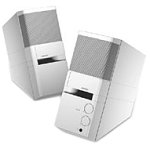
Image: The Bose MediaMate Computer Speakers in Gray. The image shows two compact speakers, one with visible volume and mix controls, and a headphone jack.
4. Enstalasyon
Follow these steps to set up your Bose MediaMate Computer Speakers:
- Plasman: Place the speakers on a flat, stable surface on either side of your computer monitor. Ensure they are angled slightly upward towards your listening position for optimal sound.
- Konekte kab odyo a: Connect the 3.5mm audio cable from the back of the primary speaker (the one with controls) to the audio output jack on your computer.
- Konekte pouvwa: Plug the power adapter into the power input on the primary speaker, then plug the adapter into a wall outlet.
- Pouvwa sou: Turn on the speakers using the volume knob. The power indicator light should illuminate.
5. Operasyon Enstriksyon
Once set up, operating your MediaMate speakers is straightforward:
- Kontwòl Volim: Use the large knob labeled "VOLUME" on the front of the primary speaker to adjust the overall sound level.
- Mix Control: The "MIX" knob allows you to blend audio from two different sources if you have a second device connected to the auxiliary input.
- Kas ekoutè Jack: For private listening, plug your headphones into the headphone jack located on the front of the primary speaker. This will mute the speakers.
- Doub Antre: The speakers feature dual inputs, allowing you to connect and mix two audio sources simultaneously. For example, you can connect your computer and a portable music player.
6. Antretyen
To ensure the longevity and optimal performance of your speakers:
- Netwayaj: Use a soft, dry cloth to clean the exterior surfaces of the speakers. Do not use liquid cleaners or aerosols.
- Pousyè: Regularly dust the speaker grilles to prevent accumulation that could affect sound quality.
- Depo: Si w ap sere oratè yo pou yon peryòd tan pwolonje, dekonekte yo nan kouran an epi sere yo nan yon kote ki fre epi sèk.
NAN. Depanaj
If you encounter issues with your Bose MediaMate speakers, refer to the following common problems and solutions:
| Pwoblèm | Kòz posib | Solisyon |
|---|---|---|
| Pa gen son |
|
|
| Son defòme |
|
|
| Se yon sèl oratè k ap travay |
|
|
8. Espesifikasyon
- Mak: Bose
- Modèl: MediaMate
- Koneksyon: 3.5mm Audio Input, AC Power
- Sòti odyo: Stereo
- Kalite oratè: Miltimedya
- Materyèl: Metal
- Gwosè Oratè: 6 Centimeters (Audio Driver)
- Pwa atik: 3 liv
- Koulè: Gri
9. Garanti ak sipò
Bose MediaMate Computer Speakers come with a limited warranty. For specific warranty details and duration, please refer to the warranty card included with your product or visit the official Bose websit.
For technical support, product registration, or service inquiries, please contact Bose customer service:
- Telefòn: 800-444-2673
- Websit: www.bose.com
Please have your product model number (MediaMate) and purchase date available when contacting support.