
Entwodiksyon
This user guide provides essential information for the proper use and care of your Memorex 64 MB SmartMedia Memory Card (Model 32502064). Please read this manual thoroughly before using the product to ensure optimal performance and longevity.
The Memorex 64MB SmartMedia Card is designed for compatibility with various devices that support the SmartMedia format. It features shock resistance and low power consumption, making it a reliable choice for portable electronic devices.
Pwodwi souview
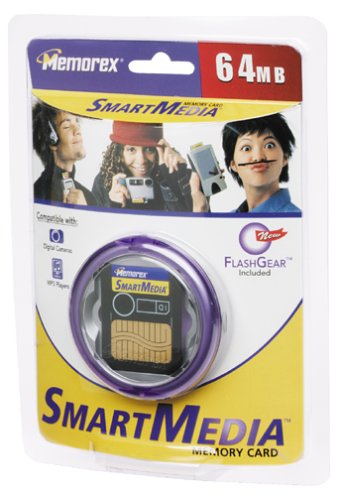
Figi 1: Memorex 64 MB SmartMedia Memory Card with its protective storage case.
This image displays the Memorex 64 MB SmartMedia Memory Card, a small, thin flash memory card, alongside its clear plastic storage case. The card itself is typically blue or black with the Memorex logo and capacity printed on it. The storage case protects the card from dust, scratches, and physical damage when not in use.
The Memorex 64 MB SmartMedia Memory Card is a type of solid-state flash memory card, primarily used in older digital cameras, PDAs, and other portable devices. It offers 64 megabytes of storage capacity for digital data such as photos, audio, or documents.
Enstalasyon ak Enstalasyon
- Identify SmartMedia Slot: Locate the SmartMedia card slot on your compatible device. This slot is typically labeled "SmartMedia" or indicated by a memory card icon.
- Oryante kat la: Hold the Memorex SmartMedia card with the metal contacts facing the insertion direction and the beveled corner aligned with the slot's shape. SmartMedia cards are designed to be inserted in only one orientation. Do not force the card.
- Mete Kat la: Gently slide the SmartMedia card into the slot until it clicks into place or is fully seated. Ensure it is flush with the device's surface.
- Rekonesans aparèy: Power on your device. The device should automatically detect the new memory card. If prompted, format the card using the device's menu options. Note: Formatting will erase all data on the card.
For specific instructions on inserting and formatting memory cards, refer to your device's user manual.
Enstriksyon Operasyon
Once installed, the Memorex SmartMedia card functions as your device's primary storage for data. The operation of the card is managed by the host device.
- Ekonomize done: When taking photos, recording audio, or saving files, your device will automatically store them on the SmartMedia card until its capacity is reached.
- Aksè a Done: Pou view or transfer data, connect your device to a computer using a compatible cable or remove the SmartMedia card and insert it into a SmartMedia card reader connected to your computer.
- Efase Done: Use your device's menu options or a computer to delete unwanted files from the card. Regularly deleting unnecessary files helps manage storage space.
- Retire kat la: Always ensure your device is powered off or the card is safely ejected through the device's menu before physically removing the SmartMedia card. This prevents data corruption.
Antretyen ak Swen
- Pwoteksyon: Always store the SmartMedia card in its protective case when not in use to prevent physical damage, dust, and static electricity.
- Netwayaj: If the metal contacts become dirty, gently wipe them with a clean, dry, lint-free cloth. Avoid using liquids or abrasive materials.
- Tanperati: Evite ekspoze kat la nan tanperati ekstrèm, limyè solèy dirèk, oswa imidite ki wo.
- Estrès Fizik: Do not bend, drop, or apply excessive force to the card. While shock-resistant, extreme impacts can cause damage.
- Sovgad done: Regularly back up important data from the SmartMedia card to a computer or other storage device to prevent data loss.
Depanaj
| Pwoblèm | Kòz posib | Solisyon |
|---|---|---|
| Aparèy la pa rekonèt kat la. | Incorrect insertion, dirty contacts, incompatible device, or card damage. |
|
| Cannot save new data. | Card is full, write-protected, or corrupted. |
|
| Koripsyon done oswa erè. | Improper removal, power loss during write, or card degradation. |
|
Espesifikasyon
- Nimewo Modèl: 32502064
- Kapasite: 64 MB (Megabytes)
- Kalite: SmartMedia (SSFDC - Solid State Floppy Disk Card)
- Dimansyon: Approximately 45.0 mm (L) x 37.0 mm (W) x 0.76 mm (T) (Standard SmartMedia dimensions)
- Karakteristik: Shock Resistant, Low Power Consumption
- Konpatibilite: Devices supporting SmartMedia cards (e.g., older digital cameras, PDAs, MP3 players). Note: Compatibility may vary by device model and firmware version.
Garanti ak sipò
Memorex products typically come with a limited warranty. For specific warranty terms and conditions, please refer to the documentation included with your purchase or visit the official Memorex websit la. Kenbe prèv acha ou pou reklamasyon garanti.
For technical support or further assistance, please contact Memorex customer service. Contact information can usually be found on the product packaging or the official Memorex websit.
Resous sou entènèt: For additional information, product updates, or frequently asked questions, visit the official Memorex support page: www.memorex.com/support