
Enfòmasyon enpòtan sou sekirite
Please read all safety and operating instructions carefully before using this VCR. Retain this manual for future reference.
- Sous pouvwa: Connect the VCR only to the power supply indicated on the label.
- Vantilasyon: Asire bon jan vantilasyon. Pa bloke ouvèti vantilasyon yo.
- Dlo ak imidite: Do not expose the VCR to rain or moisture. Do not place objects filled with liquids on the VCR.
- Netwayaj: Unplug the VCR from the wall outlet before cleaning. Use a dry cloth.
- Sèvis: Pa eseye fè sèvis pwodui sa a tèt ou. Refere tout sèvis yo bay pèsonèl sèvis kalifye.
Pwodwi souview
The Sharp VC-A422 is a 4-head VCR designed for reliable playback and recording of VHS tapes. It features a user-friendly interface for easy operation.
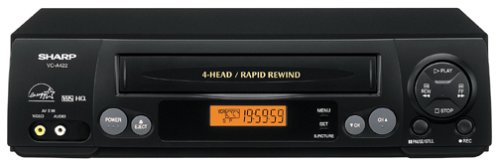
Imaj: Devan view of the Sharp VC-A422 4-Head VCR, showing the tape slot, display, and control buttons.
Enstalasyon
1. Debalaj ak Plasman
- Retire VCR a nan anbalaj li avèk prekosyon.
- Place the VCR on a stable, level surface. Ensure there is adequate space around the unit for ventilation.
- Avoid placing the VCR near heat sources, direct sunlight, or areas with high humidity.
2. Konekte ak yon televizyon
To connect your VCR to a television, you will typically use RCA audio/video cables (red, white, yellow) or a coaxial cable.
- RCA Connection (Recommended for best quality):
- Connect the yellow video output jack on the VCR to the yellow video input jack on your TV.
- Connect the white audio output jack on the VCR to the white audio input jack on your TV.
- Connect the red audio output jack on the VCR to the red audio input jack on your TV.
- Select the corresponding AV input on your television (e.g., Video 1, AV1, Input 1).
- Koneksyon Koaksyal:
- Connect a coaxial cable from the "RF Out" or "Antenna Out" jack on the VCR to the "Antenna In" or "RF In" jack on your TV.
- Connect your antenna or cable TV signal to the "RF In" or "Antenna In" jack on the VCR.
- Tune your television to channel 3 or 4 (depending on the VCR's output setting) to receive the VCR signal.
3. Koneksyon pouvwa
- Plug the VCR's power cord into a standard electrical outlet.
- The VCR should enter standby mode, indicated by a clock display or power light.
Enstriksyon Operasyon
1. Lekti debaz
- Ensure the VCR is powered on and your TV is set to the correct input.
- Insert a VHS tape into the tape slot. The VCR will automatically load the tape.
- Peze a JWE button on the VCR or remote control.
- Pou sispann lèktur, peze la SISPANN bouton.
- Pou fè yon poz lekti, peze la POZ bouton. Peze ankò pou rekòmanse.
- To fast forward or rewind, press the FF (Avanse rapid) oubyen REW (Rewind) button. Press JWE pou reprann lekti nòmal.
- Pou retire kasèt la, peze bouton an EJECT bouton.
2. Pwogram Anrejistreman
The Sharp VC-A422 allows for recording television programs. Ensure a blank or recordable VHS tape is inserted and its safety tab is intact.
- Tune the VCR to the desired channel using the VCR's tuner.
- Peze a DOSYE button. The VCR will begin recording.
- Pou sispann anrejistreman, peze la SISPANN bouton.
- For timed recordings, refer to the VCR's on-screen programming guide (if available) or consult the full manual for detailed timer recording instructions.
Antretyen
Bon antretyen asire lonjevite ak pèfòmans optimal VCR ou a.
- Netwayaj eksteryè: Siye deyò VCR a avèk yon twal mou epi sèk. Pa sèvi ak pwodui netwayaj likid oswa materyèl abrazif.
- Netwayaj tèt: If picture quality degrades (e.g., snowy picture, lines), the video heads may be dirty. Use a dry-type VCR head cleaning cassette sparingly. Excessive use can wear down the heads.
- Swen Kasèt: Store VHS tapes in their cases, away from dust, direct sunlight, and strong magnetic fields. Avoid exposing tapes to extreme temperatures.
- Vantilasyon: Keep the VCR's ventilation slots clear of obstructions to prevent overheating.
Depanaj
If you encounter issues with your Sharp VC-A422 VCR, refer to the following common problems and solutions:
| Pwoblèm | Kòz posib | Solisyon |
|---|---|---|
| Pa gen pouvwa | Kòd kouran an debranche; priz kouran an pa aktif. | Tcheke koneksyon kòd kouran an. Teste priz la ak yon lòt aparèy. |
| Pa gen foto oswa son | Ou chwazi yon antre televizyon ki pa kòrèk; kab A/V yo lach oswa mal konekte. | Select correct TV input (e.g., AV1, Video 1). Ensure A/V cables are securely connected to matching color ports. |
| Snowy or distorted picture | Dirty video heads; poor tape quality; incorrect channel for coaxial connection. | Use a VCR head cleaning cassette. Try a different tape. If using coaxial, ensure TV is on channel 3 or 4. |
| Tape will not eject | Power failure; mechanical issue. | Ensure VCR is powered on. If problem persists, seek professional service. |
| Pa ka anrejistre | Tape's safety tab removed; VCR not tuned to a channel. | Check if the safety tab on the VHS tape is intact (cover the notch with tape if removed). Ensure VCR tuner is set to the desired channel. |
Espesifikasyon
- Mak: Sharp
- Modèl: VC-A422
- Tèt: 4-Head (Video)
- Pwa atik: 6 liv
- Dimansyon pake: 15.55 x 11.02 x 5.24 pous
- ASIN: B00005LABU
- Dat premye disponib: 4 septanm 1999
Remak: Espesifikasyon yo ka chanje san avètisman.
Enfòmasyon sou Garanti
This Sharp product is covered by a limited warranty. For specific details regarding warranty coverage, duration, and terms, please refer to the warranty card included with your purchase or visit the official Sharp websit la. Kenbe prèv acha ou pou reklamasyon garanti.
Sipò pou Kliyan
For further assistance, technical support, or service inquiries, please contact Sharp customer support. You can find contact information on the official Sharp websit la oubyen nan dokimantasyon ki vini ak pwodwi w la.
Visit the official Sharp store for more information: Sharp Official Store
Limit responsabilite nou legal
AVÈTISMAN POU KONSOMATÈ: This television receiver has only an analog broadcast tuner and will require a converter box after February 17, 2009 to receive over-the-air broadcasts with an antenna because of the U.S.'s transition to digital broadcasting. Analog-only TVs should continue to work as before with cable and satellite TV services, gaming consoles, VCRs, DVD players, and similar products. For more information, call the Federal Communications Commission at 1-888-225-5322 (TTY: 1-888-835-5322), or visit the commission s digital-television Web sit nan: www.dtv.gov.